
Two Reports, One Fingerprint: Mobile Phishing Correlation for SOCs

Phishing campaign correlation for messaging means linking reported SMS, iMessage, and WhatsApp artifacts across users to expose coordinated smishing operations and the infrastructure behind them. The first move for any SOC is simple: capture the landing page before it disappears, then correlate that artifact against every other report in the queue. Done consistently, this turns scattered user complaints into a target list of domains and IPs ready for blocking or takedown.
TL;DR:
- Campaigns are identified by matching full landing-page HTML snapshots, metadata hashes, and shared hosting or infrastructure patterns across different reports.
- High-confidence correlations require at least two reports with matching page fingerprints and infrastructure; one report with a fingerprint alone is considered a lead.
- Speed is critical; automation of data collection and analysis allows for detection and takedown within hours of a campaign’s launch.
- Smishing infrastructure often uses rapid domain rotation and concentrated hosting to evade blocklists, making correlation essential for effective disruption.
- Integrating correlation tools with SIEM and automated workflows enhances detection speed and streamlines evidence collection for takedown or blocking actions.
Table of Contents
- Why Smishing Needs Campaign Correlation Now
- What Signals and Data to Capture for Correlation
- Techniques That Turn Reports Into Confirmed Campaigns
- How Should a SOC Triage a Correlated Campaign?
- Where Correlation Fits Into SIEM and Automation
- Closing the Messaging Visibility Gap With SmishAlert
- Sources
- FAQ
Why Smishing Needs Campaign Correlation Now
Smishing has outgrown the “one weird text” mental model. Attackers now run infrastructure at a scale that rivals large email phishing operations, except the reporting pipeline that would normally catch it barely exists on mobile devices.
Mobile users click malicious links at meaningfully higher rates than desktop or email users, according to Verizon’s 2026 DBIR data cited by PhiShark, largely because a text message arrives on a lock screen that carries an implicit trust signal a browser tab does not. Attackers know this, and they build for it.
They also build for churn. Domain reputation systems assume a phishing domain lives long enough to get flagged, indexed, and blocked. Smishing infrastructure often doesn’t cooperate. Unit42 traced a single evolving campaign spanning a very large number of fully qualified domain names and root domains, many registered in a short window and impersonating services like USPS and toll-payment operators. That kind of churn defeats blocklists built for slower-moving threats.
A few patterns show up again and again in public campaign reporting:
- Domains registered in bulk, often through the same registrar, shortly before a wave of activity.
- Shared hosting infrastructure that concentrates traffic on a small set of IP ranges or ASNs despite thousands of distinct domains.
- Consistent HTML templates reused across brand-impersonation pages, regardless of which brand is spoofed that week.
- U.S.-facing query volume that spikes disproportionately even when the campaign has global domain registration.
None of that shows up if a SOC treats each report as an isolated incident.
What Signals and Data to Capture for Correlation
Correlation is only as good as the artifacts feeding it. Analysts need a defined, repeatable capture checklist, not an ad hoc collection of whatever a user happened to screenshot.
Pro Tip: Capture the full landing-page HTML at the moment of report, not just the URL. Unit42’s own investigation found that phishing infrastructure is often rotated or torn down within hours, which means a URL alone becomes worthless evidence by the time anyone follows up.
Build your intake around these layers:
- Message-level fields — full message text, sender number or short code, timestamp, delivery channel (SMS, iMessage, WhatsApp), and a screenshot as a fallback for anything automated capture misses.
- Landing-page artifacts — a full HTML snapshot, hashes of every linked resource (images, JS, CSS), and embedded metadata. Hunt found a 128-character HTML metadata hash tying together 1,628 malicious URLs across 19 countries, which is the exact kind of pivot a snapshot preserves and a bare URL destroys.
- Domain and registration data — WHOIS records, registrar, registration date, and DNS history pulled through passive DNS where available.
- Network infrastructure — hosting IP, ASN, CDN provider, and any file-hash reuse across otherwise unrelated-looking domains.
- Device telemetry, scoped carefully — for managed devices, carrier metadata and app-level signals add context; for BYOD, limit collection to what the user voluntarily submits and document that boundary explicitly.
- Reporting volume over time — a spike of similar reports within a tight window is itself a correlation signal, independent of any technical fingerprint.
Reporting volume and temporal clustering matter more than most SOCs assume. A single suspicious text is noise. Five reports referencing the same sender pattern inside 48 hours is a campaign.
Techniques That Turn Reports Into Confirmed Campaigns
Raw reports become an investigation once you start applying structural fingerprinting instead of relying on domain reputation, which is always a step behind.
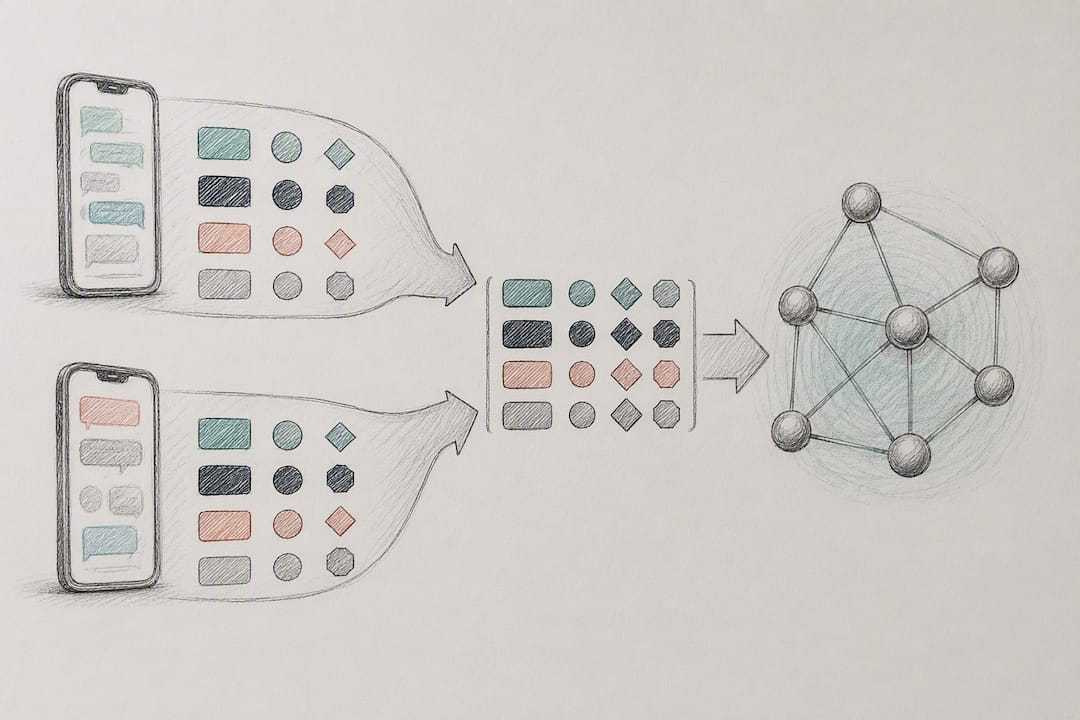
The most durable pivot is the metadata hash. Hunt.io’s fingerprinting approach linked over 1,600 URLs through a single consistent HTML metadata signature that survived domain rotation, hosting changes, and even geographic redistribution of the backend infrastructure. That kind of fingerprint is worth building into your own pipeline, because it doesn’t care what domain the page currently lives on.
Beyond the hash itself, a few techniques consistently produce reliable clusters:
- Cluster reports by hosting IP and ASN, since Unit42 observed heavily concentrated hosting behind widely distributed domain counts.
- Flag identical or near-identical JavaScript and CSS asset filenames across otherwise unrelated domains.
- Watch for template reuse: the same page layout and form structure recycled across different brand impersonations.
- Track DNS churn patterns, particularly rapid-fire registrations from the same registrar in a short window.
Confidence scoring keeps this from turning into false-positive chasing. A workable threshold: treat a cluster as high confidence when it hits at least two independent user reports, a matching page fingerprint, and shared ASN or IP infrastructure. One report with a fingerprint match is a lead. Two or more with matching infrastructure is a campaign.
Graph databases and SIEM correlation rules do the heavy lifting at scale, surfacing clusters and propagation paths that a human analyst would take hours to spot manually. Scheduled crawls of known-bad infrastructure, passive DNS monitoring, and hash-based watchlists close the loop on churn, catching new domains the moment they adopt a fingerprint you’ve already seen.
How Should a SOC Triage a Correlated Campaign?
A correlation engine is only useful if it feeds a workflow that ends in a block, a takedown, or a notification. Here’s the sequence that gets you there.
- Ingest — accept reports through frictionless, appless channels wherever possible; forcing an app install before someone can report a suspicious text kills reporting volume exactly when you need it most.
- Enrich — automatically retrieve the page snapshot, run WHOIS and DNS lookups, and resolve hosting IP and ASN data without waiting on an analyst to do it manually.
- Correlate — apply your fingerprint and clustering logic to group the report with existing campaigns and assign a confidence score.
- Escalate — assemble an evidence package (snapshot, hash, IP/ASN data, report count) for hosting providers, CDNs, legal, or law enforcement.
- Remediate — push blocklists, file abuse reports with the hosting provider or CDN, and notify affected employees or customers with clear, specific language.
- After-action — update watchlists, distribute indicators to detection tooling, and log time-to-block for the campaign.
Speed matters more here than in most security workflows. Industry guidance on mobile-first phishing response suggests victims often arrive within hours of a campaign going live, which argues for a detection-to-block window closer to email phishing playbooks than to traditional web filtering timelines.
| Workflow stage | Primary output | Typical owner |
|---|---|---|
| Ingest | Raw report with evidence fields | Reporting channel / help desk |
| Enrich | Snapshot, WHOIS, IP/ASN data | Automation pipeline |
| Correlate | Confidence-scored campaign cluster | SOC / correlation engine |
| Escalate | Evidence package for takedown | SOC lead / legal |
| Remediate | Blocklist entries, notifications | SOC / comms |
Where Correlation Fits Into SIEM and Automation
Correlation output is only valuable once it reaches the tools your team already watches every day. Feeding fingerprint matches and IP clusters into your SIEM or a graph store turns a one-off finding into something huntable, and it lets analysts pivot from a single indicator to the full campaign footprint in one query.
Automate the enrichment pipeline wherever you can. WHOIS lookups, passive DNS queries, and HTTP asset fetches are mechanical tasks that don’t need a human in the loop, and storing every snapshot means you’re not dependent on a page still being live when someone finally reviews the ticket.
A few integration points consistently pay off:
- Publish confirmed indicators to an internal threat feed so other detection tooling picks them up automatically.
- Tie correlation output directly into your ticketing and incident response workflow instead of routing it through a separate spreadsheet.
- Push watchlist indicators to CDN and hosting partners through API where those relationships exist, which shortens takedown time considerably.
- Document exactly what telemetry you request from BYOD devices and how consent is captured, since privacy expectations differ sharply between managed and personal devices.
If a campaign involves payment or invoice fraud rather than pure credential harvesting, coordinate with your fraud and payments team early. Guidance on push payment fraud prevention is a useful reference when a smishing cluster escalates into a financial fraud investigation rather than a straightforward credential-phishing takedown.
Closing the Messaging Visibility Gap With SmishAlert
Most of the correlation workflow described above depends on having reports to correlate in the first place, and that’s exactly where email security tools go dark. SmishAlert gives security teams a way to collect suspicious messages from employees, customers, members, and students, whether or not they’ve installed an app, then runs automated analysis to flag credential phishing, executive impersonation, payroll fraud, and other messaging-based social engineering.
The platform correlates reports across your user population to surface emerging campaigns, and it connects into existing SOC tooling through SIEM and API integration so correlated artifacts land in the same dashboards your team already monitors. You can review live campaign examples and indicators to see what a correlated cluster looks like before committing to a deployment.
A practical starting point for most teams is a scoped pilot focused on an executive cohort or a high-risk department, which produces correlated campaign data and takedown-ready artifacts fast enough to evaluate real operational value. If executive impersonation over text is a specific concern, SmishAlert’s guidance on protecting employees from executive impersonation via SMS walks through the exposure directly. From there, reach out through the enterprise contact page to scope a pilot for your organization.
Sources
For ongoing investigation and takedown support, keep Unit42’s smishing infrastructure analysis and Hunt.io’s fingerprint research on hand as reference points for domain and hash patterns. Cross-check mobile phishing trend data against the Verizon DBIR, and monitor CISA and FBI advisories for procedural guidance on reporting and coordinating takedowns with federal partners.
- Global smishing campaign — Unit42
- Hunt
- Mobile-first phishing: mobile phishing and smishing — PhiShark blog
FAQ
What Is Phishing Campaign Correlation for Messaging?
It’s the practice of linking reported SMS, iMessage, and WhatsApp messages and their landing pages across multiple users to identify a single coordinated campaign rather than treating each report as unrelated. Analysts do this by matching artifacts like HTML metadata hashes, shared hosting IPs, and reused page templates.
How Do You Detect a Smishing Campaign Across Multiple Users?
Detection starts with collecting consistent artifacts, such as full page snapshots and sender metadata, from every report, then applying fingerprinting to spot shared infrastructure. A cluster with two or more independent reports sharing the same page fingerprint and hosting ASN is a strong signal of a coordinated campaign rather than an isolated attempt.
What Makes SMS Phishing Harder to Correlate Than Email Phishing?
Smishing infrastructure churns faster than most reputation systems can track, and large campaigns have used over 136,900 root domains with frequent rotation. SMS also arrives outside many enterprise email controls, so the reporting pipeline that normally catches phishing attempts often doesn’t exist for text messages at all.
Which Artifacts Give the Highest Confidence for Correlation?
Metadata hashes and reused JavaScript or CSS asset files are among the most reliable pivots, since Hunt.io’s investigation tied over 1,600 malicious URLs together through a single persistent HTML fingerprint. Shared hosting IPs and ASN concentration add further confidence when they line up with a fingerprint match.
Does SmishAlert Support Campaign Correlation Across an Organization?
SmishAlert collects reported messages from employees, customers, members, and students, then correlates those reports across the user population to surface emerging campaigns and produce evidence for takedown requests. Pricing information for SmishAlert’s plans is available on their official website.