
Catch Smishing Campaigns Fast: SIEM Dashboard for SOCs, CEF/LEEF/CIM

A smishing SIEM dashboard must ingest user reports and mobile threat feeds, normalize them into a canonical schema, and correlate campaign indicators across recipients before anything reaches an analyst’s queue. That means combining reporting telemetry, vendor alert metadata, and enrichment data (URLs, sender reputation, device risk) into fields your SIEM can query consistently. Without that normalization layer, smishing data sits in the SIEM as unstructured noise. SmishAlert exists to supply that telemetry and the integration path that gets it there.
TL;DR:
- Combining user reports, mobile threat feeds, and telecom metadata is essential to generate structured, queryable smishing signals in the SIEM.
- Proper field mapping to canonical names and alignment with existing data models like Splunk CIM improve detection accuracy and investigative depth.
- Streaming webhooks are best for critical alerts requiring immediate response, while polling suffices for less urgent telemetry at 30-second to 5-minute intervals.
- Dashboards should focus on campaign grouping, trend analysis, and context-rich entity views rather than just listing raw alerts for effective triage.
- Implementing automated grouping, scoring, and escalation rules transforms raw smishing alerts into actionable SOC playbooks with consistent incident handling.
Table of Contents
- What Signals Feed a Smishing SIEM Integration?
- How Do You Map Smishing Data to a SIEM Schema?
- Should You Stream or Poll Smishing Telemetry?
- What Should a Smishing Alerts Dashboard Actually Show?
- How Do You Turn Smishing Alerts Into SOC Playbooks?
- What’s Your Pre-Launch Checklist for a Smishing Dashboard?
- SmishAlert: Enterprise Telemetry, Reporting, and SIEM Integration
- Where to Go for Deeper Integration Reference
- Sources
- FAQ
What Signals Feed a Smishing SIEM Integration?
The quality of any smishing SIEM dashboard depends entirely on what you feed it. Most SOCs underestimate how many distinct sources need to land in the same pipeline before correlation becomes possible.
User-submitted reports form the base layer. Capture the reporting account, a timestamp, sanitized content metadata, and screenshot metadata rather than raw message bodies where policy requires redaction. Reporting friction kills volume: if employees, customers, or members need to install an app or dig through settings to flag a suspicious text, most won’t bother, and your dashboard starves for data.
Mobile threat API feeds add structure the user reports lack: smishing alert type, severity, campaign indicators, device risk level, and device GUIDs. These fields are what make correlation possible later.
Telecom and aggregator metadata rounds out the picture. Sender ID, IMSI and roaming status, and aggregator tier all matter, and the NCSC’s SMS security guidance recommends working with Tier 1 aggregators that hold direct mobile network operator relationships, since they can request that spoofed sender IDs get blocked at the network level.
- Cross-channel enrichment: URL/domain reputation, WHOIS records, sandbox detonation results, phone number reputation scoring
- Privacy controls: PII minimization at ingest, defined redaction policies, and retention windows tied to your data governance policy
How Do You Map Smishing Data to a SIEM Schema?
Field mapping is where most smishing SIEM integrations quietly fail. Data arrives, technically, but analysts can’t query it consistently because three vendor feeds use three different field names for the same concept.
- Pick an ingest format that matches your SIEM. CEF, LEEF, or syslog JSON each work, but preserve nested JSON objects where your platform supports it. Wazuh connector implementations, for example, emit nested objects like
threatInfo,messageParts, andidentityso analysts can run rich queries without flattening data first, per the jnthans/wazuh-proofpoint-tap reference implementation. - Establish canonical fields. At minimum:
sourceNumber,recipientAccount,campaignIndicators,impersonationRisk,url,deviceGuid,deviceRiskLevel, andingestSource. - Map every vendor field to those canonical names and document the transformation centrally. A shared mapping document saves the analytics team from reverse-engineering someone else’s connector six months later.
- Align with Splunk CIM or your platform’s equivalent data model, and namespace vendor-specific fields (e.g.,
vendorX_campaignId) so two integrations never collide on the same key. - Tag confidence and threat score at ingest, not downstream. Scoring after the fact means every dashboard built before that point is working from incomplete context.
The choice here isn’t cosmetic. Integration whitepapers on mobile threat alerting note that mapping to a canonical schema simplifies alerting logic, while ingesting native vendor JSON preserves more investigative context. Most mature SOCs do both: canonical fields for alerting, raw JSON retained for deep investigation.
Should You Stream or Poll Smishing Telemetry?
Real-time webhooks deliver the lowest latency for active SOC response, which matters when a smishing campaign is actively harvesting credentials from your employees or customers. Polling, by contrast, offers steadier, more predictable ingest and handles catch-up after an outage more gracefully. Practitioner guidance on mobile alert integration generally recommends choosing based on SOC response needs rather than defaulting to one pattern everywhere.
For high-volume feeds where sub-minute latency isn’t a hard requirement, a 30-second to 5-minute polling interval is a reasonable starting point, similar to the default cadence documented in commercial SIEM connector guides. Reserve streaming webhooks for critical alert types like confirmed executive impersonation or active credential harvesting campaigns.
Operationally, a few patterns separate reliable pipelines from brittle ones:
- Use atomic state management (write to a temp file, then swap) so a crashed collector never leaves a corrupted checkpoint behind
- Isolate failures per API endpoint, so one vendor feed going down doesn’t halt ingestion from the others, an approach reflected in open-source connector implementations built for exactly this failure mode
- Build in automatic chunked catch-up so a multi-hour outage doesn’t require manual backfill
- Secure transport with TLS and OAuth2 or scoped API keys, and store credentials in an encrypted chain rather than flat config files
- Choose your collector type (syslog receiver, raw socket, or HTTP collector) based on what field mapping it preserves natively
Pro Tip: Test your failure isolation before go-live by killing one API connection mid-poll and confirming the other feeds keep ingesting. If one dead connector stalls your whole pipeline, you’ve built a single point of failure into your smishing detection tools.
What Should a Smishing Alerts Dashboard Actually Show?
A dashboard that just lists raw alerts is a log viewer, not a detection tool. SOCs need views built around triage speed and campaign visibility, not chronological scroll.
Start with time-series KPIs: alert volume by severity, trend lines over time, and mean time to resolution. Layer in pivotable lists analysts actually use during triage: top sender numbers by report volume, most-targeted accounts or departments, and most-clicked URLs across the reporting population. Campaign correlation views matter more than any single alert. Grouped incidents that share indicators, whether that’s a sender number, a URL fingerprint, or a device GUID, tell you whether you’re looking at one confused employee or a coordinated push against your payroll team.
Deep-dive panels should show the sanitized message view alongside enrichment results (URL sandbox verdicts, domain age, phone reputation) so an analyst never has to leave the dashboard to pull context. Different roles need different lenses on the same data.
| View | Primary Audience | Core Question Answered |
|---|---|---|
| Triage queue | SOC analysts | Which alerts need action right now? |
| Campaign correlation | SOC analysts, threat intel | Is this one report or a coordinated attack? |
| Fraud indicators | Fraud/risk teams | Is this payment or payroll fraud in progress? |
| Executive summary | CISOs | Is exposure trending up or down this quarter? |
Building separate saved views for each audience beats forcing everyone into one dense dashboard. An executive doesn’t need the URL sandbox output; a triage analyst doesn’t need a quarterly trend line.
How Do You Turn Smishing Alerts Into SOC Playbooks?
Raw alerts don’t reduce risk. Grouped, scored, and routed alerts do. The gap between those two states is where most smishing SIEM dashboard alert rules earn or lose their keep.
- Define severity mapping with concrete triggers. A high
impersonationRiskscore combined with high confidence should map to critical, warranting immediate SOC notification, not a ticket that sits in a queue overnight. - Group by shared indicators to cut noise. Campaign indicators, device GUID, sender phone number, and URL fingerprint are the four groupings that reliably collapse dozens of individual reports into one actionable incident, an approach mirrored in Sentinel’s analytic rule template for smishing alerts, which groups by campaign and device identifiers with a defined lookback window.
- Automate the enrichment steps that don’t need a human. Threat intel lookups, blocklist creation, and conditional access flags for compromised devices should fire automatically on a confirmed match.
- Build the escalation path before you need it. Decide in advance who triages, who notifies affected users or the telecom carrier, and how the incident lands in your ticketing system. Coordinating this ownership ahead of integration, rather than during a live campaign, is exactly the guidance in mobile threat alert integration whitepapers.
- Retain audit records for every stage, from initial report through remediation, since compliance-sensitive verticals will eventually need that evidence trail.
Pro Tip: Set your grouping window before you tune severity thresholds. A perfectly scored alert rule still floods the queue if ten reports of the same campaign each fire as a separate incident.
What’s Your Pre-Launch Checklist for a Smishing Dashboard?
Run this before any smishing SIEM integration goes live, not after the first real campaign exposes the gaps.
- Send synthetic test messages through the full pipeline, from report submission to dashboard visualization, to confirm every hop works end to end
- Verify field mapping with sample queries against each canonical field, not just a visual scan of the dashboard
- Simulate an API outage and confirm your checkpoint and catch-up logic actually recovers without data loss
- Set throughput and query latency acceptance criteria before go-live, then test against them under realistic report volume
- After launch, track ingest success rate, queue depth, and error rate as ongoing health metrics, not one-time launch checks
SmishAlert: Enterprise Telemetry, Reporting, and SIEM Integration
Everything above assumes you have a reliable source of smishing telemetry to feed the pipeline in the first place. That’s the harder problem for most organizations. SmishAlert closes the visibility gap between email security and the social engineering attacks reaching employees, customers, and members through text messaging, combining frictionless reporting, mobile threat protection, automated threat analysis, and cross-user campaign correlation into one telemetry source.
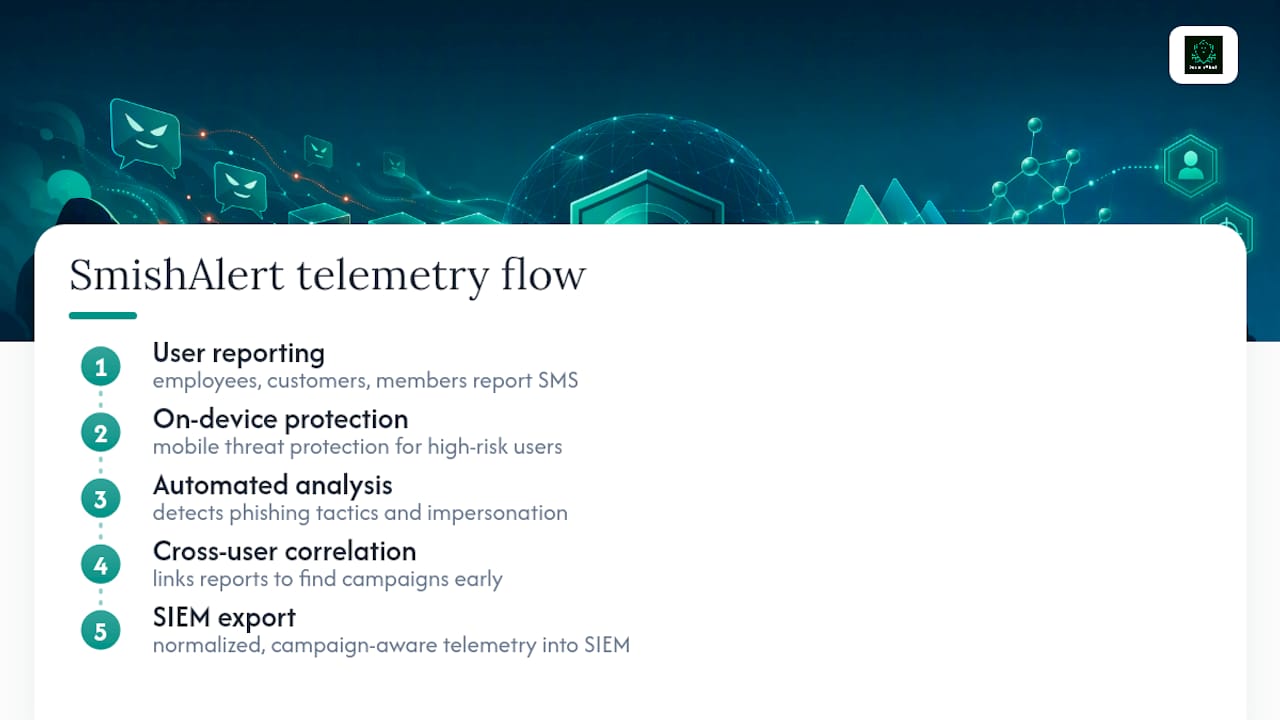
Employees and high-risk users get on-device mobile threat protection and a direct reporting path, while customers, members, and students can report suspicious text messages without installing anything. The platform analyzes reported messages for common social engineering tactics like executive impersonation, credential phishing, payroll fraud, and brand impersonation, then correlates reports across the user population to help identify coordinated campaigns early. That analyzed, correlated data flows into your SIEM through SmishAlert’s integration and reporting capabilities, providing normalized, campaign-aware telemetry to support SIEM integration without requiring you to build the ingestion pipeline from raw vendor feeds. If you’re scoping a pilot, start with the SmishAlert product overview to see how reporting, analysis, and SIEM integration map to your current stack.
Where to Go for Deeper Integration Reference
- NCSC guidance on protecting SMS in critical business processes for aggregator and network-level controls
- SIEM connector configuration guide for CEF/LEEF/syslog mapping examples
- Sentinel analytic rule template for smishing alerts for grouping and incident logic
- Open-source connector reference architecture for ingestion patterns and dashboard artifacts
Sources
- Protecting SMS messages used in critical business processes — NCSC
- jnthans/wazuh-proofpoint-tap
- Integrating Mobile Threat Alerts — Intellyx / XTD whitepaper (Guardsquare host)
FAQ
How much latency should a smishing SIEM dashboard have?
Critical alert types like confirmed executive impersonation warrant real-time webhook delivery, while lower-severity feeds can tolerate a 30-second to 5-minute polling interval without hurting SOC response.
What SIEM format works best for smishing data?
CEF, LEEF, and syslog JSON all work if you preserve nested JSON where your SIEM supports it, and mapping to Splunk CIM or an equivalent model keeps alerting rules consistent across vendor feeds.
How do you reduce false positives in smishing detection tools?
Grouping alerts by shared indicators, campaign markers, device GUID, sender number, and URL fingerprint, collapses duplicate reports of the same campaign into one incident, which cuts alert fatigue more effectively than tightening thresholds alone.
What privacy controls matter most when ingesting mobile messaging data?
PII minimization at ingest, documented redaction policies for message content, and defined retention windows are the baseline, particularly for organizations in compliance-sensitive verticals handling customer or student reports.
Does SmishAlert integrate directly with existing SIEM platforms?
Yes. SmishAlert provides reporting, analysis, and campaign correlation data through SIEM and API integration, so security teams can feed normalized smishing telemetry into their existing dashboards rather than building a separate one.