
Telemetry Signals to Authenticate Payroll SMS for Security Teams

Unexpected payroll SMS should never be treated as authenticated on its own. Any text about direct-deposit changes, pay notifications, or payroll requests requires out-of-band confirmation before action. Security teams should enforce a channel policy today, enable monitoring for payroll edits, publish a verification workflow employees can follow in seconds, and confirm there’s a reporting path for suspicious texts. The evidence, from SmishAlert threat data to the Verizon DBIR, supports moving fast on this.
TL;DR:
- Most payroll-related SMS should not be trusted without out-of-band verification, such as calling back through a known number or using the payroll portal.
- Moving to phishing-resistant MFA, like FIDO2, eliminates the risk of relay attacks that can capture SMS one-time passcodes during a smishing attempt.
- A clear, strict verification workflow should ban SMS for critical actions like direct-deposit changes and require dual approval and in-portal confirmation.
- Correlating reports of suspicious texts with payroll system logs, device evidence, and account activity is essential to identify active smishing campaigns.
- Employee reports alone are insufficient; implementing controls like account reconciliation, session revocation, and implementation of detection systems reduces attack dwell time.
Table of Contents
- How Do You Authenticate Payroll SMS Signals?
- Which Technical Controls Stop Payroll Text Scams?
- What Verification Workflow Confirms a Payroll Request?
- What Should You Do After a Suspected Payroll SMS Compromise?
- What Does Real-World Payroll Smishing Look Like?
- What Security Teams Get Wrong About Payroll Texts
- Try a 2-Minute Self-Eval Before You Build a Full Program
- Sources
- FAQ
How Do You Authenticate Payroll SMS Signals?
Payroll smishing follows the money calendar. Attackers time messages to pay-cycle proximity, benefits enrollment windows, and tax deadlines, because employees expect payroll-related contact during those windows and let their guard down. The Verizon DBIR found that 19% of breaches involve smishing or vishing as an entry vector, a figure that should reframe SMS from a minor nuisance into a real intrusion path for security operations centers.
Message content gives away most attempts before any link gets clicked. Watch for artificial urgency, a “verify your account” link, requests for routing numbers or a full Social Security number, or a callback number that doesn’t match any number on file. Sender anomalies matter just as much: spoofed display names, short codes that don’t match your registered payroll vendor, or a message thread that suddenly shifts from a known long code to an unfamiliar one.
The strongest signal comes from correlation, not any single message. Cross-reference user-reported smishing attempts against payroll system logs for the same window. Look for:
- New payee or routing-number edits within 24 to 48 hours of a reported suspicious text
- Login attempts from unfamiliar devices or IP ranges tied to payroll self-service portals
- Credential use immediately following a reported smishing click
- Multiple employees reporting near-identical message templates within a short span
Pro Tip: Treat a spike in payroll-related SMS reports the same way you’d treat a spike in email phishing reports during a known campaign. Coordinated timing across several employees is a stronger indicator of an active campaign than any single report.
Which Technical Controls Stop Payroll Text Scams?
SMS one-time passcodes are the weakest link in payroll security, not because the code itself is flawed, but because adversary-in-the-middle phishing kits now relay OTPs to attacker-controlled sessions in real time. Moving to phishing-resistant MFA, specifically FIDO2 and platform authenticators, removes the shareable-code problem entirely, since the cryptographic key never leaves the device and can’t be relayed by a fake login page. This is the single highest-leverage change most organizations can make for secure payroll messaging.
A few other controls close the remaining gaps:
- Deploy mobile threat defense on enrolled devices to flag malicious URLs before employees tap them, and feed that telemetry into your SIEM or SOAR platform alongside email alerts.
- Register short codes for payroll and HR vendors so anything arriving from an unregistered number is automatically suspect.
- Restrict which third-party vendors are permitted to text staff at all, and block known-risky domains through DNS filtering.
- Ingest payroll audit logs and bank transfer events directly into detection rules so a payee change correlates automatically with any smishing report from the same employee.
Enterprise email security, including DMARC, does nothing for SMS traffic. There’s no equivalent standard for text messages, which means organizations that rely solely on email-layer defenses have a blind spot attacker already know about. Mobile-specific defenses close that gap, but only if security teams treat SMS as its own attack surface rather than an afterthought bolted onto existing email controls.
Phishing-resistant MFA paired with continuous identity monitoring shortens attacker dwell time and reduces the financial damage from a successful payroll diversion sms attempt, since the window between initial compromise and fund transfer closes faster when anomalies surface immediately.
What Verification Workflow Confirms a Payroll Request?
Policy has to answer one question clearly: which payroll actions are never valid by text? Direct-deposit changes, wire authorizations, and any request for banking credentials should sit on a permanent banned list for SMS, full stop. A short, unambiguous rule set reduces the number of judgment calls an employee has to make in the moment, which is exactly when judgment is weakest.
- Confirm identity through a known number. Call the requester back using a number already on file, never one provided in the suspicious message.
- Route payroll changes through the portal, not a text reply. Ask the employee to log into the payroll system directly, using a typed address or saved bookmark, and confirm the change request actually exists inside that portal.
- Require dual authorization for any payee or routing edit. No single approver should be able to push a banking change without independent sign-off.
- Separate the requester from the approver. Segregation of duties means the person who initiates a change can’t be the same person who confirms it.
- Reconcile payroll runs against a fixed schedule. Weekly or per-cycle reconciliation, with automatic flags for new payees or routing edits outside the normal pattern, catches what verification misses.
A re-verification prompt can be legitimate, and that’s exactly why the in-portal check matters more than any judgment about how convincing a text looks. If the task doesn’t exist inside the real payroll system, the message is fraudulent, regardless of how official it sounds.
What Should You Do After a Suspected Payroll SMS Compromise?
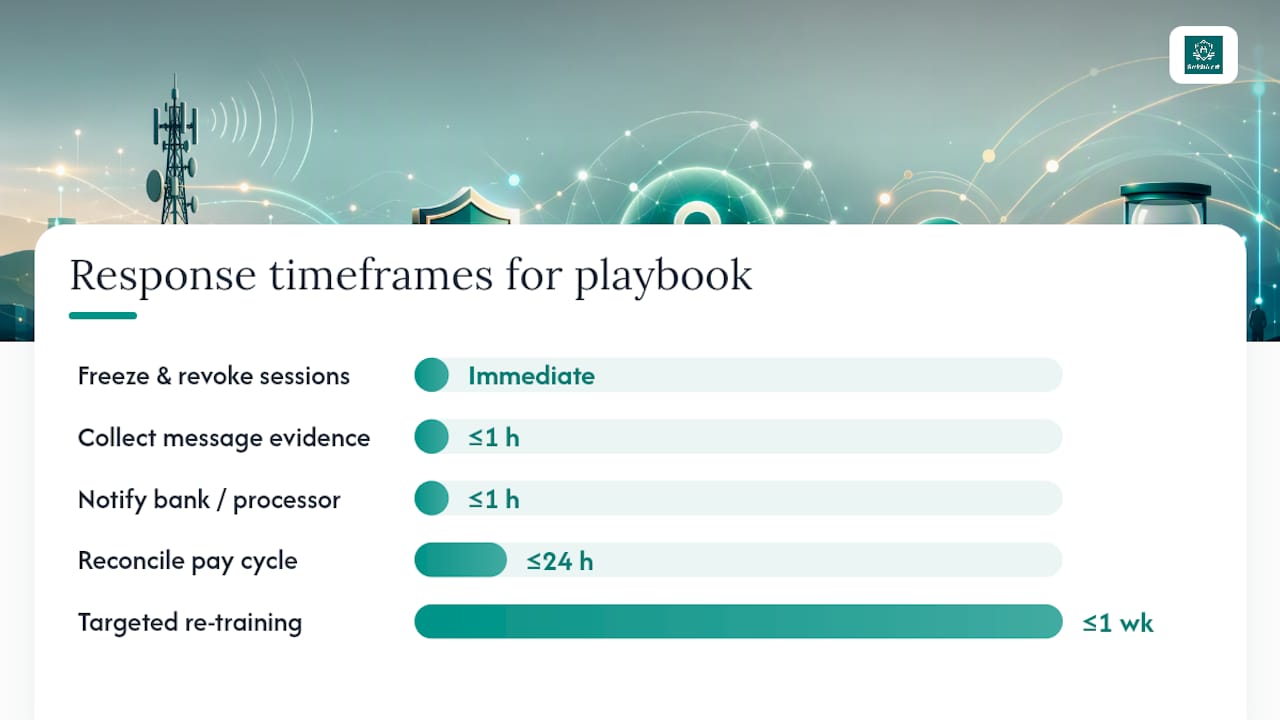
Speed matters more than completeness in the first hour. Pause any pending payroll changes tied to the suspected compromise, freeze the specific payee record in question, and revoke active sessions for the affected employee’s payroll and email accounts immediately.
Evidence collection runs in parallel with containment, not after it:
- Capture full screenshots of the SMS thread, including sender number and timestamp
- Pull device artifacts if mobile threat defense flagged the interaction
- Export bank and payment logs covering the affected payee window
- Correlate SIEM data across email, SMS reports, and payroll system access for the same timeframe
Once containment holds, notify the bank or payment processor to flag or reverse the transfer if funds haven’t cleared, and loop in payroll, HR, legal, and communications using a prepared notification template rather than drafting one under pressure. Identitytheft offers a structured reporting path that’s useful both for the affected employee and for documenting the incident formally.
| Playbook Step | Owner | Time Frame |
|---|---|---|
| Freeze suspect payee and revoke sessions | Security operations | Immediate |
| Collect message and device evidence | Security operations / IT | Within 1 hour |
| Notify bank and payroll processor | Payroll / Finance | Within 1 hour |
| Reconcile affected pay cycle | Payroll | Within 24 hours |
| Targeted re-training for affected team | HR / Security awareness | Within 1 week |
Post-incident, tighten the specific workflow gap that let the attempt get as far as it did, add a reconciliation checkpoint if one was missing, and run targeted re-training for the team that received the message rather than a generic company-wide reminder.
What Does Real-World Payroll Smishing Look Like?
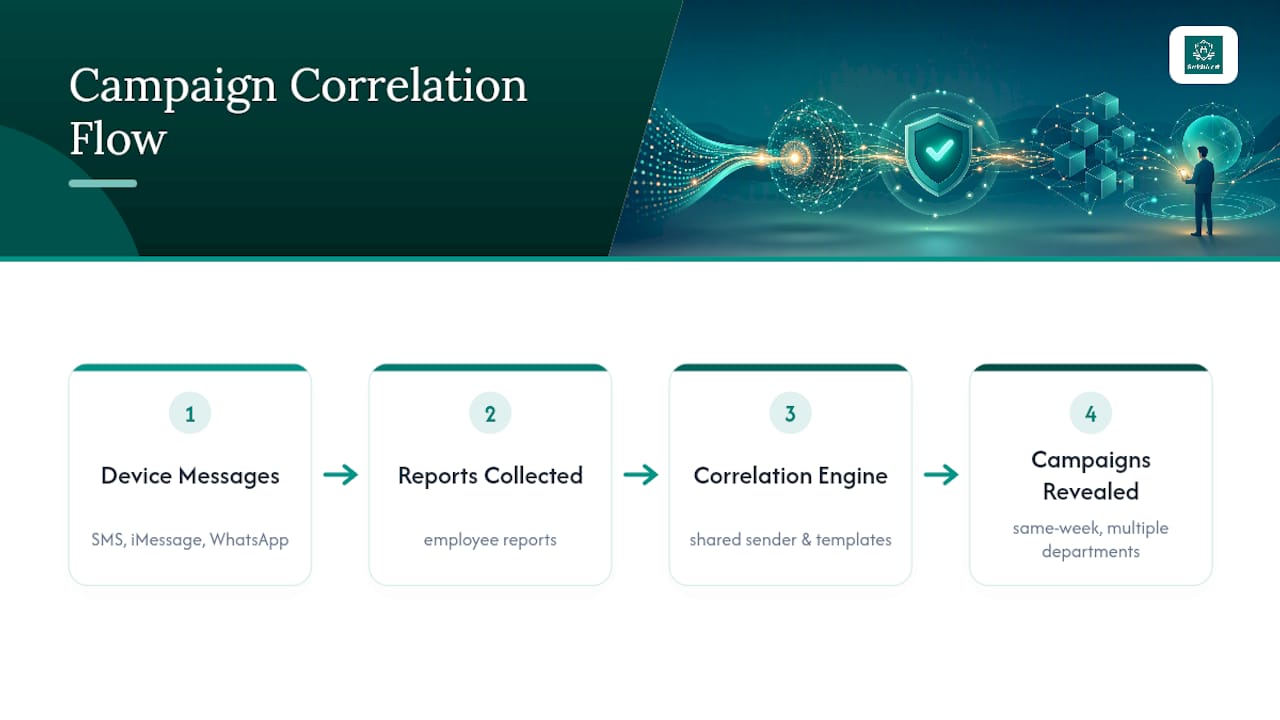
There are platforms that give security teams visibility into exactly this kind of attack, the messages that never touch a corporate email gateway because they arrive as SMS, iMessage, or WhatsApp texts on an employee’s phone. Campaign correlation across reported messages surfaces patterns a single report would never reveal on its own, including shared sender infrastructure and near-identical templates hitting different departments in the same week.
The Chinese Hackers’ Deception case study is worth studying closely for one reason: it shows how executive impersonation over SMS doesn’t require sophisticated infrastructure, just a convincing display name and a target who trusts the channel. The same mechanics apply to payroll, HR, and vendor impersonation, and the lesson holds regardless of who’s being spoofed. Device-targeted tactics that bypass perimeter defenses entirely are becoming the norm, not the exception, for payroll text scam prevention programs built on email-only assumptions.
What Security Teams Get Wrong About Payroll Texts
Most organizations still treat SMS as a minor channel because it sits outside the mail gateway, outside the SIEM, and outside the awareness training budget. That assumption is backwards. Attackers picked SMS precisely because it’s under-monitored, and the DBIR’s smishing and vishing figures confirm it’s already a meaningful breach vector, not a theoretical one.
The conventional advice, “tell employees to be careful,” falls short because it puts the entire burden of detection on the person least equipped to spot a well-crafted spoof under time pressure. What actually works is removing the decision from the employee’s hands: a banned-action list for SMS, a mandatory in-portal check, and dual authorization for any payee change. Those controls work whether or not the employee notices anything suspicious.
If there’s one place to start, it’s reconciliation cadence paired with phishing-resistant MFA. Verification workflows matter, but they only catch what a human notices. Reconciliation catches what nobody noticed at all, and it’s the backstop every payroll security program needs before it needs another training module.
Try a 2-Minute Self-Eval Before You Build a Full Program
SmishAlert gives security teams the one thing email security tools can’t: visibility into the messages attackers send directly to employee phones, outside any corporate gateway. The platform captures, correlates, and reports on SMS, iMessage, and WhatsApp based social engineering, including the payroll diversion attempts and executive impersonation campaigns covered above.

Instead of guessing at your exposure, run the self-eval, a two-minute readiness check that measures your organization’s human attack surface for messaging-based attacks. If a full pilot makes sense afterward, the 30-day engagement fee is credited toward your first annual subscription, so the assessment itself never becomes a sunk cost. Start with the self-eval, and use what it finds to justify the next step to your leadership.
Sources
- Protecting HR & payroll from cyber-attacks in 2026 and beyond | theHRDirector
- Payroll Bank Re-Verification Request: Real or a Scam? Inspirefusion
- Smishing: SMS phishing enterprise defense (Decryption Digest)
FAQ
What Is the First Step to Authenticate Payroll SMS?
Never act on the message directly. Confirm the request through a known phone number or by logging into the payroll portal yourself using a typed address or saved bookmark.
Why Is SMS OTP Not Enough for Payroll Security?
Adversary-in-the-middle phishing kits can relay SMS one-time passcodes to attacker-controlled sessions in real time, which is why phishing-resistant MFA like FIDO2 has become the standard recommendation.
How Do You Know If a Payroll Text Is a Scam?
Red flags include urgency, a link to “verify” account details, requests for routing numbers or a Social Security number, and sender numbers that don’t match your registered payroll vendor’s short code.
Should Employees Report Suspicious Payroll Texts?
Yes. Suspicious SMS reports should feed the same triage process as email phishing reports, with payroll-related messages treated as high priority given their direct financial risk.
Can SmishAlert Detect Payroll-Targeted Smishing Campaigns?
SmishAlert correlates reported messages across an organization to surface shared templates and sender infrastructure tied to payroll fraud campaigns, giving security teams visibility before losses occur.