
Microsoft Account Text Scam Playbook for Security Teams: 4 Patterns

A Microsoft account text scam, in an enterprise context, is a messaging campaign, over SMS, Teams, WhatsApp, or iMessage, that impersonates Microsoft or internal IT to harvest credentials, coach victims through MFA approval, or gain remote access to a corporate device. The moment you suspect one has landed, isolate the affected device or session, revoke active tokens and sign-ins, and start credential rotation. Everything else, detection tuning, telemetry correlation, prevention, comes after those three moves are underway.
TL;DR:
- External tenant flags on Teams chats or calls, combined with rapid OAuth consent grants, strongly indicate impersonation attempts that require immediate triage.
- Correlating identity, collaboration, and endpoint signals, such as suspicious MSI installers and remote-control acceptance, enhances detection of active threats.
- Speed is critical: isolate affected devices, revoke tokens, reset credentials, and check for malicious mailbox rules within the first hour of suspicion.
- Prioritize phishing-resistant MFA and restrict external collaboration settings to reduce the likelihood of successful impersonation and session hijacking.
- Implement a formal smishing reporting channel and use tools like SmishAlert to improve visibility into text message threats outside traditional email security measures.
Table of Contents
- How Microsoft-Branded Messaging Scams Operate in Enterprise Environments
- What Do Real-World Microsoft Impersonation Playbooks Look Like?
- Detection Telemetry: Logs, Alerts, and Correlation Rules to Implement Now
- Immediate Incident Response Checklist for a Suspected Compromise
- Which Prevention Controls Actually Reduce Successful Attacks?
- How SmishAlert Maps to This Detection and Response Playbook
- Legal and Compliance Considerations for Handling These Scams
- How Should Security Teams Work With Microsoft Support During an Incident?
- What Should Security Leaders Prioritize Next Quarter?
- Start a SmishAlert Pilot to See Your Messaging Blind Spot
- Sources
How Microsoft-Branded Messaging Scams Operate in Enterprise Environments
Email security stacks don’t see SMS, WhatsApp, or a Teams external chat request. That gap is precisely why attackers have shifted so much energy into messaging channels: a secure email gateway can quarantine a spoofed Microsoft alert, but it has no visibility into a text message landing on an employee’s personal phone, and no ability to inspect a Teams call from an unfamiliar tenant.
The lures follow predictable pretexts, timed for maximum urgency. A fake security alert claiming unusual sign-in activity. A payroll or benefits “verification” text ahead of a pay cycle. A gift-card request framed as an executive favor. Each one is designed to trigger a fast, unthinking response before the victim has time to check a sender address that doesn’t actually exist in SMS.
Once contact is made, the technique branches into a few well-documented playbooks:
- Credential harvesting through a fake Microsoft sign-in page linked from the text or chat.
- Adversary-in-the-middle (AiTM) proxying, which relays a real Microsoft login session to steal both the password and the session token, defeating traditional MFA in the process.
- OAuth consent abuse, where the victim is talked into approving a malicious app’s permissions instead of typing a password at all.
- Remote-support impersonation, where a caller posing as IT talks an employee into installing a remote-access tool, opening the door to hands-on-keyboard access.
Microsoft’s own telemetry shows this last pattern maturing into full intrusions, with threat actors using Teams external collaboration to pose as helpdesk staff, then pivoting from a remote session into enterprise-wide access.
What Do Real-World Microsoft Impersonation Playbooks Look Like?
Threat intelligence from the past year gives security teams four concrete attacker patterns to build detections around, rather than abstract “phishing” categories.
- Teams external-tenant helpdesk impersonation. An attacker registers a look-alike tenant, initiates an external chat or call posing as IT support, and coaches the target into granting remote control. Microsoft observed this leading to a malicious MSI installer and a Node.js-based implant used for hands-on-keyboard lateral movement over WinRM.
- AiTM credential and token theft. Polished lures mimicking a code-of-conduct or policy-acknowledgment email direct victims to a proxy site that relays the real Microsoft login flow, stealing the session token along with the password. One documented wave hit more than 35,000 users over a three-day window.
- Jingle Thief gift-card fraud. Unit 42 traced a persistent campaign that used smishing and phishing to steal Microsoft 365 credentials, then abused that access over months to issue and redirect gift cards at scale inside retail and consumer-services environments.
- Remote-support MSI installer flows, often the second stage after a Teams or vishing pretext succeeds, dropping a signed-looking installer that establishes persistence before any obvious malware behavior appears.
Across these cases, five indicators consistently separate a real intrusion from noise: an external tenant flag on a Teams chat or call, a short numeric remote-control code shared over voice, an unexpected OAuth consent grant, a new or modified mailbox forwarding rule, and a refresh token with an unusually long or renewed lifetime. None of these are decisive alone, but two or more occurring on the same identity within a short window is a strong signal worth immediate triage. Treat isolated MFA prompts or a single failed sign-in as low priority; treat clusters as an incident.
Detection Telemetry: Logs, Alerts, and Correlation Rules to Implement Now
No single log source catches this threat end to end. The pattern only becomes visible when identity, collaboration, and endpoint signals are correlated, which is the core lesson from Microsoft’s own Teams-abuse research: attackers deliberately chain channels precisely because most SOCs monitor them separately.
Start with identity telemetry. Azure AD sign-in logs and Conditional Access evaluation logs should flag impossible-travel patterns, sign-ins from unfamiliar ASNs immediately following an SMS or Teams contact, and refresh token issuance outside normal patterns. Token revocation events matter too. A token revoked, then a new one issued minutes later from a different network, deserves review.
Collaboration telemetry comes next:
- External tenant labels on Teams chats and calls, especially ones initiated toward finance, HR, or helpdesk-adjacent roles.
- Screen-share or remote-control acceptance events tied to an external participant.
- Quick Assist or similar remote-support tool launches immediately following an inbound Teams contact.
Endpoint telemetry closes the loop. Watch for silent MSI installations outside your patch management pipeline, PowerShell processes spawning from a remote-support tool, unexpected Node.js runtime drops, and outbound WinRM connection attempts from a workstation that has never made one before. Microsoft’s case documented exactly this chain: MSI installer, Node.js implant, then lateral movement.
Pro Tip: Build one correlation rule that fires when an external Teams contact event and a new OAuth consent grant occur on the same user within 30 minutes. That single rule catches a disproportionate share of the helpdesk-impersonation pattern without generating much noise.
Immediate Incident Response Checklist for a Suspected Compromise
Speed matters more than completeness in the first hour. Work through containment before investigation, not after.
- Isolate the endpoint. Disconnect or quarantine the device from the network and terminate any active remote-support session immediately.
- Force sign-out and revoke tokens. Kill the active session and revoke refresh tokens on the affected identity so a stolen token stops working even if the password hasn’t changed yet.
- Reset credentials. Rotate the account password and any service credentials that were accessible from the compromised session, not just the primary login.
- Audit mailbox rules and app consents. Check for newly created forwarding rules and remove any OAuth app grants the user didn’t knowingly authorize, a step Microsoft’s own incident response guidance treats as non-negotiable.
- Triage the endpoint. Hand the device to forensics if there’s any sign of an installer, implant, or lateral-movement attempt. Repair-shop guidance on urgent malware signs offers a useful field checklist for technicians doing first-pass triage before full forensic escalation.
- Notify and verify. Alert the affected business unit, confirm through a separate, trusted channel that no further “IT” contact is legitimate, and file a report with the mobile carrier or FBI IC3 if the campaign appears to target your organization specifically rather than being opportunistic.
Which Prevention Controls Actually Reduce Successful Attacks?
Not every control carries equal weight. Prioritize identity hardening first, because it blocks the highest-value outcome, token theft, regardless of which channel delivers the lure.
- Phishing-resistant MFA. Roll out FIDO2 hardware keys or platform authenticators for admins and any high-risk role before expanding company-wide. Microsoft’s AiTM research is explicit that FIDO2 and Conditional Access are the defenses that actually stop this attack class, not password complexity rules.
- Lock down collaboration settings. Restrict or require approval for external Teams tenants, and mandate a callback-verification step before anyone grants remote control to an inbound contact.
- Harden endpoints. Block unsigned installer execution, alert on MSI installs outside your software deployment pipeline, and limit WinRM exposure to management subnets only.
- Formalize the human policy. Put in writing that no employee ever reads an MFA code aloud or installs remote-access software because a caller or text asked them to, and give employees a one-tap way to report smishing the moment they see it.
- Register your corporate SMS. Using a registered short code for legitimate company texts makes spoofed messages easier for employees and carriers to spot.
How SmishAlert Maps to This Detection and Response Playbook
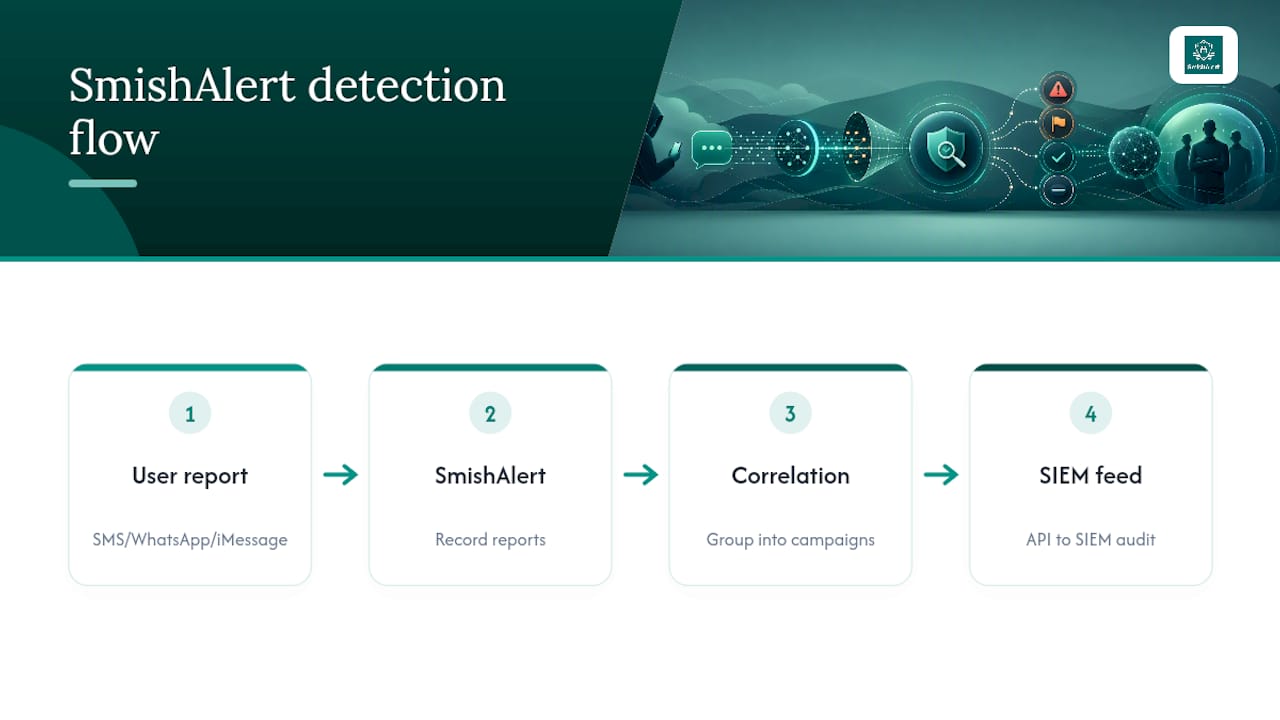
The gap every section above runs into is the same one: SMS, WhatsApp, and iMessage sit outside your email security and often outside MDM entirely. SmishAlert’s platform captures employee-reported messages, correlates them into campaigns, and feeds that record into your SIEM through API integration, producing the audit trail your IR checklist and compliance reporting both need. Review documented threat intelligence examples to see the correlation in practice.
Legal and Compliance Considerations for Handling These Scams
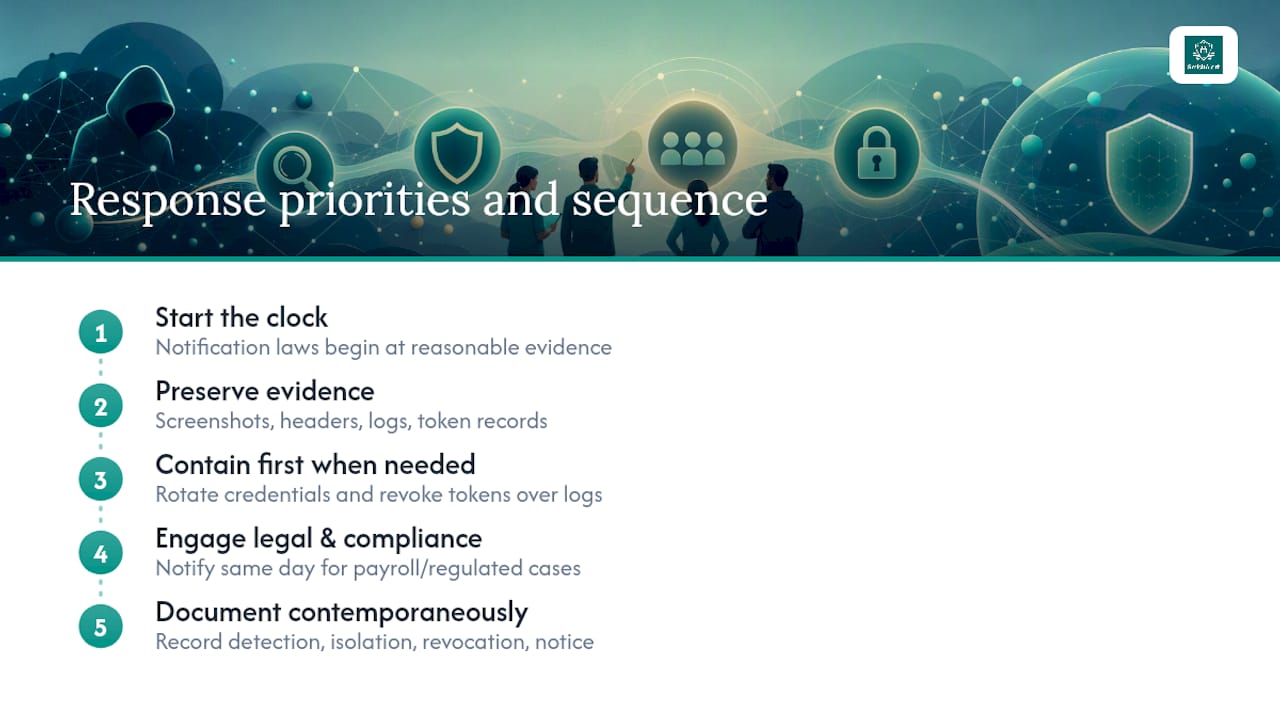
A Microsoft-impersonation messaging incident isn’t purely a technical event. If the attack resulted in unauthorized access to personal data, payroll records, or financial systems, most breach notification laws start their clock the moment you have reasonable evidence of compromise, not the moment forensics finishes. Delaying notification while you wait for a complete root-cause analysis can create its own liability.
Preserve evidence before you remediate anything you can safely defer. Screenshots of the SMS or Teams chat, header and sender metadata where available, sign-in logs, and token issuance records all matter if the incident escalates to law enforcement involvement or a regulatory inquiry. Rotating credentials and revoking tokens takes priority over evidence preservation when the two conflict, since containment protects more people than an intact log file does, but capture what you can before you flatten a device.
Coordinate with legal counsel early if the scam involved payroll diversion or gift-card fraud, since those cases often cross into wire fraud territory and may trigger cyber insurance notification requirements with their own tight deadlines. Financial services, healthcare, and other regulated industries carry sector-specific reporting obligations that a general IR runbook won’t cover, so loop in compliance the same day you confirm the incident, not after remediation wraps.
Document your response timeline as you go, not retroactively. Regulators and insurers both scrutinize the gap between detection and containment, and a clean, contemporaneous record of when you isolated the device, revoked tokens, and notified affected parties is often the difference between a routine disclosure and a drawn-out inquiry.
How Should Security Teams Work With Microsoft Support During an Incident?
Microsoft support can move faster on tenant-level actions than your team can from the outside, but only if you come prepared with specifics. Have your tenant ID, the affected user’s object ID, approximate timestamps of the suspicious sign-in or Teams contact, and any token IDs you’ve already identified ready before you open a case. Vague reports of “suspicious activity” sit in a queue far longer than a report with concrete identifiers attached.
Use your Microsoft 365 Defender or Sentinel support channel for anything involving conditional access policy conflicts, tenant-wide token revocation at scale, or confirming whether a flagged external tenant has been associated with other reported abuse. Microsoft’s threat intelligence team has visibility into cross-tenant patterns that your organization alone cannot see, which is part of why its published research on Teams impersonation reads like a shared detection blueprint rather than a one-off case study.
Internally, designate one incident commander as the single point of contact with Microsoft support. Splitting communication across multiple team members during an active investigation creates duplicate tickets, conflicting instructions, and delays in tenant-level containment actions like forced token revocation. Set a standing expectation with your Microsoft account team, if you have one, for an escalation path that doesn’t start from zero every time. That relationship, built before an incident rather than during one, consistently shortens time to resolution.
What Should Security Leaders Prioritize Next Quarter?
If your organization has FIDO2 rolled out only to executives, extend it to every admin and finance role before the next budget cycle. Tighten Conditional Access to require compliant devices for any Teams external chat approval. Stand up a formal smishing reporting channel; without one, you’re relying on employees to recognize and manually escalate a threat that’s specifically designed to bypass their judgment. A pilot of SmishAlert’s platform is a reasonable way to see what your current blind spot actually looks like before you commit budget to closing it.
— Sophie
Start a SmishAlert Pilot to See Your Messaging Blind Spot
Everything in this playbook depends on visibility you likely don’t have yet: what’s actually landing in employee text messages and chat apps right now, before it becomes an incident. Smishalert runs as a 30-day pilot that converts into an annual subscription, with the pilot fee credited toward your first year.

The self-eval tool takes about two minutes and gives you a baseline reading on exposure before you commit to a pilot. If credential harvesting over SMS is your specific concern after reading the AiTM section above, the credential harvesting solution page walks through how detection works for that exact scenario. Either page is a reasonable next step if your team is still relying on email security tools to cover a threat that never touches email at all.
Sources
- Impersonating IT support: how threat actors turn a remote session into enterprise-wide access | Microsoft Security Blog
- Breaking the code: multi-stage code-of-conduct phishing campaign leads to AiTM token compromise | Microsoft Security Blog
- Cloud-based gift card fraud campaign (Jingle Thief) | Unit 42