
Verify Mobile Identity Across Distributed Teams: A Playbook
The recommended posture is simple to state and hard to fake: adopt a verification-first playbook that pairs lightweight operational checks with messaging telemetry and cross-channel correlation, so no distributed employee acts on a Teams, SMS, iMessage, or WhatsApp request until its source has been confirmed out of band.
That means combining a call-back to a known number, ticket verification, and a challenge/response script with real-time detection tools like SmishAlert, standards references such as GSMA’s RCS Verified Sender framework, and lessons from the STAC4749 Teams impersonation campaign. Most organizations can validate this approach in a focused pilot before rolling it out wider.
- Real-time detection across SMS, iMessage, WhatsApp, and Teams
- Out-of-band verification before any remote-access or payment action
- SIEM/API integration so messaging signals reach the SOC
- A short pilot window, typically around 30 days, before wider rollout
The safest assumption for any distributed team is that a messaging request for remote access, credentials, or a payment change is unverified until proven otherwise, not the other way around.
Key Takeaways
Verifying mobile identity across distributed teams works only when out-of-band operational checks are paired with messaging telemetry and cross-channel correlation feeding the SOC.
| Point | Details |
|---|---|
| Verification before action | Require a call-back, ticket number, or challenge/response before any remote-access or payment request is honored. |
| Watch combined signals | Prioritize alerts pairing a sender anomaly with a remote-access request to cut false positives. |
| Correlate across channels | Ingest SMS, Teams, and WhatsApp signals into one collector so a single campaign doesn’t hide across silos. |
| Treat RCS verification as one signal | GSMA’s verified-sender indicator helps but shouldn’t be the sole proof of identity. |
| Pilot before scaling | SmishAlert’s 30-day pilot, scoped to executives and finance, credits its fee to the first annual subscription. |
Table of Contents
- Why Attackers Target Distributed Teams Through Messaging Apps
- What Signals Reveal a Messaging-Based Impersonation Attempt
- How Should Employees Verify a Suspicious Chat or Teams Request?
- Which Controls Reduce Mobile Impersonation Risk?
- What to Do If a Device or Session Is Already Compromised
- What Does a Realistic Rollout Timeline Look Like?
- Running a Pilot to Verify Mobile Identity Across Your Team
- Frequently Asked Questions
- Sources
Why Attackers Target Distributed Teams Through Messaging Apps
Distributed staff make attractive targets precisely because they cannot lean over a cubicle wall to ask “did IT really call you?” Attackers have adapted their playbooks accordingly, and the recent STAC4749 campaign is the clearest example yet.
In that operation, threat actors impersonated IT support inside Microsoft Teams, registered lookalike IT-themed domains, and talked victims into granting remote access. The campaign’s tooling evolved in real time: it started with Quick Assist, then shifted to RemSupp starting in April, before attackers layered in DWAgent and AnyDesk and attempted to enable RDP for lateral movement. That progression ended in Chaos ransomware.
Mobile-first fraud follows a parallel track. WhatsApp “boss” scams have used malicious ZIP attachments to compromise an executive’s account, auto-propagate to contacts, and then direct finance staff to wire funds. One reported incident cost a company 3.5 crore rupees after an employee opened a single file. SMS and iMessage smishing follow the same credential-harvesting logic, just with a shorter message.
- Mobile UX hides sender detail that a desktop email client would surface.
- Users respond faster on mobile, often within seconds of a notification.
- Messaging apps carry inherent trust that attackers borrow to create urgency and pressure.
What Signals Reveal a Messaging-Based Impersonation Attempt
Detection starts with knowing exactly what to look for across mobile telemetry, collaboration logs, and SIEM feeds. No single indicator is conclusive, but the combinations are.
- Sender anomalies: lookalike display names, contact addresses created within the past days, or service IDs that don’t match the corporate directory.
- Behavioral signals: requests for remote access, urgent payroll or bank-detail changes, or a one-time passcode shared over chat.
- Technical telemetry: shortened or redirecting links, compressed attachments like .zip files, sudden permission grants for remote-support tools, and RMM install events.
- Cross-channel correlation: an unsolicited SMS followed by a Teams or in-app contact attempt within the same short window.
- On-device signals: new remote-access sessions, newly installed tools such as DWAgent, AnyDesk, or RemSupp, and unexplained changes to contact lists.
Simple checks still matter at the individual level, too: verifying a business account’s badge, checking an official directory, and inspecting links before tapping catch a surprising share of impersonation attempts before they escalate.
Pro Tip: Prioritize alerts that combine two or more signal classes, such as a sender anomaly plus a remote-access request, rather than triaging each signal type separately. That pairing cuts false positives dramatically compared to single-signal alerting.
How Should Employees Verify a Suspicious Chat or Teams Request?
When someone claiming to be IT, a vendor, or an executive reaches out over chat, the response needs to be fast, consistent, and auditable. Build it into a script, not a judgment call.
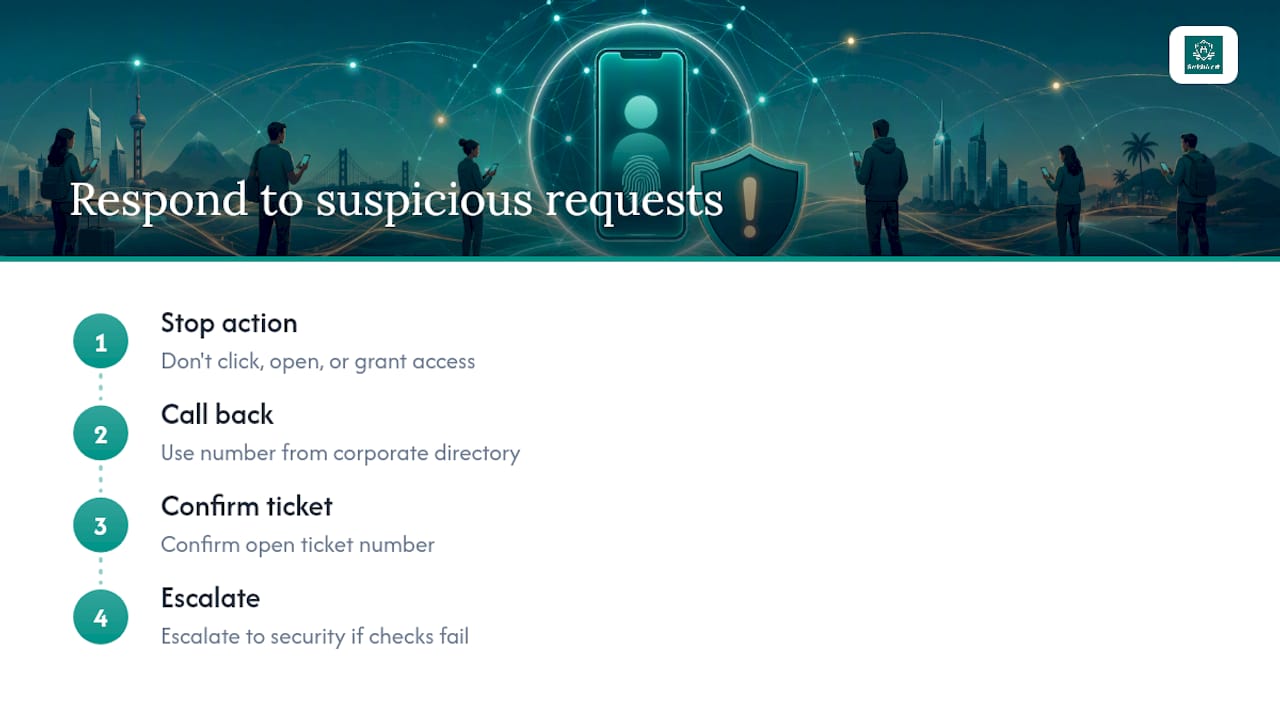
- Contain first. Do not click links, open attachments, or grant remote access while verification is pending.
- Call back out of band. Use a number pulled from the corporate directory, never one supplied in the message itself.
- Confirm the ticket. Any IT-support contact should map to an open, numbered ticket the employee can independently verify in the ticketing system.
- Apply escalation thresholds. Requests involving payroll changes, wire transfers, or remote-access tool installs go straight to a security analyst, no exceptions.
A two-line challenge/response script works well in practice: “Can you confirm the ticket number tied to this request?” followed by “I’ll call you back at the number on file before proceeding.” That single exchange defeats most Teams vishing attempts outright.
Decision logic should be equally blunt:
- Block immediately if the sender ID doesn’t match the directory.
- Escalate to incident response if remote-access software is already installed.
- Force device isolation or terminate the session if a challenge fails twice.
Log every interaction in the ticketing system with fields the SIEM can ingest, including sender ID, channel, and outcome, so repeated attempts against different employees surface as a single campaign rather than isolated noise.
Pro Tip: Require a verified ticket number plus at least one out-of-band confirmation before anyone installs a remote-support tool or changes payroll or bank details. No ticket, no call-back, no action.
Which Controls Reduce Mobile Impersonation Risk?
A layered architecture beats any single control, because attackers only need one weak link and defenders need every layer covered.
- On-device iOS message filtering and Android reporting hooks catch smishing before an employee ever taps a link.
- MDM policy can limit which remote-support tools are allowed to install on managed devices at all.
- RCS Verified Sender, per GSMA’s specification, lets a client display a cryptographically verified sender indicator, but it depends on operator-side support and works best as one signal among several, not a single point of trust.
- A cross-channel correlation layer that ingests SMS, Teams, and WhatsApp signals into one collector lets a SOC catch a campaign hitting five employees on three channels in one afternoon.
- Automated blocklists for suspicious service IDs and quarantine flows for devices that spin up unexpected remote sessions contain damage before it spreads.
- Connect Teams logs, SMS gateway feeds, and mobile reporting SDKs to the SIEM.
- Standardize alert fields (sender ID, channel, timestamp, device) across every feed.
- Apply least-privilege policy to remote-access tools by default.
On-device, privacy-preserving detection deserves specific mention here. WhatsApp’s Scam Alert model runs inference locally and never sends message content to a server, which is the right template for enterprise deployments that need detection without expanding what data leaves the device. Architect any messaging-security stack the same way: minimize data collected, keep audit trails for compliance, and correlate metadata rather than harvesting message bodies wholesale.
What to Do If a Device or Session Is Already Compromised
Speed matters more than perfection in the first hour. The sequence below should be rehearsed, not improvised.
- Isolate the affected device from the network immediately.
- Terminate any active remote-access sessions and revoke credentials tied to the account.
- Preserve a forensic image of the device before any remediation begins.
- Capture a full timeline of messages, including metadata, plus hashes of any remote-access installers found.
- Document contact-list changes and outbound network indicators for the incident record.
- Loop in legal and HR immediately for anything touching payroll fraud.
- Notify carriers or platform providers when impersonation crosses provider boundaries.
- Tag every event in the SIEM for post-incident detection tuning and the next tabletop exercise.
Evidence preservation windows shrink fast on mobile devices, so containment has to happen before triage, not after.
What Does a Realistic Rollout Timeline Look Like?
Most security teams start with a scoped pilot covering executives, finance, and a sample of distributed employees, then expand once detection quality and false-positive rates prove out.
| Phase | Typical Duration |
|---|---|
| Pilot (executives, finance, sample group) | 30 days |
| Phased rollout | 2 to 3 months |
| Full coverage | typically around 30 days before wider rollout |
- Track verified versus flagged incidents, detections correlated into the SIEM, mean time to verify (MTTV), and mean time to contain (MTTC).
- Run weekly detection reports during the pilot, then shift to monthly cadence once in production.
- Budget separately for the pilot fee, per-user annual licensing, executive add-ons, and integration engineering.
What SmishAlert prioritizes first
Rapid detection only matters if it converts into a verification step someone actually takes, which is why we push clients toward out-of-band checks as hard as we push detection telemetry. Visibility outside the corporate perimeter, on personal and executive devices alike, is where most messaging attacks now originate. Policy, training, and technical controls have to move together, or the gap between them becomes the attacker’s entry point.
Running a Pilot to Verify Mobile Identity Across Your Team
Most organizations patch this gap with a mix of employee training, ad-hoc directory call-backs, and whatever native reporting their messaging apps provide, which leaves the SOC blind to campaigns spanning SMS, Teams, and WhatsApp at once. SmishAlert closes that visibility gap directly: on-device filtering catches the message before the click, cross-channel correlation flags the same campaign hitting multiple employees, and SIEM/API integration means your analysts see it without switching tools.

The fastest path to results is scoping a pilot to executives and finance first, since that’s where impersonation and payroll fraud concentrate, then expanding once detection quality is proven. The 30-day pilot runs on a paid basis with the fee credited toward your first annual subscription, so there’s no sunk cost if the scope needs adjusting. Distributed and BYOD devices without MDM enrollment are covered too, which matters for any team weighing how to deploy mobile phishing protection without forcing device management on personal phones. Start with the 2-minute readiness check to see where your current gaps sit before committing to a pilot scope.
Frequently Asked Questions
What does it mean to verify mobile identity for distributed teams? It means confirming that a person contacting an employee over SMS, iMessage, WhatsApp, or Teams is who they claim to be, typically through an out-of-band call-back, a ticket-verification check, or a challenge/response script, before any sensitive action is taken.
How do distributed teams detect messaging-based impersonation? Security teams monitor sender anomalies, requests for remote access or credential sharing, compressed attachments, and cross-channel patterns, such as an SMS followed quickly by a Teams contact attempt, then correlate those signals in a SIEM.
Is RCS verified sender enough to trust a message? No. GSMA’s own guidance frames verified sender as one signal that reduces impersonation risk, not a standalone proof of identity, since operators control the trust anchors behind it.
What’s the first thing to do if a remote-access request seems suspicious? Do not click, open, or grant access. Call the requester back using a number from the corporate directory, confirm an open ticket number, and escalate to security if either check fails.
How long does a mobile identity verification pilot typically take? Most pilots run about 30 days, scoped to executives, finance, and a sample of distributed staff, before expanding into a phased rollout over the following two to three months.
Sources
- Microsoft Teams vishing attacks lead to Chaos ransomware attacks
- GSMA — RCS Verified Sender report (v5)
- Phishing on Messaging Apps: How Attackers Use WhatsApp, Teams, Slack, and SMS
- How We’re Building Scam Alert on WhatsApp With End-to-End Encryption and Verifiability Guarantees - Engineering at Meta
- WhatsApp ‘Boss’ Scam: Employees opened a ZIP file sent by ‘manager’ and lost Rs 3.5 crore; here’s how this dangerous fraud is targeting company officials