
Vendor Impersonation Texts: How Finance Teams Should Respond

Vendor impersonation texts are fraudulent SMS or messaging-app communications that pose as a known supplier to redirect a payment, usually through a fake bank-change request or an “urgent” invoice update. If your accounts payable team receives one, the correct first move is simple: pause the payment, do not call or click any number or link inside the message, and verify through the vendor contact already on file. Americans lost $3.5 billion to impersonator scams last year, and the Federal Trade Commission tracked substantial losses specifically to text-based scams in 2024.
Before you do anything else with a suspicious vendor message:
- Freeze the payment in your accounting system immediately.
- Do not reply to the number the message came from, even to ask questions.
- Locate the vendor’s phone number from your existing records, not from the message or its signature block.
- Loop in a second finance staffer before you take any action.
Key Takeaways
Vendor impersonation texts succeed when finance teams trust the contact information inside the suspicious message instead of verifying against records they already control.
| Point | Details |
|---|---|
| Verify, don’t reply | Always call the number already on file, never the one in the suspicious text. |
| Separate duties | Vendor creation and payment approval should never rest with the same person. |
| Expect multiple channels | A text scam often continues by email or a cloned voice call to reinforce the fraud. |
| Preserve evidence fast | Screenshot messages and headers before escalating to your bank or law enforcement. |
| Add mobile visibility | Smishalert correlates SMS, iMessage, and WhatsApp threats security teams otherwise miss. |
Table of Contents
- What Makes Vendor Impersonation Texts Different From Ordinary Phishing
- Red Flags That Should Stop a Payment Cold
- Attackers Rarely Stay in One Channel
- The Process Controls That Actually Stop Redirected Payments
- Technical Defenses Worth Adding on Top of Process
- What to Do in the First Hour After a Suspected Attack
- How Smishalert Adds Visibility Finance Teams Currently Lack
- Why Most Vendor Fraud Advice Misses the Real Weak Point
- Get Ahead of Vendor Impersonation Before the Next Text Arrives
- Sources
What Makes Vendor Impersonation Texts Different From Ordinary Phishing
A vendor impersonation text is not a random spam blast. It is a targeted attempt to insert an attacker into a real, ongoing financial relationship your company already has. That precision is what makes it dangerous, and it typically unfolds in a predictable sequence.
- Reconnaissance. The attacker studies public invoices, LinkedIn profiles, or a breached email thread to learn who handles payments and which vendors are active.
- Entry point. They hijack an existing email thread, spoof a lookalike phone number one digit off from the real vendor, or work from a vendor account they already compromised.
- The payload. The message requests a bank-account change, flags an “overdue” invoice, or asks the recipient to confirm a one-time verification code, which doubles as credential harvesting.
- The push. A follow-up text adds urgency, often timed near a payment run or month-end close when AP staff are moving fast.
Vendor impersonation is functionally a subset of business email compromise that has simply moved to a channel with weaker default scrutiny. SMS carries an assumption of immediacy that email lost years ago, and most AP teams have no equivalent of a spam filter or a callback habit for texts the way they do for emails.
Red Flags That Should Stop a Payment Cold
Most vendor fraud messages share a handful of telltale signs once you know what to look for. Train your team to treat any of the following as an automatic pause, not a judgment call made under deadline pressure.
Message-level signs:
- An unsolicited request to update banking details, especially with no prior notice from the vendor relationship manager.
- Language pushing urgency: “before end of day,” “final notice,” “your account will be suspended.”
- A sender name that doesn’t match the phone number displayed, or a number with a different area code than the vendor’s usual contact.
- A request to keep the change “confidential” or to skip the usual approval chain.
Operational signs:
- A “new” contact person suddenly handling billing for a long-standing vendor.
- A request for a small test payment to “confirm” new account details.
- Pressure to bypass dual approval because the requester claims it’s an emergency.
When something looks off, screenshot the message and preserve the full number and timestamp rather than forwarding just the text body. That metadata matters if you escalate to your bank or file a report later.
Pro Tip: Keep a shared document of every vendor’s verified phone number and email domain, reviewed quarterly. Most successful impersonation attempts succeed simply because nobody has that reference handy when the fraudulent message arrives.
Attackers Rarely Stay in One Channel
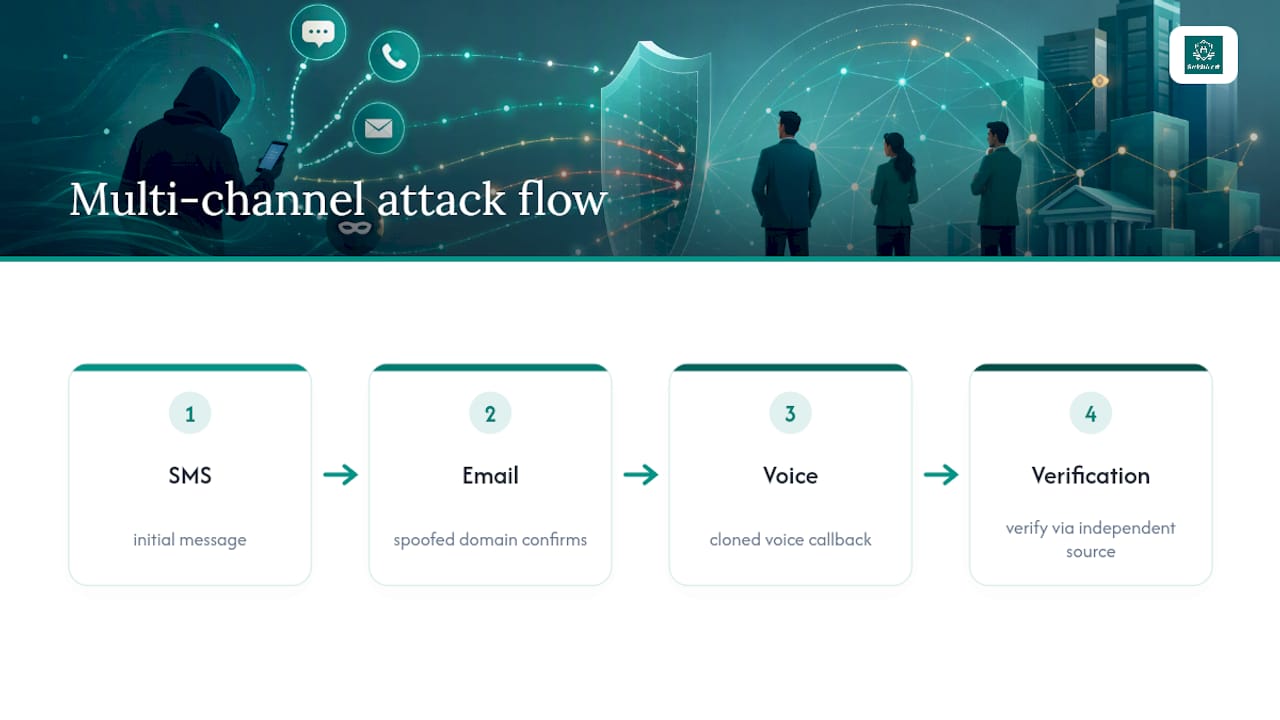
Vendor fraud messages that start on SMS often continue on email, voice, or WhatsApp, because a single channel is easier to distrust than three that reinforce each other. A text arrives flagging a bank change, then a follow-up email from a spoofed domain “confirms” it, then a phone call using a cloned voice closes the loop by walking someone through a callback that sounds legitimate. Each channel is designed to validate the other.
Voice cloning has made the traditional callback less reliable on its own. If the number an employee dials was supplied by the attacker, or if the voice on the other end has been synthetically generated from a few seconds of public audio, the callback confirms nothing.
The 2022 Twilio smishing incident showed how a single well-crafted text, sent to employees claiming to be an IT help desk, can cascade into credential theft and a much larger supply-chain breach. The initial message looked routine. The downstream damage did not.
The lesson isn’t that any one channel is untrustworthy. It’s that verification needs to happen against a source the attacker never touched, not against whatever contact information showed up in the suspicious message itself.
The Process Controls That Actually Stop Redirected Payments
Technology helps, but the controls that most reliably block vendor impersonation losses are procedural. They cost nothing to implement beyond discipline.
- Enforce a mandatory callback to the number on file, never the number provided in the suspicious message. This single habit defeats the majority of bank-change scams because attackers can spoof a text far more easily than they can answer a call at a legitimate vendor’s actual switchboard.
- Separate vendor creation from payment approval. The person who can add or edit a vendor’s banking details should never be the same person who releases payment to that account. This segregation of duties is one of the most consistently cited defenses in BEC prevention guidance for a reason: it forces collusion instead of a single point of failure.
- Require dual approval on any banking-detail change, not just on payments above a dollar threshold. Bank-account edits deserve the same scrutiny as the money that flows through them.
- Run vendor onboarding checks that flag reused bank accounts across different vendor names. Automated similarity checks catch the pattern where a fraudster reuses the same account for multiple impersonated vendors, a detail humans routinely miss.
- Reconcile vendor master data on a set schedule, not only when something looks wrong. A quarterly review catches drift before it becomes a loss.
- Run a tabletop drill at least twice a year that simulates a vendor impersonation text arriving during a payment run, so staff practice the pause-and-verify reflex before they need it under real pressure.
Forwarding a suspicious bank-change request to the vendor’s known email address, or calling the saved contact number and requiring a second person to confirm before processing, closes the loop that most scams depend on staying open.
Technical Defenses Worth Adding on Top of Process
Email authentication standards like SPF, DKIM, and DMARC block a lot of crude spoofing, but they do nothing against a genuinely compromised vendor mailbox or a lookalike domain registered a day before the attack. That gap is exactly why messaging-layer defenses matter for the channels email authentication was never designed to cover.
- Verified messaging formats like RCS for Business and WhatsApp Business verification display a checkmark or business profile the recipient can confirm in seconds, rather than trusting whatever caller ID a text carries.
- Carrier registration programs filter a meaningful share of scam and spam texts before they ever reach an employee’s phone.
- On-device filtering catches smishing attempts that never touch corporate email infrastructure, which matters since most vendor fraud texts land on personal or BYOD devices outside traditional security perimeters.
Sinch’s consumer trust testing found that 59% of people prefer RCS over basic SMS, and 79% said a visible logo or checkmark made a message feel more trustworthy. That trust signal works both directions: it also makes an unverified impersonation text stand out by contrast once employees know what a verified vendor message is supposed to look like.
What to Do in the First Hour After a Suspected Attack
Speed determines whether a redirected payment is recoverable. Work through this sequence in order, not in parallel guesswork.
- Place an immediate hold on the payment in question and any pending payments to the same vendor record.
- Contact your bank’s fraud department directly, using your bank’s published number, not any number referenced in the suspicious message.
- Preserve the original message, including headers, sender number, and timestamps, before anyone deletes or forwards it in a way that loses metadata.
- Escalate internally to your incident response lead and legal or compliance team, even if the amount seems small.
- File a report with the FTC and notify local or federal law enforcement, since recovery windows on wire transfers close fast.
- Run a post-incident review to identify which control gap let the message get as far as it did, and fix that gap before the next attempt arrives.
How Smishalert Adds Visibility Finance Teams Currently Lack
Most vendor impersonation texts land on devices security teams have no visibility into: personal phones, BYOD tablets, executive mobile lines. Smishalert closes that gap by capturing, correlating, and reporting on social engineering attempts across SMS, iMessage, and WhatsApp, the exact channels vendor fraud increasingly uses.
- On-device iOS filtering flags suspicious messages before an employee acts on them.
- Campaign correlation links a single impersonation attempt to a broader pattern targeting multiple staff or vendors at once.
- SIEM and API integration feeds those detections into the same workflows your security team already monitors.
- Audit-ready reporting gives compliance and finance leadership a documented trail after an incident, not just an anecdote.
| Capability | Why it matters for vendor fraud |
|---|---|
| Mobile message capture | Surfaces texts that never touch corporate email security |
| Campaign correlation | Connects one impersonation attempt to a wider attack pattern |
| SIEM/API integration | Routes messaging threats into existing security operations |
Why Most Vendor Fraud Advice Misses the Real Weak Point
The conventional advice on vendor impersonation focuses almost entirely on spotting bad grammar or an odd tone in the message. That guidance is outdated. Attackers now write cleaner messages than most internal memos, and pinning your defense on spelling errors is a losing bet.
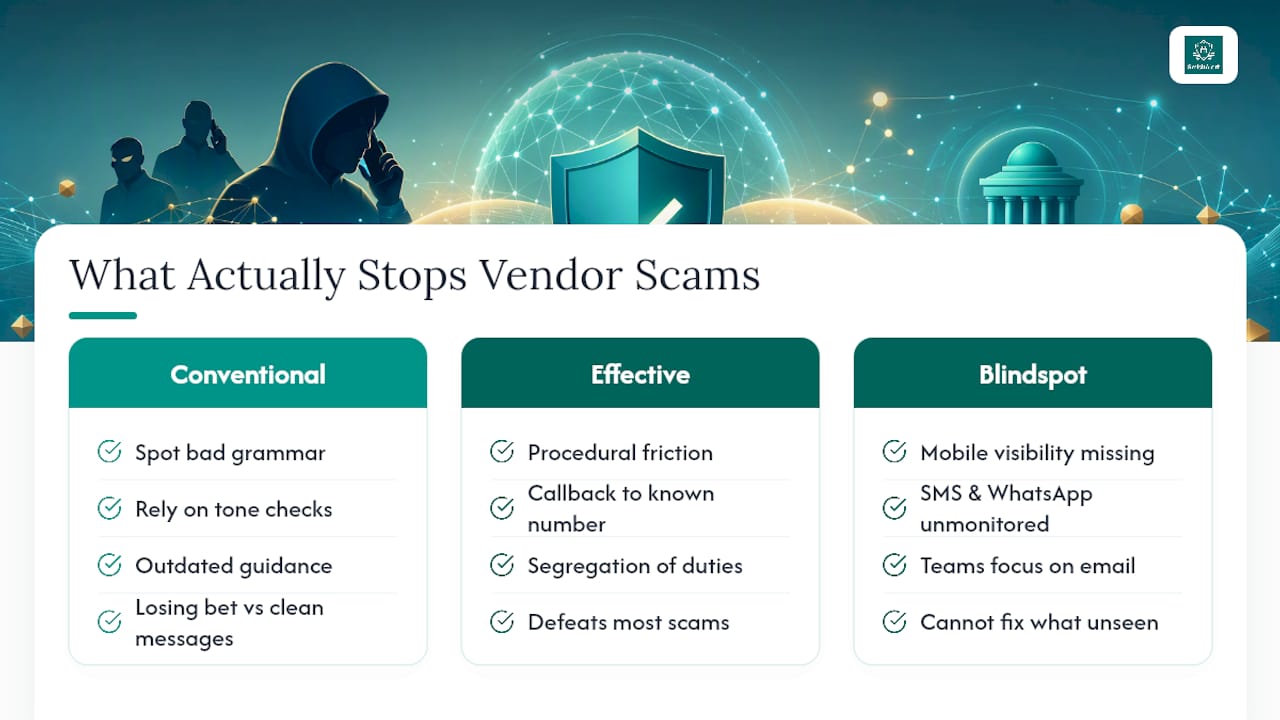
What actually works is procedural friction, not detection skill. A callback to a number your team already had on file before the message arrived defeats nearly every version of this scam, regardless of how convincing the text reads. Segregation of duties matters more than any single employee’s instincts, because instincts fail under month-end pressure and attackers know exactly when that pressure peaks.
The gap most organizations underestimate is mobile visibility. Security teams have spent a decade hardening email while vendor fraud quietly migrated to SMS and WhatsApp, channels most companies still monitor with zero tooling. If you prioritize one thing this quarter, prioritize seeing what’s actually landing on your employees’ phones. You cannot fix what you cannot see, and right now, most finance and security teams are flying blind on the exact channel where this fraud increasingly starts.
— Sophie
Get Ahead of Vendor Impersonation Before the Next Text Arrives
A callback policy and dual approvals stop plenty of vendor fraud attempts, but they only work after someone notices the message in the first place. Smishalert closes that blind spot by surfacing impersonation attempts across SMS, iMessage, and WhatsApp before they reach a payment approval queue, giving security and finance teams the same visibility into mobile threats they already have over email.

The platform correlates campaign patterns across devices, so a single impersonation attempt targeting one AP staffer gets flagged as part of a broader trend rather than treated as an isolated incident. Reports feed directly into your existing SIEM and API workflows, and detections generate audit-ready documentation your compliance team can actually use.
If you want a read on where your organization stands today, run Smishalert’s two-minute readiness check and see what gaps show up before an attacker finds them first.
Sources
Review the FTC and Sinch impersonation-loss data, the BEC red-flags checklist, and Smishalert’s guide on how smishing bypasses MFA for deeper implementation detail.
- $3.5B lost to impersonator scams last year: Can you still spot a fake business text? | KRDO
- VENDOR IMPERSONATION ATTACKS EXPLAINED: COMPLETE DETECTION & PREVENTION GUIDE (2026)
- What is vendor impersonation fraud and business email compromise (BEC), and what are the red flags? - Stampli
- Twilio smishing breach 2022 | Cloudskope