
Stop Telegram Phishing for SOCs: 7 Scams and 2 Minute Visibility Test

Telegram phishing attacks trick you into approving an attacker-controlled login, scanning a hostile QR code, or entering a one-time code that hands over your account. The single most important defense is procedural, not technical: never approve a login you did not initiate, and enable Two-Step Verification today. What follows covers how these attacks unfold, the scam types circulating right now, the advanced tradecraft that fools even careful users, and the recovery and reporting steps that limit the damage.
TL;DR:
- Most Telegram phishing attacks rely on fake login pages, QR codes, or support bots to steal session tokens or verification codes from unsuspecting users.
- Attackers often use impersonated support messages, suspicious links, or QR codes that, when scanned, grant immediate account access without further confirmation.
- Red flags include urgent requests, unusual payment methods, and suspicious links with domain rotors or unicode disguises, especially in messages claiming support or verification.
- Advanced techniques such as device fingerprinting and real-time code relay increase the difficulty of detection, making reconnaissance and targeted attacks more effective.
- Immediately reviewing active sessions, enabling Two-Step Verification, and reporting suspect messages can contain most Telegram account compromises.
Table of Contents
- How Telegram Phishing Attacks Work
- Common Telegram Scams and the Red Flags That Give Them Away
- The Advanced Tradecraft Behind Sophisticated Telegram Phishing
- What to Do Immediately After a Suspected Phishing Interaction
- Best Practices for Organizations Facing Messaging-Based Phishing
- What Smishalert Sees in Messaging Phishing Campaigns
- Closing the Visibility Gap on Messaging-Based Phishing
- Sources
How Telegram Phishing Attacks Work
Every Telegram phishing attack follows a similar chain: a lure gets your attention, a link or QR code moves you off the app or into a fake interface, and the final step captures either a session token or a one-time password. The mechanics vary, but the goal is always the same: get Telegram to hand the attacker a valid, authenticated session without you noticing until it is too late.
The lure arrives through a private message, a post in a public group, a forwarded link passed along by someone you trust, or occasionally a secret chat designed to feel more private and therefore more credible. From there, the attacker steers you toward one of three outcomes. You click a link that opens a cloned Telegram login page built to harvest your phone number and verification code. You scan a QR code that, unbeknownst to you, is a legitimate Telegram login QR being relayed by the attacker’s own device, which instantly binds your account to their session. Or you interact with a bot posing as Telegram support, an admin, or a customer service agent, and it walks you through “verifying” your account by sharing a code sent to your phone.
Telegram’s own architecture makes some of this easier for attackers to scale. Bots can run entirely automated conversations that mimic support staff, and Securelist’s research into the Telegram phishing market documents an active economy of free phishing kits and paid phishing-as-a-service offerings built specifically around the platform’s bot API and group infrastructure. Large public groups and channels give scammers a built-in audience without any cold outreach, and the platform’s QR-based login option, while convenient for legitimate multi-device use, becomes a liability the moment someone convinces you to scan a code you did not generate yourself.
A typical attack chain looks like this:
- A message arrives claiming to be from Telegram support, a giveaway organizer, or a known contact whose account has already been compromised.
- The message includes a link to a page that looks identical to Telegram’s login screen, or it asks you to scan a QR code “to verify your device.”
- If you enter your phone number, the attacker’s backend requests a real login code from Telegram and displays a fake “verifying” screen while you wait.
- You receive the actual Telegram code by SMS or in-app and, believing the fake page needs it, type it in.
- The attacker’s system immediately uses that code to log into your account on their own device, gaining full session access.
Kaspersky’s threat research tracked a marked increase in discussion of Telegram scams and documented how automated bots and public group structures let a single operator run dozens of parallel phishing conversations. Once inside, the attacker often does not change your password at all. They simply operate your account in parallel, which is part of why these intrusions go undetected for so long.
Common Telegram Scams and the Red Flags That Give Them Away
Most Telegram phishing attacks fall into a small number of recognizable categories, even when the specific pitch changes. Recognizing the pattern matters more than memorizing every variant, because scammers rotate scripts constantly while reusing the same underlying mechanics.
- Tech support impersonation. A message claims to be from “Telegram Support” or an account safety team, warning that your account will be suspended unless you verify it immediately by sharing a code. Telegram does not initiate unsolicited support conversations through regular user accounts.
- QR and login-verification scams. You are asked to scan a QR code to “confirm” your identity, unlock a feature, or join a private group. Scanning it authorizes a device you cannot see, and Bitdefender’s analysis of this scam pattern shows the takeover happens instantly, with no further action needed from the attacker.
- Credential-harvesting pages. A link leads to a page styled like Telegram’s official login, sometimes down to matching fonts and layout, built solely to capture your phone number and code.
- Crypto and giveaway schemes. A channel or bot promises free cryptocurrency, doubled deposits, or “verified” giveaway winnings, and asks you to send a small amount first or connect a wallet to a malicious link.
- Job scams. A recruiter contact offers remote work with unusually high pay for simple tasks, then asks for upfront “training fees” or personal documents before any real vetting occurs.
- Marketplace purchase scams. A seller in a buy/sell group insists on payment through an untraceable method, then disappears, or asks a buyer to click a “secure payment” link that is actually a credential trap.
- Romance and advance-fee scams. A new contact builds rapport over days or weeks before introducing a financial emergency, an investment “opportunity,” or a request to move the conversation to an external app right before asking for money.
Certain red flags cut across nearly every category. Pressure to act within minutes, requests for a screenshot of your code or verification screen, a sudden shift to payment via gift cards or crypto, and any unsolicited request to scan a QR code should all stop you cold. Guidance on spotting scam text red flags applies just as directly to Telegram messages as it does to SMS, since the manipulation techniques (urgency, authority impersonation, artificial scarcity) are channel-agnostic.
Pro Tip: Before trusting any account claiming to be an admin, moderator, or support agent, tap their profile and check the “Username” field against the group’s pinned rules or official channel. Scammers routinely clone display names and photos but can’t always match a verified username.
The Advanced Tradecraft Behind Sophisticated Telegram Phishing
The scams above are the visible layer. Underneath them, some campaigns run technical tradecraft sophisticated enough to fool security-aware targets, including journalists, activists, and enterprise employees with privileged access.
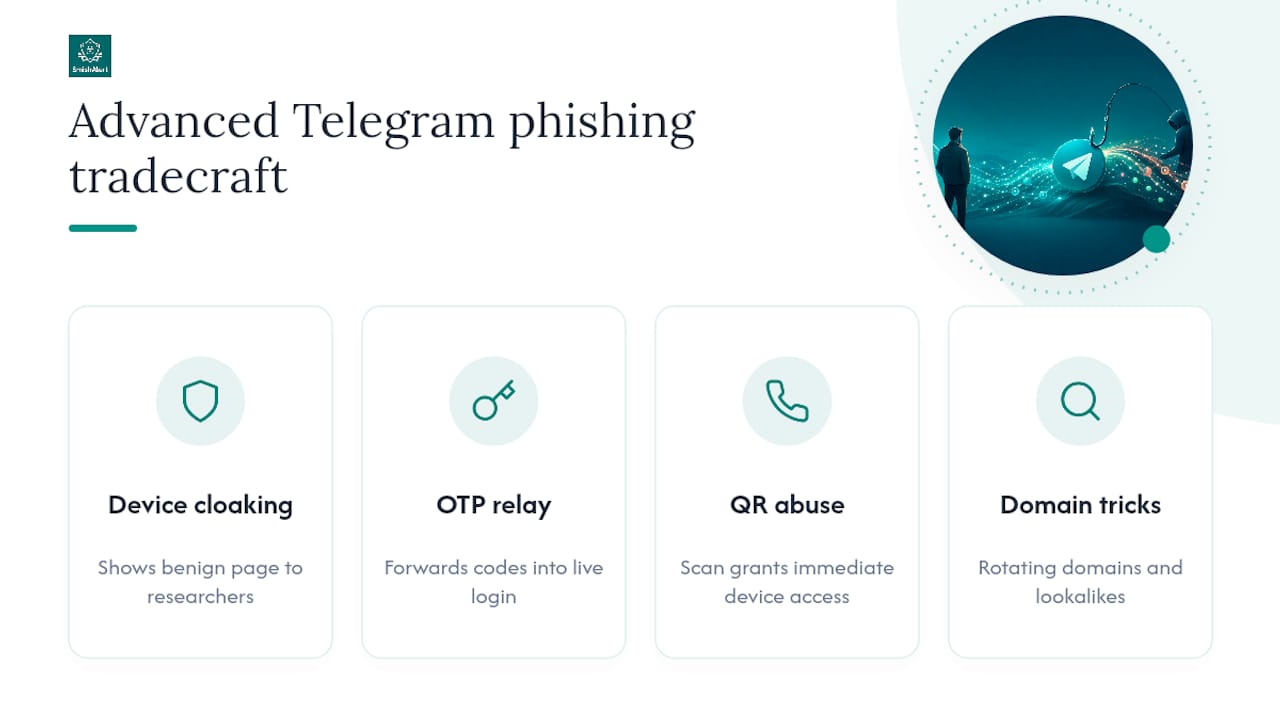
Device-aware cloaking is one of the more troubling techniques documented in recent incident analysis. A phishing page checks the visitor’s browser fingerprint, IP address, or device characteristics before deciding what to show. If the visit looks like a security researcher, an automated scanner, or a browser type outside the target profile, the page serves entirely benign content. Only the intended victim, arriving through the expected link and device, sees the actual phishing interface. RESIDENT.NGO’s analysis of a phishing operation targeting an exiled activist documented exactly this pattern, paired with personalized tokens issued per target so that each phishing link only worked once, for one person, at one moment.
OTP and session-harvesting attacks push the sophistication further. Rather than storing a stolen code for later use, some phishing kits relay the code in real time: the moment a victim types it into a cloned page, the backend feeds it into a live Telegram login attempt. This is also the mechanism behind attacks that abuse Telegram’s own authentication workflows to obtain a fully authorized session, since the victim is technically approving a real login, just one initiated by someone else.
QR-based login should be treated as an authorization event, not a convenience feature. Scanning a code outside Telegram’s own app or official web interface grants a device access the instant the scan completes, with no additional confirmation step to catch a mistake.
QR abuse deserves special attention because it removes the “type a code” friction that sometimes tips off cautious users. Indicators worth watching for include phishing domains that rotate every few hours or days, links hosted on throwaway subdomains rather than established infrastructure, and messages that use Unicode separators or visually similar characters to disguise a fake domain as legitimate. None of these signs are visible from a casual glance, which is exactly why they work against otherwise careful targets.
What to Do Immediately After a Suspected Phishing Interaction
Speed matters more than perfection here. A few fast, correctly ordered steps can contain most Telegram account compromises before they turn into financial loss or broader identity exposure.
- Stop the interaction immediately. Do not enter any additional codes, do not reply, and close the browser tab or app screen showing the suspicious login page.
- Check active sessions. Open Telegram, go to Settings, then Devices, and review every listed session. Terminate anything you do not recognize, including sessions from unfamiliar locations or device types.
- Enable Two-Step Verification. Under Settings, Privacy and Security, set a cloud password. This step alone blocks most session-hijacking attempts even if an attacker has your phone number and a code.
- Audit connected bots and linked services. Revoke access for any bot or third-party integration you don’t actively use or recognize.
- If money or credentials were shared, act on that separately. Change reused passwords elsewhere, contact your bank if you shared financial details, and consider a card freeze if payment information was exposed. The financial fallout from account takeover can move fast: one account-security case study documented thousands of dollars in unauthorized charges within a single hour of a compromised account, a useful reminder that the window for containment is short.
- Preserve evidence before you delete anything. Screenshot the phishing message, the sender’s profile, and any links involved, and note the message ID if possible.
- Report it. Forward the phishing message to Telegram’s dedicated scam-reporting bot, @notoscam, and send supporting evidence to abuse@telegram.org for platform-level takedown action.
Session auditing deserves emphasis because it is the step most people skip. Analysis of authentication-workflow abuse found that attackers using session-binding techniques rarely need your password at all, which means a password change alone leaves the attacker’s session active and untouched.
Best Practices for Organizations Facing Messaging-Based Phishing
Telegram phishing rarely stays contained to a personal account when the target works at a company with valuable data or financial access. Security teams need a messaging-specific defense layer, not just email controls, because attackers increasingly route around the corporate perimeter entirely.
- Train employees to recognize the same red flags covered above, and give them one clear, low-friction channel to report a suspicious message the moment they see it.
- Correlate employee-submitted reports against known campaign indicators and threat intel feeds, since a single suspicious message often belongs to a wider campaign hitting multiple employees at once.
- Enforce strong account protections organization-wide, including mandatory Two-Step Verification for any messaging app used on managed or BYOD devices tied to corporate identity.
- Vet external contacts during onboarding processes, since job scams and vendor-impersonation attempts frequently target new hires who don’t yet know internal norms.
- Centralize incident intake so triage teams aren’t chasing screenshots across five different Slack channels and personal inboxes.
When an incident does surface, collect the same evidence individuals should: message content, sender profile details, timestamps, and any URLs involved, then escalate through your existing SOC workflow rather than treating it as a one-off. SmishAlert’s threat intelligence on live campaign patterns shows how quickly a single phishing template gets reused across targets once it proves effective.
Pro Tip: Treat messaging-app phishing reports with the same urgency as email phishing reports in your SIEM. A Telegram-based credential-harvesting attempt against one employee is often the first visible signal of a campaign that will hit a dozen more within days.
What Smishalert Sees in Messaging Phishing Campaigns
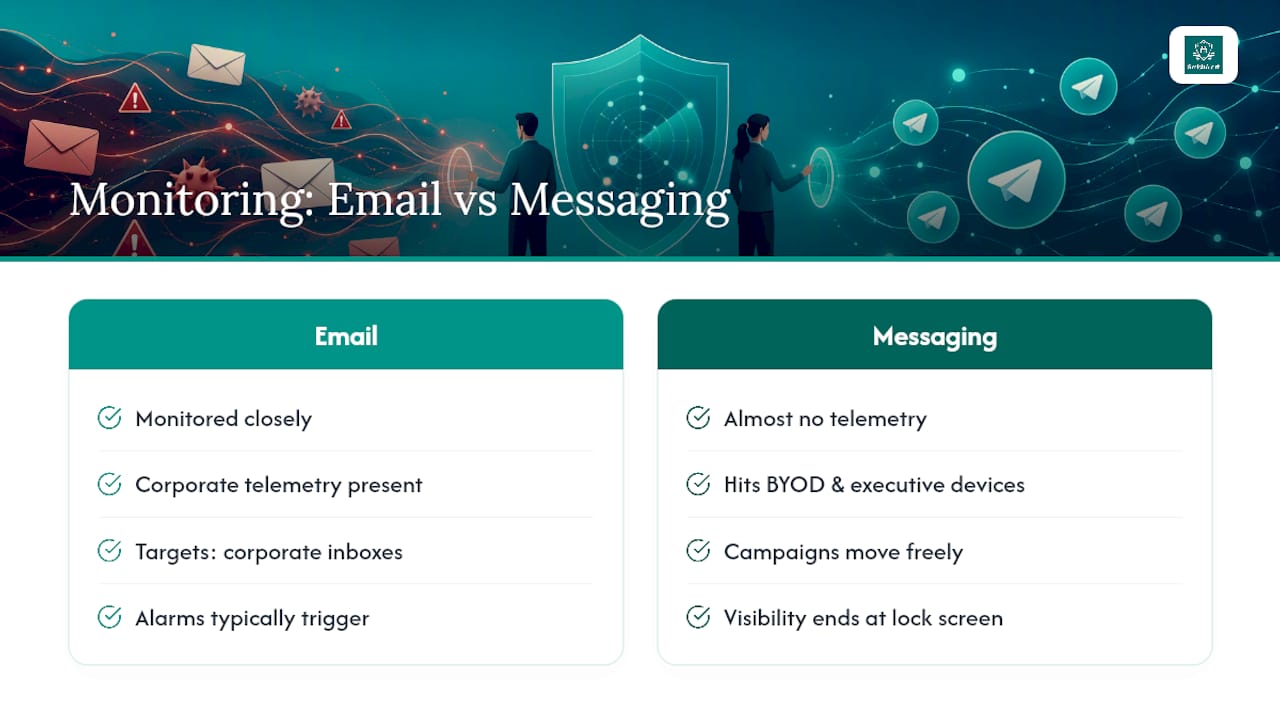
Smishalert’s visibility into messaging-based social engineering consistently surfaces the same gap: organizations monitor email closely but have almost no telemetry on SMS, iMessage, WhatsApp, or Telegram-style attacks hitting BYOD and executive devices. Attackers know this. Campaigns that would trip alarms on a corporate inbox move freely through personal messaging apps, where visibility often ends at the phone’s lock screen.
Closing the Visibility Gap on Messaging-Based Phishing
There are ways to reduce this risk without Smishalert: employee training, mandatory Two-Step Verification, and a designated reporting channel all help. But those measures share one limitation. None of them give a security team visibility into what is actually landing on employee devices across SMS, iMessage, WhatsApp, and Telegram-style messaging before someone clicks.

This gap can be closed by capturing messaging-based threats as they arrive, correlating them across employees to surface coordinated campaigns instead of isolated reports, and feeding that data into existing SIEM and incident response workflows. That matters specifically for the attack patterns covered in this article: credential-harvesting attempts that mimic login pages, and executive impersonation attempts that target the people attackers profit from most.
Security teams that don’t yet know how exposed their organization is on messaging channels can start with the two-minute self-eval to see where the visibility gaps sit, or review the full platform capabilities directly to see how detection, reporting, and campaign correlation work together across managed and BYOD devices.
Sources
- New Telegram Phishing Attack Abuses Authentication Workflows to Obtain Full Authorized User Sessions
- Top 10 Telegram scams to watch out for
- Telegram QR code scam: How a fake QR scan leads to account takeover
- The Telegram phishing market