
SMS Phishing Prevention for Security Teams: 2026 Guide
Security teams that want to reduce organizational smishing risk in the next 24–72 hours should prioritize three actions above all others: activate carrier-level and on-device message filtering, replace SMS-based MFA with phishing-resistant alternatives on high-value accounts, and enforce a verified out-of-band callback protocol for any financial or payroll change request received via text. Those three controls address the most exploited gaps in enterprise mobile security today.
Two immediate people-side steps reinforce the technical layer: send a targeted advisory to executives and payroll staff explaining current impersonation tactics, and open a dedicated reporting channel (a shared mailbox or SOC ticket queue) where employees can forward suspicious messages without friction. Once those steps are in place, run a focused 30-day pilot to measure baseline attack volume, user click-through rate, and mean time to block, so you have numbers to bring to leadership.
Key Takeaways
Effective SMS phishing prevention requires layered technical controls, a verified out-of-band protocol for financial requests, and cross-channel telemetry that extends visibility beyond what carrier filtering alone can provide.
| Point | Details |
|---|---|
| Replace SMS-based MFA now | SMS codes are vulnerable to SIM-swap and interception; migrate high-value accounts to FIDO2 keys or authenticator apps. |
| Carrier filtering has a ceiling | Commercial tools block only 25–35% of smishing attempts; layered controls and infrastructure blocking are required to close the gap. |
| Speed determines containment | Roughly 75% of victims reach phishing pages within ten hours; MTTR under 4 hours is the target for high-severity campaigns. |
| Measure a 30-day pilot baseline | Track incoming volume, user report rate, and credential capture rate before and after deploying controls to show leadership a trend. |
| Smishalert extends detection beyond the inbox | Smishalert correlates employee-reported messages into campaigns and surfaces phishing infrastructure for SIEM integration and takedown. |
Table of Contents
- How SMS phishing (smishing) attacks actually work
- Indicators your SOC and users should recognize
- Technical controls that reduce smishing exposure
- People, policy, and training: hardening the human layer
- Incident response: what to do after a click or credential disclosure
- Running a pilot and measuring what matters
- Why cross-channel detection is the gap most security stacks miss
- Smishalert gives your team the visibility SMS filtering alone cannot provide
- Authoritative reporting endpoints and resources
- Sources
How SMS phishing (smishing) attacks actually work
Smishing exploits channel trust and the near-total absence of SMS metadata that defenders rely on in email. There is no DMARC, no DKIM, no header chain to inspect. A spoofed sender ID or a rented short code looks identical to a legitimate bank alert or HR notification on a mobile screen.
The typical attack chain runs like this: an attacker sends a message from a spoofed number or short code, often referencing a real event (a package delivery, a payroll update, an IT password reset). The message contains a shortened or obfuscated URL. On a mobile screen, the full domain is rarely visible before the tap. The victim lands on a mobile-optimized phishing page designed specifically for small screens, enters credentials or installs a malicious profile, and the attacker harvests the data within minutes.
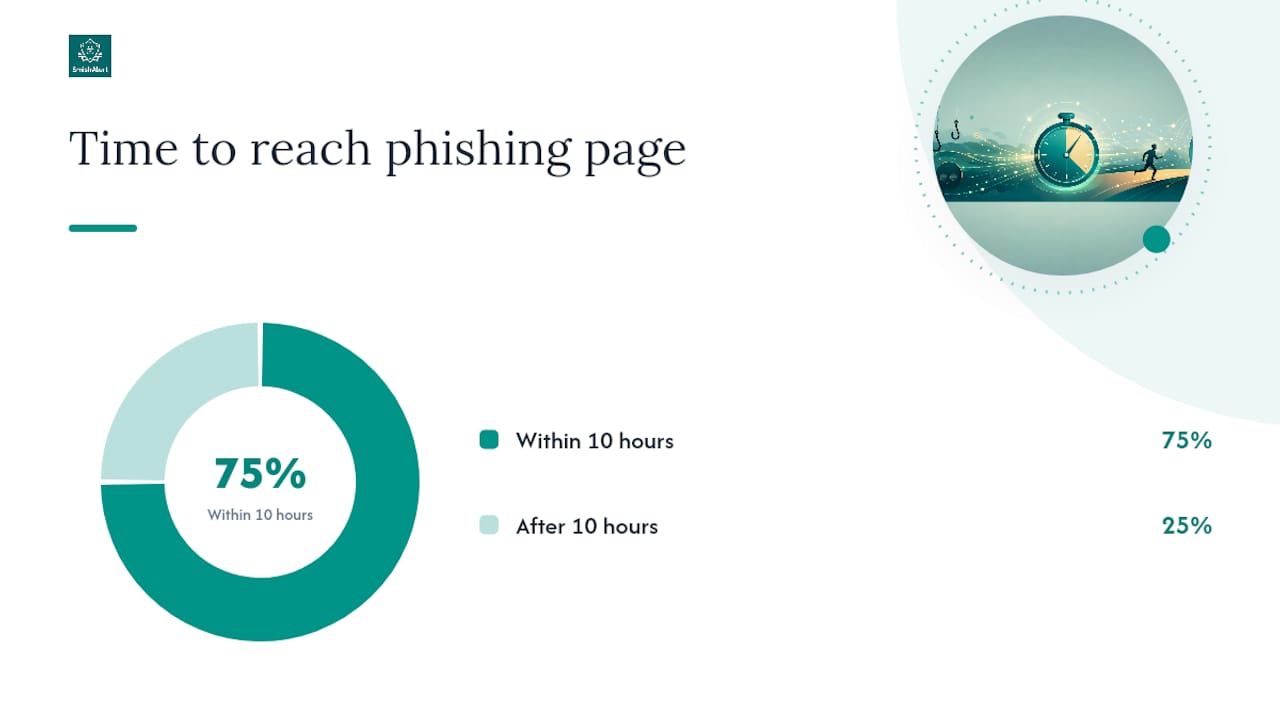
Speed is the defining characteristic of these campaigns. Commercial anti-smishing tools block roughly 25–35% of smishing attempts, and approximately 75% of victims arrive at phishing landing pages within ten hours of campaign launch. That victim window is shorter than most SOC shift cycles, which is why detection at the infrastructure level matters as much as message filtering.
Two patterns your team will encounter most often:
CEO impersonation: An attacker spoofs the CEO’s mobile number and texts the CFO or an executive assistant asking for an urgent wire transfer or gift card purchase. The message arrives outside business hours, creates time pressure, and bypasses email security entirely.
Payroll fraud: An attacker impersonates HR or a payroll vendor via SMS, directing an employee to “verify” direct-deposit account details through a link. The link leads to a credential-harvesting page that captures the employee’s SSO or payroll portal login.
Both patterns share a common feature: they exploit the absence of a verification step that most organizations only enforce for email-based requests.
Indicators your SOC and users should recognize
The clearest signal of a smishing attempt is a message that creates urgency, contains a link, and arrives without a corresponding out-of-band trigger. No legitimate payroll system sends an unsolicited “verify your account” text without a prior user action.
Message-level indicators to flag:
- Unsolicited links, especially shortened URLs (bit.ly, tinyurl, or custom short domains)
- Urgent or threatening language (“Your account will be suspended in 2 hours”)
- Reply-to instructions using short codes or unfamiliar numbers
- Sender context that doesn’t match the claimed organization (a bank texting from a 10-digit number rather than its registered short code)
- Requests for information the sender should already have (SSN, account number, password)
- “Reply YES to confirm” or “Reply STOP to unsubscribe” prompts in unsolicited messages
Behavioral and targeting indicators:
- Financial or payroll change requests arriving exclusively via SMS with no email or portal confirmation
- Messages targeting executives, payroll staff, or IT helpdesk personnel specifically
- Timing anomalies: messages sent late at night, on weekends, or immediately before a known payroll cycle
- Wire transfer or gift card requests framed as confidential and urgent
Analyst triage checklist: When a user reports a suspicious message, capture the sender number, timestamp, and raw message text before any action. Use a URL sandboxing tool (such as URLScan.io or VirusTotal) to preview the link destination without clicking it on a live device. Check the sending number against known smishing databases. Escalate to incident response if the link resolves to a credential-harvesting page, if the message targets an executive, or if any user has already clicked.
Pro Tip: Configure your employee reporting channel to auto-generate a SOC ticket with the forwarded message text and sender number pre-populated. Manual re-entry of that data introduces errors and slows triage.
Technical controls that reduce smishing exposure
The prioritized technical answer: enable what you can today (carrier filtering and on-device spam filters), then build toward the controls that require longer deployment cycles (MTD, SIEM integration, MFA migration).
Enable now:
- Carrier-level filtering: Major US carriers (AT&T, T-Mobile, Verizon) operate network-level spam and fraud detection. The FCC has empowered carriers to block suspected illegal traffic proactively. Confirm your carrier agreements include these protections and that they are active for corporate-liable lines.
- On-device filters: iOS offers built-in message filtering that routes unknown senders to a separate list; Google Messages on Android includes spam detection. Both can be enabled via MDM policy for managed devices.
- Forward to 7726: The FTC recommends forwarding suspicious texts to 7726 (SPAM), which feeds carrier detection systems. Build this step into your employee reporting workflow.
- Phase out SMS-based MFA: CISA and the FBI have both recommended against SMS codes for sensitive accounts. SMS authentication carries well-documented SIM-swap and interception risks; replace it with FIDO2 hardware keys or authenticator apps (such as Google Authenticator or Microsoft Authenticator) for any account with access to financial systems, HR data, or privileged infrastructure.
Longer-term controls:
- Mobile Threat Defense (MTD): Platforms that provide on-device URL reputation scanning and behavioral analysis catch threats that carrier filtering misses. For BYOD environments, agentless or lightweight agent options reduce privacy friction while still providing telemetry.
- URL scanning and sandboxing: Integrate URL reputation feeds into your proxy or firewall to block known phishing domains referenced in SMS campaigns. Smishing pages are increasingly mobile-optimized, so desktop-only sandboxing misses a significant portion of payloads.
- SIEM integration: Ingest employee-reported message data and MTD alerts into your SIEM (Splunk, Microsoft Sentinel, or equivalent) to correlate SMS threats with email and web telemetry. A domain appearing in both a smishing campaign and a spear-phishing email is a high-confidence indicator of a coordinated attack.
Deployment trade-offs by method:
| Control method | Typical blocking efficacy | Deployment complexity | BYOD compatible |
|---|---|---|---|
| Carrier-level filtering | Low–moderate (25–35%) | Low | Yes |
| On-device native filters | Moderate | Low | Yes (user-enabled) |
| MTD with URL scanning | Moderate–high | Medium | Partial (agent required) |
| SIEM correlation + IR | Varies (detection-focused) | High | Yes (agentless reporting) |
| Phishing-resistant MFA | High (for credential theft) | Medium | Yes |
For detecting phishing in SMS and messaging apps at scale, the most durable architecture combines carrier filtering, on-device warnings, and infrastructure blocking of the phishing domains themselves. Filtering messages alone leaves the credential-harvesting sites operational.
People, policy, and training: hardening the human layer
Technical controls reduce attack surface; people controls determine whether the attacks that get through cause damage. The two are not interchangeable.
Policy essentials to implement now:
- Verified callback protocol: Any financial transaction, payroll change, or account update requested via SMS must be verified through a pre-established out-of-band channel (a known phone number or in-person confirmation) before action is taken. No exceptions for urgency.
- Executive communication policy: Define which channels are approved for sensitive requests. A CEO who never uses SMS for wire transfer requests gives employees a clear baseline to flag anomalies.
- BYOD and personal device policy: Clarify whether employees are expected to report smishing attempts received on personal devices. Ambiguity here creates blind spots in your attack-surface visibility.
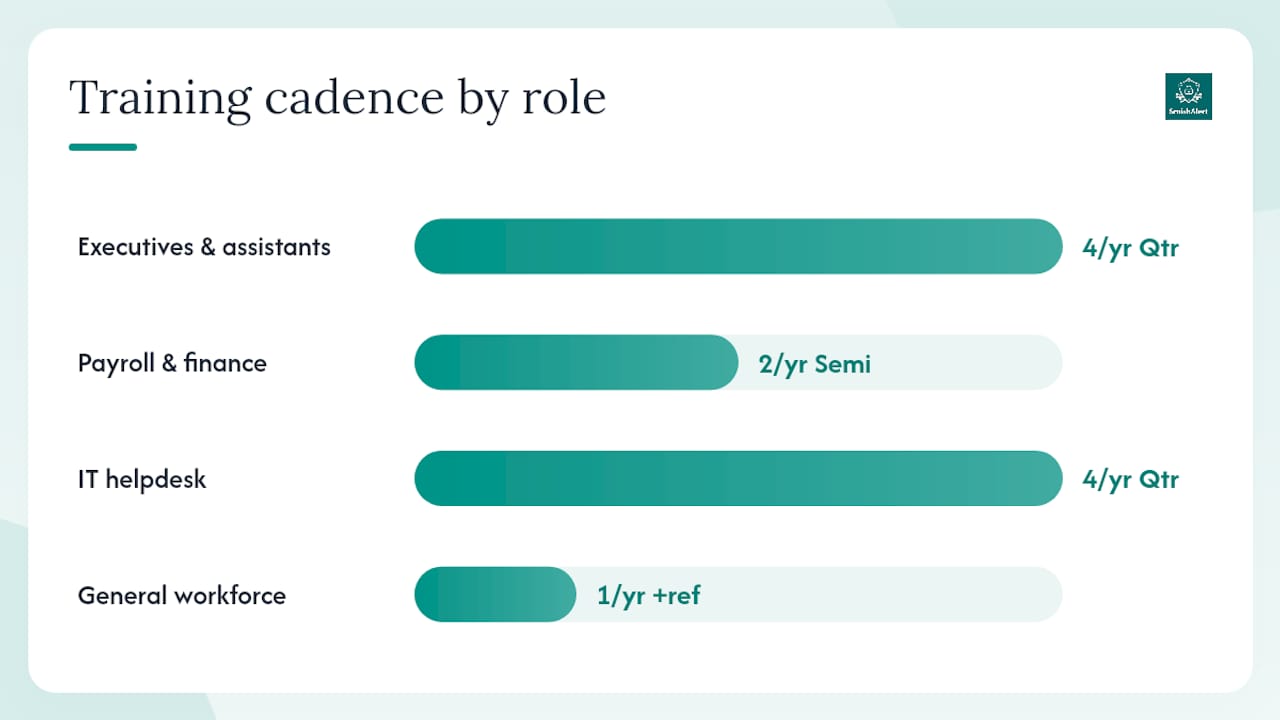
Training cadence by role:
- Executives and executive assistants: Quarterly, scenario-based training focused on impersonation and urgency manipulation. Include real examples of CEO-fraud SMS patterns.
- Payroll and finance staff: Semi-annual training plus a written verification protocol posted at workstations.
- IT helpdesk: Quarterly, with emphasis on social engineering via SMS (attackers frequently impersonate employees to reset credentials via helpdesk SMS).
- General workforce: Annual awareness training with a short refresher after any confirmed smishing incident.
Simulation design checklist (treat smishing simulations with the same rigor as email phishing campaigns):
- Define measurable objectives before launch: click rate, report rate, and time-to-report.
- Scope the simulation to a specific role group first (payroll, executives) before running org-wide.
- Use safe payloads only: a landing page that informs the user they participated in a simulation, with no credential capture.
- Test the reporting workflow, not just the click rate. If users don’t know how to report, the simulation reveals a process gap.
- Get HR and legal sign-off before launch, particularly for any simulation targeting executives.
- Debrief within 48 hours: share aggregate results, not individual names, and provide immediate remediation guidance.
Pro Tip: Run a multi-channel simulation that combines a smishing message with a follow-up voice call. Attackers increasingly use both channels in sequence to build credibility. A single-channel simulation will not reveal whether your verification protocol holds under that combined pressure.
Incident response: what to do after a click or credential disclosure
Speed is the controlling variable. With roughly 75% of victims reaching phishing pages within ten hours of campaign launch, containment actions taken in the first hour reduce downstream damage more than any post-incident remediation.
0–24 hours: Immediate containment
- Isolate the affected account: suspend active sessions, revoke OAuth tokens, and force a credential reset.
- Block the phishing domain and any associated IPs at the firewall and proxy level.
- Reset MFA enrollment on the affected account; do not allow SMS-based re-enrollment.
- Notify the user’s manager and the relevant business system owner (payroll, finance, IT).
- Preserve evidence: capture the original message text, sender number, timestamp, and a screenshot. Do not delete the message from the device until forensic capture is complete.
- If a financial transaction was initiated, contact the bank or payment processor immediately to attempt a recall.
24–72 hours: Investigation and notification
- Conduct a forensic review of the device if corporate-managed; for BYOD, work within the privacy constraints of your policy.
- Determine the scope: did the attacker use harvested credentials to access other systems? Check IAM logs for lateral movement indicators.
- File a report with the FBI’s Internet Crime Complaint Center (IC3) if the incident involves financial fraud or a large-scale campaign.
- Notify affected customers or partners if their data was exposed, per your breach notification obligations.
- Report the sending number and campaign details to the carrier and forward the original message to 7726.
72 hours to 30 days: Remediation and hardening
- Complete a root-cause analysis: which control failed, and why?
- Update the smishing simulation library with the confirmed attack pattern.
- Review and tighten the verification protocol for any process the attacker exploited.
- Present findings to leadership with a residual-risk summary and recommended control improvements.
For BYOD devices, chain-of-custody for mobile evidence is constrained by privacy law. Document what was collected, from which device type, and under what policy authority before any forensic action.
Running a pilot and measuring what matters
A 30-day pilot that measures baseline attack volume, user click-through rate, and mean time to block gives you the numbers to justify investment and show leadership a trend line. Without a baseline, every smishing control is a cost center with no demonstrated return.
Pilot checklist:
- Define scope: which user groups, device types, and messaging channels are in scope.
- Obtain stakeholder sign-off from IT, HR, legal, and the CISO before instrumenting any telemetry.
- Instrument reporting: connect employee-reported messages to a SOC queue and tag them in your SIEM.
- Establish a baseline in week one before deploying any new controls, so you have a pre-intervention reference point.
- Deploy controls in week two and track changes in the KPIs below.
- Report weekly to the pilot sponsor with raw numbers and trend direction.
KPIs to track:
| KPI | What it measures | Target improvement |
|---|---|---|
| Incoming smishing count | Raw attack volume reaching users | Establish baseline; track week-over-week |
| Percent filtered (carrier + on-device) | Filtering efficacy before user exposure | Benchmark: 25–35% at carrier level; target higher with MTD |
| User report rate | Percentage of received smishing messages reported to SOC | Increase from baseline after training |
| Mean time to remediate (MTTR) | Time from user report to domain block | Target under 4 hours for high-severity campaigns |
| Credential capture rate | Percentage of attacks resulting in confirmed credential theft | Target: zero; any non-zero value triggers protocol review |
Present pilot results as a two-slide executive summary: one slide showing the attack volume and filtering efficacy trend, one slide showing MTTR and credential capture rate. Executives respond to risk reduction expressed as a rate change, not as a count of blocked messages.
For SOC teams integrating smishing telemetry, the most useful SIEM correlation rule is: any domain appearing in both a reported SMS message and a web proxy alert within a 24-hour window should auto-escalate to a high-severity incident.
Why cross-channel detection is the gap most security stacks miss
The conventional view of smishing prevention focuses on the message: filter it, block it, train users not to click it. That framing is incomplete, and it leaves organizations exposed in a predictable way.
The more durable defense targets the phishing infrastructure itself. A credential-harvesting domain that gets blocked at the firewall is neutralized regardless of how many SMS messages carry its URL. Filtering messages alone leaves the destination operational; a single message that slips through carrier filtering still delivers the payload. The evidence supports this: commercial tools block only 25–35% of smishing attempts, which means the majority of messages reach recipients even when filtering is active.
The second gap is channel isolation. Most enterprise security stacks have mature email threat detection, but SMS, iMessage, and WhatsApp operate entirely outside that perimeter. An attacker who knows your email gateway will flag a credential-harvesting link will simply move the same campaign to SMS. Without cross-channel telemetry, your SOC has no visibility into that pivot. The organizations that close this gap fastest are those that treat messaging-based social engineering as a first-class threat category, not an edge case handled by carrier filtering and user awareness alone.
Smishalert gives your team the visibility SMS filtering alone cannot provide
Security teams that have deployed carrier filtering and user training still face a structural problem: they cannot see what they cannot measure. Smishalert’s platform addresses that gap directly. It captures employee-reported smishing attempts across SMS, iMessage, and WhatsApp, correlates them into campaigns, and surfaces the phishing infrastructure behind each attack so your team can block it at the domain and host level rather than message by message.

Three ways Smishalert maps to the playbook above: on-device iOS message filtering delivers contextual warnings before a user taps a malicious link; campaign correlation connects individual reports into a unified attack picture for SIEM ingestion; and rapid reporting workflows support domain takedown and carrier notification without manual analyst effort. For credential-harvesting campaigns and executive impersonation specifically, the platform provides audit-ready incident records that satisfy compliance reporting requirements.
Run the 2-minute SmishAlert Self-Eval to assess your organization’s current smishing readiness, or contact the team to scope a 30-day paid pilot with the pilot fee credited toward your first annual subscription.
Authoritative reporting endpoints and resources
Every security team handling smishing incidents should have these endpoints bookmarked and integrated into their IR runbook.
- FTC — ReportFraud.ftc.gov: File consumer and organizational fraud complaints here. Use it when a smishing campaign results in financial loss or credential theft affecting employees. The FTC also recommends forwarding suspicious texts directly to 7726 (SPAM) to feed carrier detection systems.
- FCC consumer guidance: Reference for carrier-blocking authority and consumer reporting options. Use it when coordinating with carriers on persistent spoofing or short-code abuse.
- CTIA / 7726 (SPAM): Forwarding suspicious messages to 7726 is the fastest way to contribute to carrier-level detection. Build this step into your employee reporting workflow and your IR playbook. Ofcom’s device-specific guidance (UK-based, but applicable to iMessage and Google Messages steps) provides practical instructions security teams can adapt for employee guidance on both iOS and Android.
- Smishalert Answers Hub: Enterprise-focused playbooks for detecting and responding to messaging-based social engineering, including SIEM integration guidance and BYOD deployment considerations.
Sources
- What Is a Smishing Attack? How SMS Phishing Works - Allure Security
- IBM — smishing industry guidance
- How to Recognize and Report Spam Text Messages - FTC
- Stop unwanted robocalls and texts - FCC
- Smishing Attacks: How to Recognize and Stop SMS Phishing - Defend-ID blog
- What to do about a scam call, text or message - Ofcom