
Simulating Smishing Attacks Against Board Members
A safe smishing simulation for board members reproduces attacker tactics such as personal-device targeting, authority impersonation, and payment urgency without harvesting real credentials or exposing personal data. It runs under explicit governance, including legal sign-off, HR alignment, and executive sponsor consent, with sandboxed landing pages rather than credential capture.
Immediate next step: launch a 30-day pilot or a staged tabletop exercise with one or two volunteer board members, using audit-ready controls from the start rather than retrofitting them later. Microsoft’s attack simulation training documents the automation patterns worth borrowing, and SmishAlert’s own threat intelligence work shows how quickly smishing campaigns escalate from a text message to a wire transfer.
- Set one measurable objective (reporting rate, time-to-report, or click rate) before writing a single message.
- Use a sandboxed or educational landing page, never a real credential form.
- Get sign-off from legal and the executive sponsor before the first message sends.
Pro Tip: Run the first simulation as a tabletop walkthrough with your executive sponsor before sending a single live message. It surfaces objections early, when they’re cheap to fix.
Key Takeaways
A safe smishing simulation for board members combines role-based personalization, sandboxed payloads, and documented consent to measure real risk without causing real harm.
| Point | Details |
|---|---|
| Start with a pilot | Test with one or two volunteer board members before scaling to a full campaign. |
| Lock governance first | Get legal, HR, and executive sponsor sign-off before drafting any message. |
| Use safe payloads only | Route every link to a sandboxed or educational page, never a live credential form. |
| Measure reporting rate | Track how fast recipients flag suspicious messages, not just who clicked. |
| Consider SmishAlert | Its 30-day pilot delivers audit-ready, board-focused metrics across SMS, iMessage, and WhatsApp. |
Table of Contents
- Why Board Members Present a Distinct Smishing Risk
- How to Design a Realistic, Safe Smishing Simulation
- Running the Campaign: Runbook and Timeline
- What Metrics Matter and How to Report Them
- Legal, Ethical, and Governance Guardrails
- Safe Templates and the Red Flags Worth Teaching
- How SmishAlert Supports Executive-Focused Simulations
- Start a Pilot Built for Executive-Level Smishing Risk
- Frequently Asked Questions
- Sources
Why Board Members Present a Distinct Smishing Risk
Board members treat their personal phones differently than corporate devices. There’s no email gateway, no security awareness training reminder, no IT-managed inbox filtering out obvious spoofs. Most executives view SMS and iMessage as a private channel reserved for family, colleagues, and trusted contacts, which is precisely why attackers gravitate there.
Personalization compounds the problem. A message referencing a real board meeting date, a known vendor relationship, or an actual payroll cycle carries far more credibility than a generic phishing email, and attackers increasingly target leadership specifically because the payoff is larger. A compromised board member’s device can lead to business email compromise, payroll fraud, or vendor impersonation at a scale a compromised junior employee rarely produces.
- Personal devices sit outside most corporate email security stacks entirely.
- Authority impersonation (a “CFO” or “general counsel” text) exploits organizational trust structures.
- Payment and benefits pretexts convert at higher rates than generic phishing lures.
Smishing succeeds partly because people simply aren’t conditioned to treat a text message as a potential attack vector the way they have been trained to scrutinize email. That conditioning gap is exactly what a board-focused simulation needs to close.
How to Design a Realistic, Safe Smishing Simulation
Start with objectives, not templates. Decide upfront whether you’re measuring recognition (did they spot it?), reporting behavior (did they tell security?), time-to-report, or exposure to a mock credential page. Trying to measure all four in one campaign muddies the results and makes remediation harder to target.
1. Set the scope and acceptable risk threshold. Define how aggressive the pretext can be and where the line sits between “realistic” and “reckless.”
2. Choose your targets deliberately. Pilot volunteers, executive assistants, and a representative subset of the board work better than a surprise blast to everyone. Never test vulnerable individuals without a consent protocol in place first.
3. Set personalization rules in writing. Role-based details (title, known vendor names, meeting cadence) are fair game. Impersonating a specific named individual the target trusts, without that person’s knowledge, usually crosses an ethical line worth avoiding.
4. Build the payload safely. Point every link to a sandboxed or educational landing page, never a functional credential harvester. No malware, no real financial redirection, no requests for actual verification codes.
5. Lock in your approval gates before drafting a single message.
- Legal sign-off on message content and data handling
- HR alignment on remediation versus disciplinary consequences
- Executive sponsor consent, documented in writing
- A decision on notification: opt-in volunteers versus advance notice to the broader board
Pro Tip: Draft two versions of every message: the live simulation copy and a plain-language explainer you’ll send afterward. Writing the explainer first often reveals if a pretext is too manipulative to use.
Microsoft’s guidance on attack simulation training covers payload attachment and cleanup steps that translate directly to a mobile-first campaign, even though its native tooling targets email.
Running the Campaign: Runbook and Timeline
A board-focused campaign moves through five stages, and skipping any of them tends to show up later as a governance gap you’ll have to explain to the audit committee.
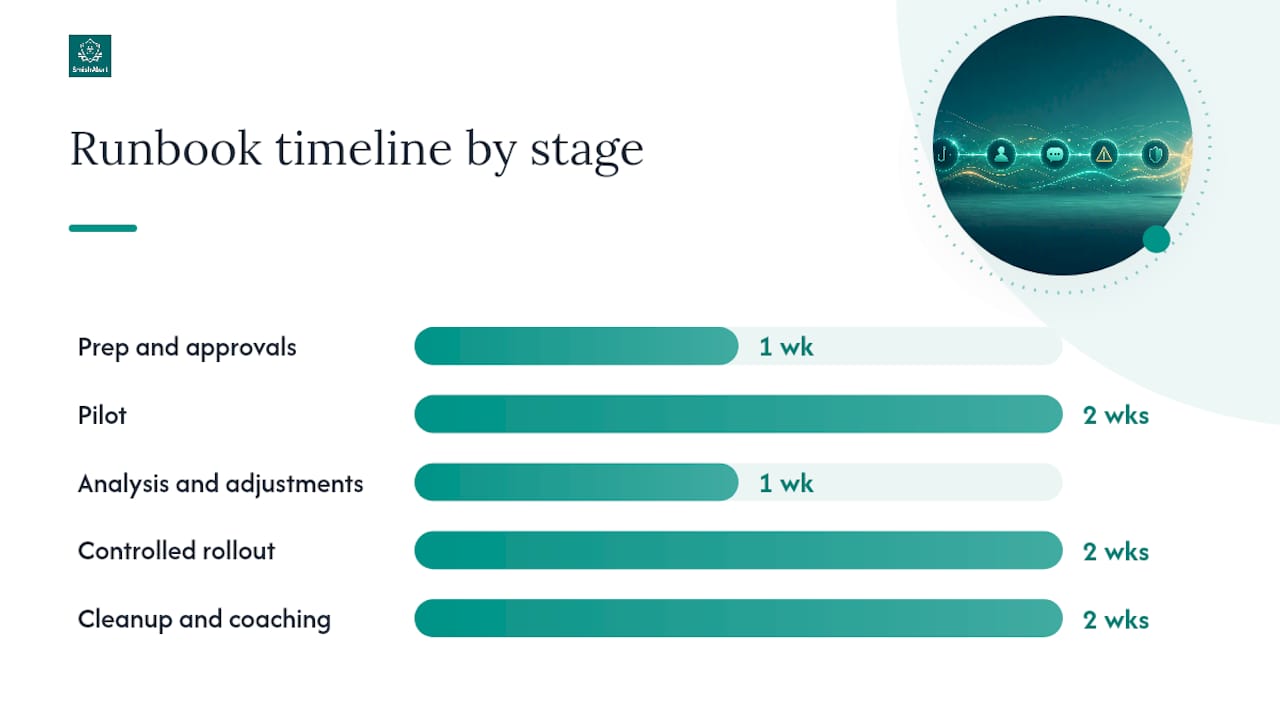
| Stage | Timeline | Primary owner |
|---|---|---|
| Prep and approvals | Week 0 | Campaign owner, legal reviewer |
| Pilot | Weeks 1 to 2 | Campaign owner, executive protection lead |
| Analysis and adjustments | Week 3 | Campaign owner, SOC/IR |
| Controlled rollout | Weeks 4 to 5 | Campaign owner, HR liaison |
| Cleanup and coaching | Weeks 6 to 7 | HR liaison, executive protection lead |
Assign roles before week 0 starts, not during it:
- Campaign owner runs day-to-day execution and message scheduling.
- Legal reviewer signs off on content, data handling, and jurisdictional questions.
- HR liaison owns coaching conversations and any disciplinary distinctions.
- Executive protection lead manages board relationships and sensitive communication.
- SOC/IR monitors in real time and handles escalation if something looks like a genuine compromise rather than a simulated one.
During the live window, watch three signals constantly: link clicks, any credential submission attempts (even against a sandboxed page), and how fast the security team receives a report.
- Confirm monitoring dashboards are live before the first message sends.
- Set a hard cutoff time for message delivery to avoid overnight surprises.
- Preserve every log, timestamp, and coaching note in an audit-ready format for board reporting.
Arsen’s platform documentation on SMS-based simulations describes real-time interaction monitoring at scale, a capability worth matching even for a small board-focused pilot.
What Metrics Matter and How to Report Them
Five numbers tell the whole story: click rate, credential submission rate (only ever against a sandboxed page), reporting rate, time-to-report, and remediation completion rate. Reporting rate is the one board members care about most once they understand it, because it measures whether the organization’s human layer is catching threats before damage occurs.
Present results the way a board expects to see risk data: trend lines over multiple campaigns, not a single snapshot, and a cohort breakdown separating board members from executive assistants and other high-exposure roles.
| Metric | What it tells you |
|---|---|
| Click rate | How many recipients engaged with the lure at all |
| Reporting rate | How many flagged it to security instead of clicking |
| Time-to-report | How fast the human layer surfaces a real threat |
| Remediation completion | Whether coaching or policy follow-through actually happened |
A short report format works best for board audiences: one paragraph of summary, a strengths-and-weaknesses breakdown, and a list of required governance actions such as policy updates or targeted coaching. Establishing a baseline susceptibility measurement on the first campaign gives every future result something to compare against.
Legal, Ethical, and Governance Guardrails
Consent models vary by organization, but three approaches cover most cases: opt-in pilot volunteers, advance notification to an executive sponsor with the board kept unaware of timing, or full post-test disclosure with no advance notice at all. Whichever you choose, document it before the campaign starts, not after someone asks why.
Legal and privacy considerations aren’t optional add-ons. Retain the minimum personal data necessary, use non-destructive payloads exclusively, and consult counsel on local regulatory boundaries before scaling beyond a pilot.
- Define remediation-only outcomes (coaching, policy refreshers) separately from disciplinary escalation paths, and write both down in advance.
- Tie any signal resembling a real compromise directly into your incident response process, not a parallel simulation-only workflow.
- Keep personal device exposure top of mind since board members’ phones often sit entirely outside corporate device management.
Pro Tip: Have HR review your consequence policy before the first simulation, not after someone fails one. A board member who feels blindsided by disciplinary language after the fact will remember that far longer than the simulation itself.
Safe Templates and the Red Flags Worth Teaching
Four template families cover most real-world smishing patterns aimed at executives, and all four work fine with an educational landing page instead of a credential collector.
- Payment and receipt scams, modeled on patterns like this fake Venmo text template, which reproduces the unexpected-payment and suspicious-link combination that makes these lures effective.
- Delivery notifications, exploiting routine package tracking habits.
- Payroll or vendor impersonation, referencing a plausible internal process without naming a real colleague.
- MFA and account alert parodies, similar to the verification-code bait shown in this fake Cash App text template, which recreates the classic account-takeover request pattern.
Personalization should stay role-based, not identity-based. Referencing a title or a general vendor relationship is fair game; referencing a real person’s actual account details is not.
Teach five red flags on repeat: unexpected payment links, requests for a verification code, mismatched or shortened domains, urgency-plus-fear phrasing, and any request for wire instructions over text. Vary the templates across campaigns, since reusing the same scenario trains recipients to recognize your test rather than the real threat.
Pro Tip: Show board members a mock screenshot of a failed red flag next to a passed one, side by side. The comparison teaches faster than a written checklist ever will.

How SmishAlert Supports Executive-Focused Simulations
SmishAlert maps directly onto this playbook. It provides cross-channel coverage across SMS, iMessage, and WhatsApp, campaign correlation to spot patterns across a coordinated attack, and audit-ready incident reporting suited to board-level review.
- On-device filtering for iOS and Android reduces exposure on personal and BYOD devices without requiring a full mobile device management rollout.
- SIEM and API integration routes simulation and real-world signals into existing SOC workflows instead of creating a parallel dashboard nobody checks.
- Threat analysis draws on published research, including SmishAlert’s Q2 2026 Smishing Report, to keep template design current against active attack patterns.
Pro Tip: Start with the pilot’s smallest viable scope, one or two volunteer board members, before expanding. A clean 30-day result is worth more than a rushed full-board rollout that raises trust problems before you’ve proven the approach.
Why Executive Simulations Demand Empathy, Not Gotchas
A simulation that embarrasses a board member accomplishes less than one that teaches them something they’ll remember. The goal is resilience, not a compliance checkbox, which means remediation should read as coaching, never as punishment dressed up in security language. Security, HR, and executive protection teams need to move as one unit here. Trust, once damaged, is far harder to rebuild than a click rate.
Start a Pilot Built for Executive-Level Smishing Risk
The templates and runbook above work. What most security teams lack isn’t the framework, it’s the tooling to run it safely at executive scale without building sandboxed infrastructure from scratch. SmishAlert’s 30-day pilot gives you exactly that: a scoped campaign against board members, audit-ready reporting your governance team can hand straight to the audit committee, and metrics broken out by cohort so you can see how board members compare to executive assistants or general staff.

The pilot fee credits toward your first annual subscription if you move forward, so there’s no sunk cost in testing the approach first. Deliverables include a sample campaign built around your actual industry threats, board-focused click and reporting metrics, and a remediation plan you can present clearly for your audience. Visit the SmishAlert solutions page to scope a pilot for your board, or start with the product overview if your SOC needs to confirm SIEM integration details first.
Frequently Asked Questions
Is it legal to simulate a smishing attack on board members? Yes, when run with proper consent, legal review, and non-destructive payloads. Requirements vary by jurisdiction, so consult counsel before scaling beyond a small pilot, and always document the consent model you choose.
How long should a board-focused smishing simulation run? A pilot typically runs one to two weeks, followed by a week of analysis before any controlled rollout. Rushing this timeline tends to produce noisy results that are hard to act on.
What happens if a board member fails a simulation? Most programs treat a failed simulation as a coaching opportunity, not a disciplinary event, unless the failure reveals a deliberate policy violation. Define that distinction in writing before the campaign starts.
Can simulations use real payment apps like Venmo or Cash App in the message content? Simulations should reference payment-app patterns for realism, similar to templates built for Venmo and Cash App scam awareness, but must never route to a real account or request actual financial details.
How is this different from standard employee phishing training? Board members use personal devices outside corporate email defenses, respond more to authority and payment pretexts, and carry higher-impact consequences if compromised, which is why cybersecurity awareness for executives needs its own tailored approach rather than a repurposed employee campaign.
This article is general information, not a substitute for advice from a qualified lawyer. Consult a qualified legal professional about your own circumstances before acting on anything here.
Sources
- Attack simulation training | Microsoft Security
- Fake Venmo text template | PostMock
- Fake Cash App text template | PostMock