
Messaging Offboarding: Secure Data Before Access Slips Away
Revoke verified sender access, force session and token revocation, and capture message evidence within the first hour of any departure notice. That single sequence prevents the two failure modes that matter most: messaging-based social engineering launched from a departed employee’s identity, and sensitive data sitting untouched on a device the company no longer controls. Secure offboarding messaging sensitive data isn’t a compliance checkbox. It’s a race against a clock that starts the moment HR flags a departure.
The highest-impact first steps, in order:
- Revoke verified sender access and remove the user from any messaging groups where they hold admin rights.
- Force session and token revocation across SMS gateways, WhatsApp Business API keys, and any shared messaging credentials.
- Sign the user’s Apple ID out of iMessage and remove trusted devices; on Google Android, revoke app-level messaging permissions and carrier SMS access.
- Preserve message logs, screenshots, and SIEM alerts before disabling anything, so evidence survives the deprovisioning process.
- Route the departure through a monitoring layer like SmishAlert to correlate any post-offboarding messaging activity against known campaign patterns.
Pro Tip: Treat payroll and executive departures differently from everyone else. Set a one-hour deprovision goal for these roles specifically, since impersonation of a departing CFO or payroll admin is one of the fastest-moving fraud vectors security teams see.
Key Takeaways
Securing messaging during offboarding requires revoking access, preserving evidence, and correlating post-departure activity within a 72-hour window, not a general IT close-out process.
| Point | Details |
|---|---|
| Act within the first hour | Revoke session tokens and sign out Apple ID for high-risk roles like payroll and executives. |
| WhatsApp deletion is an illusion | Group removal blocks future messages but leaves prior history on the ex-employee’s device and backups. |
| iMessage can’t be carrier-archived | Organizations needing archival must disable iMessage or enforce SMS via MDM. |
| Evidence before revocation | Export message logs, headers, and SIEM alerts before disabling any account. |
| Pilot before scaling | SmishAlert’s 30-day pilot validates detection coverage and SIEM integration across SMS, iMessage, and WhatsApp before full rollout. |
Table of Contents
- Why Offboarding Creates Messaging-Specific Risk
- What Should a 24 to 72 Hour Offboarding Checklist Include?
- Which Technical Controls Actually Close the Gap?
- How Should SOC Teams Detect and Respond to Post-Offboarding Messaging Threats?
- How Do You Pilot Messaging Offboarding Controls in 30 Days?
- What Should Employees Know Before They Leave?
- What Security Teams Get Wrong About Messaging Offboarding
- How SmishAlert Fits Into Your Offboarding Runbook
- Frequently Asked Questions
- Sources
Why Offboarding Creates Messaging-Specific Risk
Messaging channels break the standard offboarding model because the data doesn’t live where your controls reach. A corporate laptop gets wiped. A departed employee’s personal iPhone, still signed into their Apple ID, does not. iMessage conversations, iCloud backups, and 2FA approval prompts remain live on that device until the Apple ID itself is signed out or the device is removed from the account. Removing someone from a WhatsApp group stops future messages, but it does nothing to the conversation history already stored on their phone or synced to their personal Google Drive or iCloud backup.
The identity layer compounds the problem. Disabling a primary corporate account rarely touches the OAuth grants, shadow-IT tools, and shared credentials tied to messaging workflows, things like shared SMS gateway logins or a payroll contact number routed through a departed manager’s phone.
That gap gets exploited fast. Security teams report a consistent pattern: executive impersonation texts sent within days of a leadership departure, payroll redirect scams timed to pay cycles, and contact lists harvested from group chats before access is pulled. Apple, WhatsApp, and Android each fail differently here, which is exactly why a single revocation step never covers the whole surface.
What Should a 24 to 72 Hour Offboarding Checklist Include?
Run this by time window and owner. Every task below targets a messaging risk surface specifically, not general IT offboarding.
- First hour (IT/SOC): Revoke session tokens and MFA approvals tied to messaging apps; disable the user’s ability to send as a verified sender on any shared numbers.
- First hour (IT): Sign the departing employee’s Apple ID out of iMessage and remove all trusted devices from the account; on Android, revoke app permissions for SMS and messaging clients through the mobile management console.
- First 4 hours (IT/manager): Remove the user from every messaging group and revoke any group admin privileges before removing membership, since admin rights sometimes persist after removal otherwise.
- First 24 hours (SOC): Export and preserve message evidence, including timestamps, sender headers, and MDM logs, before any device wipe or account closure.
- First 24 hours (IT): Rotate shared credentials used in messaging workflows, including shared inbox logins and payroll contact numbers routed through the departed employee’s device.
- 24 to 72 hours (SOC): For WhatsApp specifically, document that group removal does not delete prior message history from the personal device, and flag the account for monitoring rather than assuming deletion.
- 72 hours (HR/IT): Confirm closure with a documented ticket. Closure criterion: all messaging surfaces (SMS, iMessage, WhatsApp) show revoked access, and evidence artifacts are attached to the ticket.
A named owner and a timestamped completion log turn this from a hope into an enforceable SLA.
Which Technical Controls Actually Close the Gap?
Controls fall into four categories: identity and session revocation, device management, on-device filtering, and carrier or platform-level archiving. Each carries real tradeoffs, and none of them alone covers SMS, iMessage, and WhatsApp at once.
Apple’s iMessage presents the hardest technical problem. Because it’s end-to-end encrypted and routed through Apple’s servers rather than the carrier network, standard carrier-based archiving simply cannot capture it. Organizations that need message archiving for compliance generally have to disable iMessage entirely or use MDM to force SMS-only delivery, a real usability tradeoff for departing employees still finishing handoff tasks. Android’s messaging stack is more fragmented across manufacturers but generally offers better carrier-level SMS capture and app-level reporting APIs. WhatsApp sits furthest from enterprise control: Meta’s administrative tools let you remove someone from a Business account, but personal-device message history and backups are outside your reach entirely.
| Control category | Channel coverage | Detection speed | Evidence & auditability | Deployment / BYOD | SOC integration |
|---|---|---|---|---|---|
| Identity/token revocation | Cross-channel | Fast (minutes) | Low unless logged | Works on BYOD and corporate | Depends on IAM logging |
| MDM/Apple Business Manager | iMessage, device-level | Moderate | High (device logs) | Corporate-owned only, weak on BYOD | Moderate, needs export |
| Carrier SMS archiving | SMS only | Slow | High for SMS | Corporate-managed lines | Often manual export |
| On-device iOS Message Filter | iMessage, SMS | Fast | Moderate | Works on BYOD with user opt-in | Limited native SIEM hooks |
| Vendor correlation platform | SMS, iMessage, WhatsApp | Fast | High (audit-ready) | Works across BYOD and managed | Native SIEM/API |
Legal holds complicate all of this. Never remote-wipe a device under litigation hold, even during standard offboarding; preserve first, revoke access second.
Pro Tip: Rank controls by what they hand your SOC afterward, not just what they block. A control that silently blocks a smishing attempt but produces no log entry is worse than one that generates a webhook event you can correlate later.
How Should SOC Teams Detect and Respond to Post-Offboarding Messaging Threats?
Detection starts with layered sources: employee reports, on-device filtering like the iOS Message Filter, Android reporting APIs, vendor campaign correlation, and standard SIEM/UEBA alerting. No single source catches everything, which is why correlation across sources matters more than any one tool.
The workflow that scales into a repeatable runbook:
- Detect — Collect signals from user reports, device-level filters, and platform telemetry.
- Validate — Triage message artifacts: check timestamps, sender headers, device IDs, and whether the sender maps to a recently departed identity.
- Correlate — Match sender reuse, URL clustering, and messaging patterns against known campaigns to determine if this is an isolated incident or part of a broader wave.
- Contain — Block the sender, revoke any remaining tokens, and isolate affected accounts.
- Remediate — Rotate shared credentials, notify impacted customers or employees, and coordinate with HR and legal on evidence handling.
- Audit — Log time-to-detect, time-to-deprovision, and the number of artifacts preserved for the incident record.
Track these metrics after every offboarding-linked incident:
- Time between departure notice and full messaging access revocation.
- Number of preserved evidence artifacts per case.
- Percentage of offboards completed within the 72-hour SLA.
- Campaign correlation hits tied to former-employee identities.
Live threat intelligence examples of campaign correlation in action help SOC teams calibrate what “normal” post-offboarding noise looks like versus an actual escalation.
How Do You Pilot Messaging Offboarding Controls in 30 Days?
Don’t roll this out organization-wide on day one. A scoped pilot validates coverage and SOC integration before you commit budget or policy changes company-wide.
Define scope first: pick a sample group covering executives, payroll, and HR, since those roles carry the highest impersonation and fraud risk. Include SMS, iMessage, and WhatsApp, and cover both corporate-issued and BYOD devices, since BYOD is where most gaps hide.
Week-by-week structure:
- Week 0 — Update offboarding policy language, align HR, IT, and SOC stakeholders on ownership.
- Week 1 — Deploy logging and reporting across the pilot group; confirm SIEM ingestion is working, not just configured.
- Weeks 2 to 3 — Run real offboards as live test cases; refine detection thresholds and escalation paths.
- Week 4 — Assess results against success criteria and draft a scale plan.
Success criteria to measure: detection coverage by channel, mean time to detect, evidence collection success rate, percentage of offboards closed within SLA, and whether webhook and SIEM ingestion held up under real load. Expect friction from MDM enrollment rates on BYOD devices and pushback from employees uneasy about message monitoring; address both with clear policy communication before the pilot starts, not after. Report results to executive sponsors on a fixed cadence, not just at the end.
What Should Employees Know Before They Leave?
Messaging offboarding fails quietly when nobody tells the departing employee, or their team, what’s changing and why. Communication belongs in the process itself, not as an afterthought.
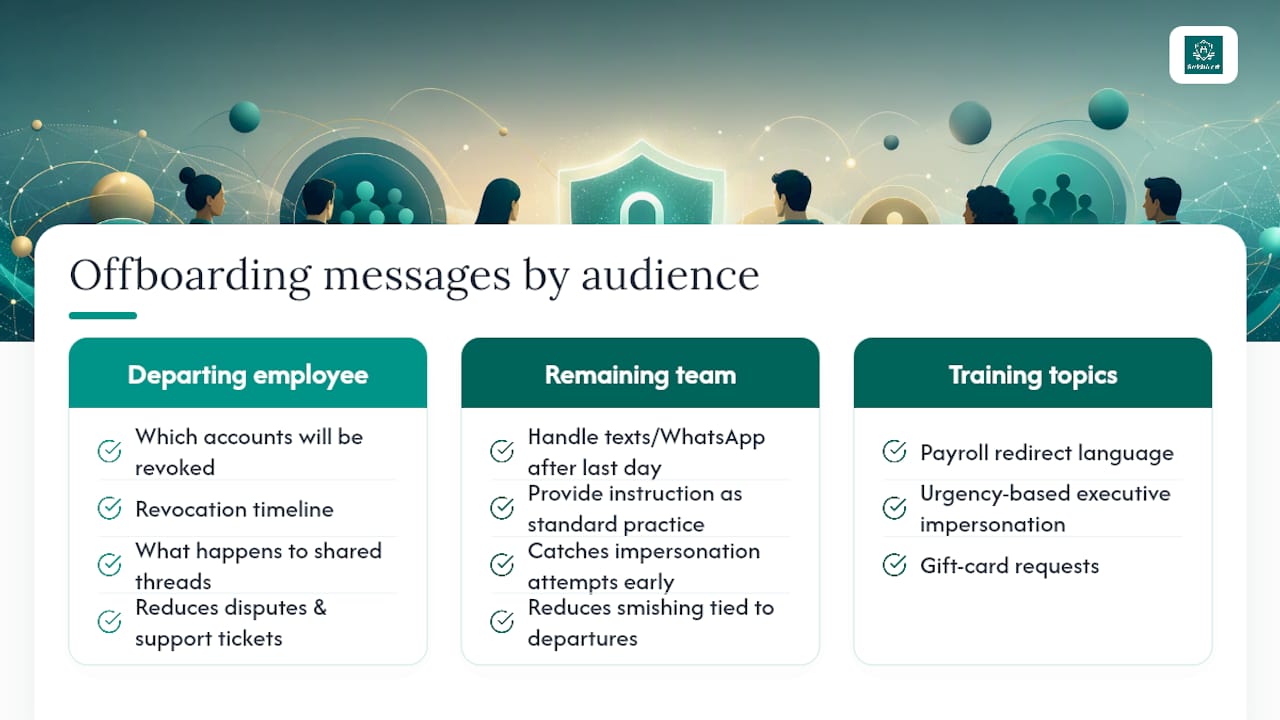
Two audiences need different messages. The departing employee should receive a plain-language notice explaining which messaging accounts will be revoked, on what timeline, and what happens to shared conversation threads they were part of. This isn’t optional courtesy; it reduces disputes and support tickets, and it closes the window where a confused former employee might try to “finish up” a conversation on a channel that’s already been flagged for revocation.
The remaining team needs a different message entirely: instructions on what to do if they receive a text or WhatsApp message that appears to come from the departed colleague after their official last day. That single instruction, delivered as standard practice rather than an emergency alert, catches a meaningful share of impersonation attempts before they escalate. Security teams that build this into a mobile messaging policy see fewer successful smishing attempts tied to departed identities, because employees already know the pattern to watch for.
Training should specifically cover payroll redirect language, urgency-based executive impersonation, and gift-card requests, the three patterns that show up most often in post-departure smishing campaigns.
What Security Teams Get Wrong About Messaging Offboarding
Messaging offboarding tends to fail for a boring reason: nobody owns it specifically. IT closes the laptop ticket, HR closes the personnel file, and the messaging surface, iMessage, WhatsApp, the shared SMS gateway, falls into the gap between departments. The fix that actually works is naming one owner per offboard and requiring timestamped evidence in the ticket before it closes, not after. Tie that ownership model back to the pilot metrics and SOC reporting cadence, and offboarding stops being a checklist people forget and becomes something the organization can actually audit.
How SmishAlert Fits Into Your Offboarding Runbook
Every control described above still leaves a visibility gap: how do you know whether a departed employee’s number, or someone impersonating it, shows up in a smishing campaign three weeks later? SmishAlert closes that gap with on-device iOS message filtering, Android and cross-channel reporting, and campaign correlation that flags reused senders and clustered URLs before they reach a second employee.

The platform integrates directly with SIEM and API workflows, so the evidence your offboarding checklist requires, timestamps, sender data, campaign matches, lands in your existing audit trail instead of a separate dashboard nobody checks. That matters most for the audit-ready incident reporting compliance-sensitive verticals like healthcare, finance, and HR/payroll depend on during investigations. If you’re refreshing device policy alongside your messaging controls, pairing this with compliant IT equipment disposal closes the physical-device side of the same problem. Start with the self-eval readiness check to see where your current offboarding process leaves messaging channels exposed, then scope a 30-day pilot from there.
Frequently Asked Questions
What does secure offboarding for messaging sensitive data actually require? It requires revoking messaging access, preserving evidence, and monitoring for post-departure impersonation, typically within a 24 to 72 hour window after the departure notice.
Does removing someone from a WhatsApp group delete their message history? No. It stops future messages, but the conversation history remains on the former employee’s device and any personal backups they’ve made.
Why can’t carrier archiving capture iMessage conversations? iMessage routes through Apple’s encrypted infrastructure rather than the carrier SMS network, so carrier-based archiving tools never see the content unless iMessage is disabled or MDM forces SMS delivery.
What happens if a departed employee’s Apple ID stays signed in? Their device retains access to iMessage, iCloud data, and 2FA approval prompts until the account is signed out or removed, an active exposure until it’s addressed.
How long should a messaging-focused offboarding pilot run? A 30-day pilot covering executives, payroll, and a BYOD sample is enough to validate detection coverage, SIEM integration, and SLA adherence before scaling company-wide.
Sources
- Security Risks and Remediation for Devices Retaining Ex-Employee Apple IDs | buralog|ITトラブルと業務改善の実務メモ
- Text Archiving: Disabling iMessage on iOS Devices — DataCove Email Archiving
- Employee Offboarding Security: The Access That Stays Behind | Cubit Cyber