
How to Prevent Social Engineering Texts Targeting Employees

Preventing social engineering texts at the enterprise level requires four capabilities working together: visibility into messages that never touch corporate email servers, a one-tap reporting path for employees, verification protocols that stop requests before money or credentials move, and an incident response process fast enough to contain a campaign before it spreads. Security teams that lack even one of these pieces are effectively defending only half the attack surface.
Three actions produce measurable risk reduction within a week:
- Deploy a single, memorable reporting channel (a short code, a forward-to address, or an app button) so employees flag suspicious texts without hunting for the right process.
- Publish a verify-by-known-channel rule: any payment, credential, or gift-card request arriving by text gets confirmed through a directory-listed number or internal portal, never by replying.
- Route every reported message into a log your SOC actually watches, rather than a shared inbox that gets triaged once a month.
Platforms like SmishAlert build these four capabilities into a single workflow, which matters once you see how differently texting behaves from email.
Key Takeaways
Preventing social engineering texts at scale requires combining employee reporting, cross-system telemetry, verification scripts, and rapid incident response into one continuous loop rather than treating them as separate initiatives.
| Point | Details |
|---|---|
| Prioritize reporting friction | A one-tap or single-number reporting path drives far higher report volume than email forwarding or screenshots. |
| Verify through known-good channels | Never confirm payment or credential requests by replying to the original text; use a directory-listed number instead. |
| Test conversation, not just clicks | Nearly half of smishing attempts carry no URL, so simulations must include reply-based pretexting scenarios. |
| Correlate reports as campaigns | Match sender IDs, templates, and timestamps across reports to spot coordinated attacks early. |
| Deploy SmishAlert for full-loop coverage | SmishAlert combines on-device filtering, one-tap reporting, campaign correlation, and SIEM integration in a pilot-ready platform. |
Table of Contents
- Why Texts Are a Different, Higher-Risk Social Engineering Channel
- What Telemetry Do You Need to Detect Text-Based Campaigns?
- Which Controls Actually Stop a Text-Based Scam?
- How Should You Test Defenses With Simulations?
- What Should Your Incident Response Playbook Cover?
- Planning a Pilot: BYOD, Executives, and Procurement
- Beyond Training: Keeping Awareness Alive Between Simulations
- What’s the Realistic Rollout Sequence for a Messaging Defense Program?
- Where SmishAlert Fits Into This Playbook
- Sources
Why Texts Are a Different, Higher-Risk Social Engineering Channel
Email security stacks filter, sandbox, and quarantine before a message reaches an inbox. SMS and messaging apps skip that layer entirely. A text lands directly on a phone, often a personal device under a BYOD policy, with no gateway scanning the link or the sender ID.
That gap shows up in the numbers. The human element was present in 62% of breaches, and mobile-centric social engineering simulations show interaction rates roughly 40% higher than equivalent email tests, according to the 2026 Verizon Data Breach Investigations Report. People trust texts more than emails, and attackers know it.
The attack chains that exploit this trust follow familiar patterns:
- Executive impersonation: a text claiming to be the CEO asks a finance employee to process an urgent wire or buy gift cards.
- Payroll diversion: a fake HR message asks an employee to “confirm” direct deposit details through a spoofed link.
- Credential harvesting: a text mimics an IT reset notice to capture SSO login details.
- Cross-channel escalation: an initial text primes a target for a follow-up phone call or WhatsApp exchange that closes the deal.
Generative AI has made these pretexts harder to spot on sight, since grammar and tone no longer give attackers away the way they once did.
What Telemetry Do You Need to Detect Text-Based Campaigns?
Detection starts with getting the message data out of employees’ hands and into a system your SOC can query. Three moves make that possible:
- Build one-tap forwarding into a centralized pipeline. A reporting mechanism that requires screenshotting and emailing a message loses most of its volume within a month; friction kills reporting behavior.
- Correlate reports against existing security data. Match forwarded messages with identity and access logs, help-desk ticket timestamps, email gateway alerts, and SIEM events to see whether a smishing attempt preceded a login anomaly.
- Capture privacy-safe metadata rather than full content on unmanaged devices. Sender ID, timestamp, and message hash tell you enough to correlate a campaign without storing an employee’s personal texts wholesale.
Campaign correlation is where isolated reports become intelligence. If three employees in finance report near-identical wording within an hour, from different but structurally similar numbers, that is not three incidents. It is one campaign, and your response should scale accordingly. This is also where one-tap reporting paired with identity and help-desk correlation becomes a documented operational pattern for detecting messaging-based threats.
Pro Tip: Build a webhook from your reporting tool into your SOAR platform before you need it. Manually re-keying smishing reports into a ticketing system during a live campaign wastes the ten minutes that actually matter.
Which Controls Actually Stop a Text-Based Scam?
Detection tells you an attack happened. Controls stop it from succeeding in the first place, and most of the effective ones cost nothing to implement beyond policy discipline.
Start with a verification rule that applies company-wide: sensitive requests, meaning payments, credential resets, or changes to payroll banking details, get confirmed through a known-good channel looked up independently, never through a reply to the original text or a number it provides. Design this as an actual script your help desk and finance team follow, not a vague suggestion, so a rushed employee has something concrete to fall back on.
Layer in structural friction for high-risk actions:
- Require two-person authorization for wire transfers or gift-card purchases above a set threshold, regardless of who appears to be asking.
- Give finance and HR staff a specific, written script for handling “urgent” executive requests received by text.
- Restrict what the service desk can reset based on a text or chat message alone, and require a secondary identity check for account recovery.
Carrier-level spam filtering helps against high-volume commodity smishing, but targeted enterprise campaigns often route around it using grey-listed numbers or spoofed sender IDs, so it should never be your only line of defense. Mobile threat defense tools on enrolled devices add another layer, though BYOD phones frequently sit outside that coverage.
Pro Tip: When collecting message data from personal devices, capture metadata and hashes rather than full message bodies. It reduces both privacy exposure and the legal footprint of your monitoring program. Mobile messaging policies that spell this out for HR and legal stakeholders tend to clear internal review faster than ad hoc data collection practices.
How Should You Test Defenses With Simulations?
Annual phishing tests miss smishing almost entirely, which is a problem given how often it gets left out of awareness programs despite being one of the fastest-growing vectors. Effective testing looks different in three ways:
- Run simulations continuously and by role. Finance, HR, service desk, and executives each face distinct pretexts and need distinct test scenarios, not a single generic template sent quarterly.
- Test conversational manipulation, not just link clicks. Close to half of real smishing attempts contain no malicious URL at all, relying instead on a back-and-forth exchange to extract information or authorization.
- Map results to a governance framework. Aligning tests to the MITRE ATT&CK Enterprise Matrix and NIST control families gives auditors and boards a structure they already recognize.
Track report volume, time-to-report, and simulation interaction rates as your core KPIs. A rising report volume paired with a falling interaction rate is the signal a program is actually working, not just running.
What Should Your Incident Response Playbook Cover?
When a report comes in confirmed or suspected malicious, speed determines whether it stays a near miss or becomes a breach.
- Triage intake. Capture the message content, sender ID, timestamp, the reporting employee’s role, and any related log activity in the minutes before or after the text arrived.
- Contain immediately. Force a credential reset and MFA re-enrollment for the targeted user, quarantine the account if compromise is suspected, and block the sending number or malicious URL at the gateway.
- Assess campaign scope. Search recent reports for matching templates, numbers, or timing to determine whether this is isolated or part of a broader push.
- Remediate and communicate. Fix affected accounts, notify the groups likely to be targeted next, and assign targeted retraining rather than a blanket company-wide notice.
- Escalate where possible. Report malicious numbers to carriers and threat-sharing groups when the campaign is large enough to warrant it.
After containment, feed what you learned back into detection rules and playbooks:
- Update correlation logic to catch the specific template or number pattern used.
- Revise the verification script if the attack exploited a gap in it.
- Adjust simulation content to mirror the real pretext for future testing.
Planning a Pilot: BYOD, Executives, and Procurement
A 30-day pilot focused on your highest-risk cohorts, typically finance, HR, and executive assistants, gives you enough data to judge fit before a full rollout. Define your KPIs (report volume, time-to-report, interaction rate) before day one, not after.
BYOD deployment is the trickiest trade-off: telemetry that preserves personal data privacy will always give you less visibility than managed enrollment, but it clears legal and HR review faster and protects personal devices without full MDM control. Executives often warrant separate handling, with per-executive coverage add-ons and alternate verification channels since they are disproportionately targeted for impersonation.
On the procurement side, confirm SIEM, SOAR, and ticketing integration exists before signing anything, and clarify how pilot fees apply toward a full subscription.
Beyond Training: Keeping Awareness Alive Between Simulations
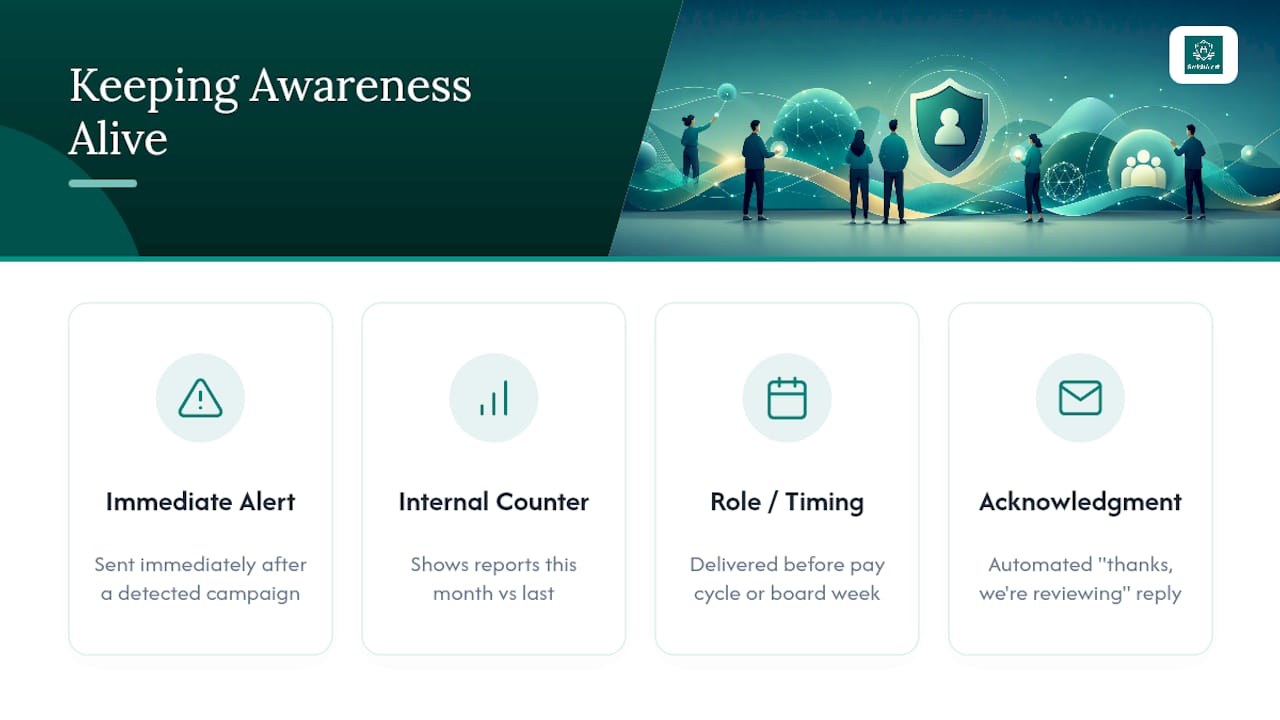
Annual training sessions fade from memory within weeks, and a single quarterly simulation isn’t enough to keep smishing awareness active in the moments it matters most. Automated, contextual reminders close that gap far better than another slide deck.
A short alert sent immediately after a real regional smishing campaign is detected does more than a scheduled reminder ever could, because it ties the warning to something happening right now. Pairing that with a visible internal counter, showing how many employees reported a text this month versus last, turns reporting into a normalized habit rather than an occasional favor to security.
Nudges tied to role and timing work better than generic broadcasts. A payroll fraud reminder that lands in finance inboxes right before a pay cycle, or an executive impersonation alert sent before a board meeting week, reaches people when their guard is naturally lower. Post-report acknowledgment matters too: a quick automated “thanks, we’re reviewing this” message reinforces the behavior far more effectively than silence, which tends to make employees stop bothering.
None of this replaces role-specific training. It fills the gaps between sessions, when most real attacks actually land.
What’s the Realistic Rollout Sequence for a Messaging Defense Program?
Most organizations that get this right follow a similar 90-day arc: a focused pilot on high-risk groups, a hard look at the metrics it produces, then expansion to the next tier of exposure, typically mid-level managers with approval authority.
Privacy concerns and procurement friction are the two blockers that stall programs longest, usually because legal wasn’t looped in before a vendor demo, not because the technology fails. Loop in legal and IT early, scope metadata collection tightly for BYOD from day one, and the rest of the rollout moves considerably faster than the alternative of relitigating data governance after a pilot is already underway.
— Sophie
Where SmishAlert Fits Into This Playbook
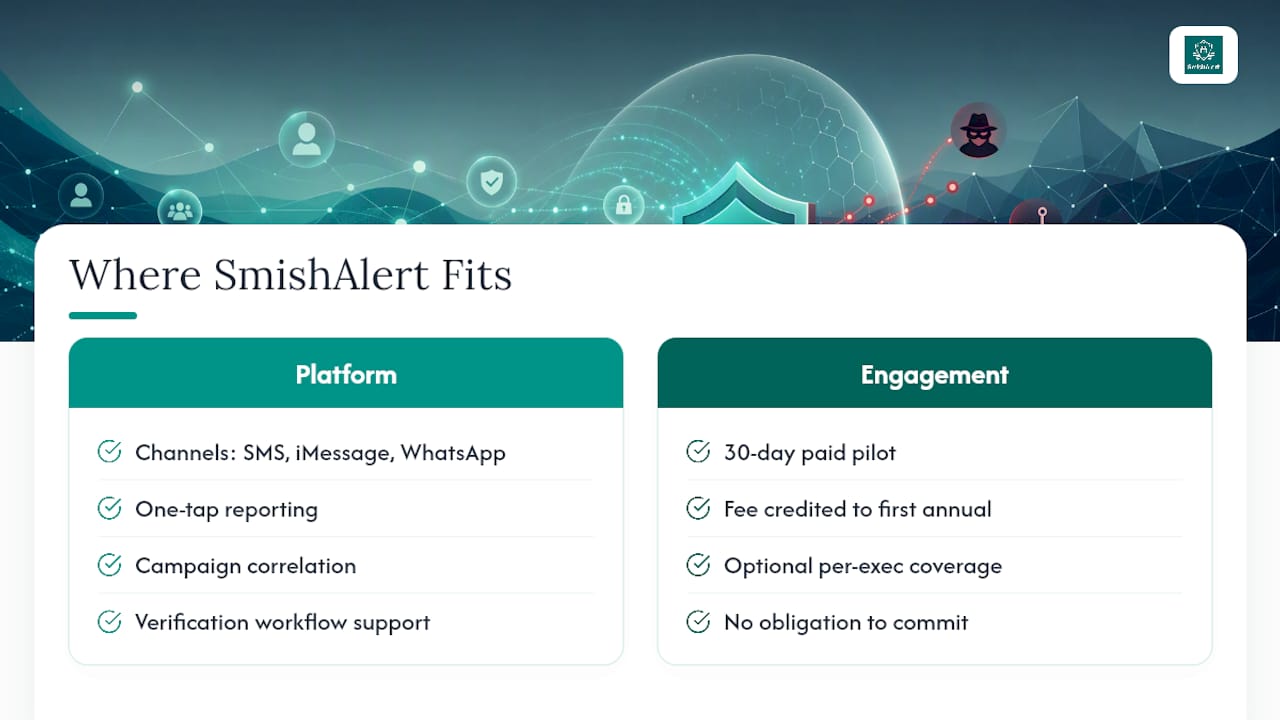
Every capability described above, one-tap reporting, campaign correlation, verification workflow support, and SOC-ready integration, maps directly to what SmishAlert’s platform is built to deliver. It captures messaging reports across SMS, iMessage, and WhatsApp, correlates them into campaigns rather than isolated tickets, and applies on-device filtering on iOS to catch threats before an employee even has to report them. For teams evaluating executive impersonation defenses or credential harvesting detection specifically, the platform surfaces those attack types as distinct, trackable categories rather than folding them into generic phishing metrics.
The engagement model mirrors the pilot approach outlined above: a 30-day paid pilot, with that fee credited toward your first annual subscription if you move forward, plus optional per-executive coverage scoped to your highest-risk leadership. There is no obligation to commit before you see report volume and time-to-report data from your own environment.
If you are not sure where your program stands today, the 2-minute Self-Eval gives you a readiness snapshot before you talk to anyone. From there, a pilot conversation can be scoped around the specific cohorts, finance, HR, or executive staff, where your exposure is highest.
Sources
- 2026 Verizon Data Breach Investigations Report (DBIR) — executive summary
- How to incorporate smishing into security awareness training — TechTarget