
30 Day Mobile Social Engineering Assessment for Security & IT Leaders

Run a mobile-first human-risk assessment that measures every messaging channel, SMS, iMessage, WhatsApp, voice, and QR, against objective mobile telemetry rather than self-reported surveys alone. The verdict: pilot this for 30 days with a defined sample of employees and executives, safety and consent rules in place, and simulations that mirror how attackers actually operate on mobile. Waiting for a full annual review misses the exposure sitting on every phone right now.
TL;DR:
- Mobile risk assessments should include multiple attack vectors such as smishing, voice cloning, QR codes, and multi-channel chain attacks, reflecting real attacker methods.
- Conducting tests on both managed and BYOD devices, prioritizing high-impact roles like finance and executives, provides a more accurate risk picture than equal sampling.
- Using objective telemetry to measure click, compromise, and reporting rates reveals mobile channels are three to five times more effective for attackers than email.
- Technical controls like alternative MFA methods and URL analysis must be combined with verification processes and scenario-specific microlearning for effective mitigation.
- A 30-day pilot with stakeholder alignment, proper consent, and focused scenario testing provides actionable insights, especially if mobile threat detection is integrated into existing security systems.
Table of Contents
- What Is a Mobile Social Engineering Risk Assessment?
- Which Mobile Attack Vectors Should a Risk Assessment Cover?
- How Do You Run a Mobile-Tailored Risk Assessment?
- What Metrics and Benchmarks Matter Most?
- What Controls Actually Reduce Mobile Social Engineering Risk?
- How Do You Pilot and Sustain the Program Over Time?
- How Does SmishAlert Support Mobile Risk Assessments?
- Sophie’s Perspective: The Blind Spots Nobody Budgets For
- Getting Started: A SmishAlert Pilot Checklist
- Sources
What Is a Mobile Social Engineering Risk Assessment?
A mobile social engineering risk assessment measures how likely your employees and executives are to fall for manipulation delivered through mobile-native channels, then quantifies that exposure with objective data instead of guesswork. It is fundamentally a human-risk measurement exercise, not a device audit. The goal is to answer a specific question: if an attacker sends a fraudulent text, voice call, or QR code to your workforce today, what happens next, and how would you know?
Most organizations still run phishing simulations that stop at email. That leaves a massive blind spot, because mobile-first attacks exploit higher trust and weaker technical filtering than email does. Employees who would never click a suspicious link in Outlook will tap the same link in a text message from what looks like their CEO or payroll provider. An assessment scoped to email alone is measuring the wrong attack surface.
A properly scoped program covers both managed and BYOD devices, since most executive and field-staff phones fall into the second category and carry the least visibility. It also requires cross-functional ownership. The stakeholder map typically includes:
- Security to define threat scenarios and interpret telemetry
- IT to manage device enrollment, MDM boundaries, and technical controls
- HR to handle consent, communication, and disciplinary policy for simulation results
- SOC to receive and triage real-time reports generated during testing
- Legal to review consent language, especially for BYOD and executive personal devices
Skipping any one of these groups tends to produce either weak legal cover or a program employees don’t trust.
Which Mobile Attack Vectors Should a Risk Assessment Cover?
A mobile assessment needs to reflect how attackers actually reach employees, and that list has grown well past basic SMS phishing. Industry reporting increasingly describes a “mobile-first” attack strategy, where attackers deliberately favor phones because defenses there lag far behind email.
Scenarios worth building into a test plan include:
- Smishing and messaging-app phishing: fake delivery notifications, HR benefits updates, or IT password reset texts sent via SMS, WhatsApp, or similar apps
- Vishing and voice-cloning follow-ups: a text lure followed by a phone call using a synthesized voice impersonating a manager or vendor contact
- QR and code-based lures: malicious QR codes on posters, parking meters, or fake conference materials that route to credential-harvesting pages
- Multi-channel chain attacks: an email that references a text message, or a text that sets up a voice call, designed to build false legitimacy across channels
A useful way to prioritize which of these to test first comes from a four-layer resource-based taxonomy that classifies mobile attacks from Novice to Expert based on the tools and skill required. Basic smishing needs almost nothing: a spoofed sender ID and a phishing kit. Voice cloning combined with a targeted executive lure sits much higher on that scale, requiring research and audio samples. Testing across tiers, not just the easiest scenario, gives a more honest picture of where your real exposure sits.
How Do You Run a Mobile-Tailored Risk Assessment?
A mobile assessment follows a different sequence than a standard email phishing test, mostly because the channels, consent requirements, and telemetry sources are different. Here is the process that holds up across most mid-sized and large organizations:
-
Define the mobile profile. Inventory device types (iOS, Android), split managed corporate devices from BYOD, and flag which executives or high-privilege roles use personal phones for business communication. This step alone often surprises security leaders. It’s common to find a significant portion of executive communication happening on devices IT has zero visibility into.
-
Inventory assets and high-impact identities. Not every employee carries equal risk. Payroll administrators, finance approvers, executive assistants, and anyone with wire-transfer authority represent outsized impact if compromised. Weight your sample toward these roles rather than testing everyone equally.
-
Identify threats and design scenarios specific to mobile channels. Pull from the attack vectors above and anchor each scenario to a real business workflow, a fake vendor bank-detail change, a fraudulent PTO approval request, an “urgent wire” text from a spoofed executive number. Scenarios tied to actual workflows produce cleaner signal than generic “you’ve won a prize” lures, which employees increasingly recognize and ignore.
-
Run safe, controlled simulations with documented consent. This is where mobile testing differs most from email. Legal and HR need to sign off before any test that could trigger a real security response (a locked account, a fraud alert, an executive’s assistant calling the bank). Build in an opt-out path for personal devices, notify executives before executive-impersonation tests run, and have an incident response plan ready in case a simulation accidentally triggers a genuine compromise workflow.
-
Collect data using objective telemetry, not just self-reporting. Click rates and self-reported “I would have clicked” surveys are weak signals on their own. Telemetry pulled from mobile agents or network monitoring correlates far more reliably with actual susceptibility than questionnaire responses do. If your assessment only asks people how they think they’d react, you’re measuring confidence, not risk.
-
Analyze results, prioritize by impact, and build remediation plans. Cross-reference who clicked, who reported, and who did neither against their identity’s business impact. A finance approver who clicked a smishing lure and never reported it deserves a different remediation path than a general employee who clicked but reported within minutes.
This sequence isn’t a one-time audit. Each pass through it should get faster and sharper as your telemetry sources mature and your scenario library grows. A single triage checklist for the SOC team receiving reports helps keep step five and step six connected instead of siloed.
What Metrics and Benchmarks Matter Most?
Four metrics carry the most weight in a mobile assessment: click-through rate, click-to-compromise rate, reporting rate, and time-to-report. Click-through rate tells you how many people engaged with the lure at all. Click-to-compromise rate, whether they went further and entered credentials, opened an attachment, or approved a fraudulent request, tells you how much of that engagement translated into real damage. Reporting rate and time-to-report tell you whether your workforce functions as an early-warning system or a liability.
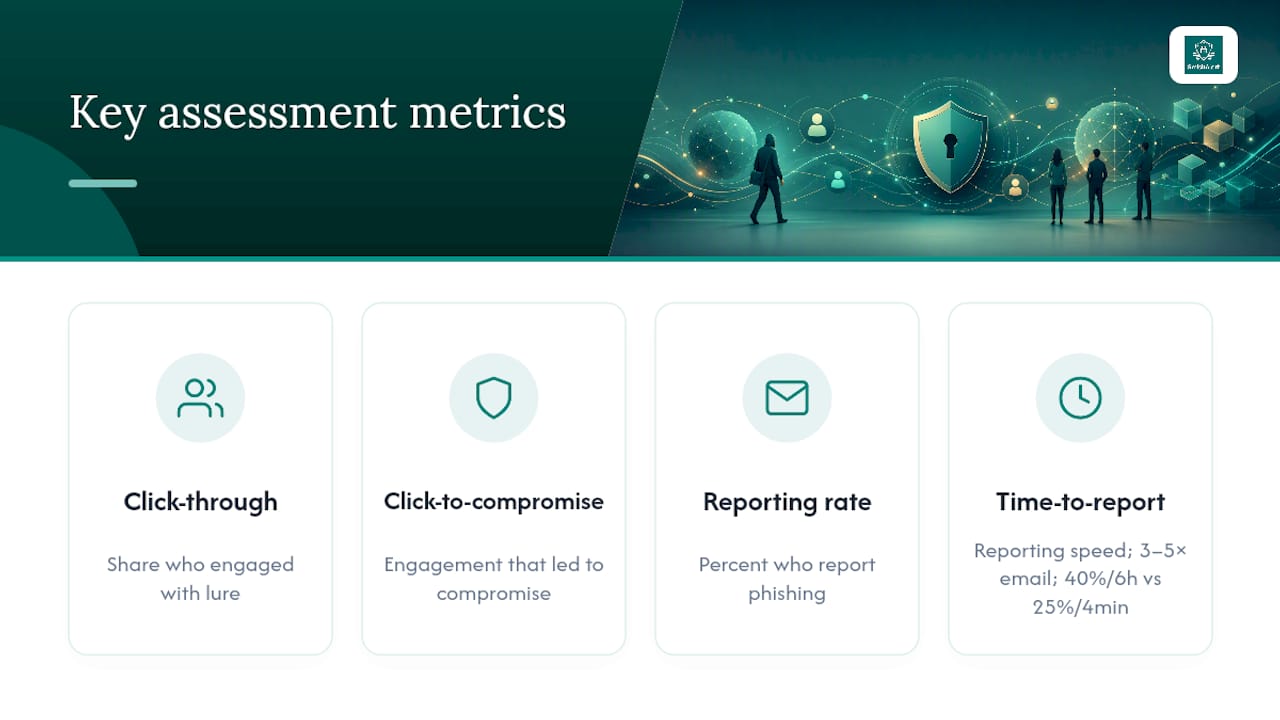
Pro Tip: Track time-to-report separately from reporting rate. An organization where 40% of employees eventually report a phishing text, but it takes an average of six hours, has a much bigger operational gap than one where only 25% report but the median time is four minutes.
Benchmarks differ sharply between mobile and email, and that gap is the whole reason mobile deserves its own assessment track. Enterprise smishing click-through rates run several times higher than email phishing rates in comparable test conditions. That’s not a marginal difference. It suggests mobile channels are somewhere between three and five times more effective for an attacker running the same basic playbook.
To move beyond raw click rates, build a composite human-risk score, similar to an ISA (Information Security Awareness) methodology, by combining simulation outcomes with mobile-agent signals: installed app risk, device security posture, and recent network indicators. Weighting that score by identity privilege (does this person approve payments, access payroll systems, or represent the company externally) turns a flat percentage into a prioritized remediation list.
One caution on sample size: testing fewer than 50 people in any single scenario tier produces numbers too noisy to act on. A single unlucky or savvy employee can swing a small sample’s click rate by 10 points or more. Aim for enough volume per scenario category to draw a defensible conclusion, not just a headline number.
What Controls Actually Reduce Mobile Social Engineering Risk?
Effective mitigation blends three layers, technical, process, and people, and the order you prioritize them in should track directly to which identities carry the most business impact.
On the technical side, the highest-value moves include:
- Moving critical accounts off SMS-based multi-factor authentication toward authenticator apps or hardware keys, since SMS MFA codes are themselves a smishing target
- Deploying link and URL analysis on messaging channels, not just email gateways
- Enforcing basic device hygiene: OS patching, app vetting, and restrictions on sideloaded apps for managed devices
- Extending visibility to BYOD and executive personal devices, where most exposure concentrates and traditional MDM has the least reach
On the process side, verification workflows matter more than any single technical control. Any request to change a vendor’s bank details, approve an off-cycle payment, or authorize a wire transfer should require a callback to a known number or a secondary approval, never a reply to the message that made the request. Pair that with an obvious, low-friction reporting channel; if employees have to hunt for how to report a suspicious text, most won’t bother.
On the people side, generic annual awareness training does little against mobile-specific lures. Simulated smishing tests paired with immediate, scenario-specific microlearning improve both retention and reporting far more reliably than a slide deck once a year. Role-based remediation, extra training and tighter verification steps for finance and executive-support staff, closes the gap fastest because that’s where the impact concentrates.
Prioritization should follow business impact, not headcount. A five-point improvement in reporting rate among 20 payroll and finance staff is worth more than the same improvement across 2,000 general employees. Layer these controls deliberately.
technical defenses and MDM alone consistently fall short against smishing without a behavioral and verification layer sitting alongside them.
How Do You Pilot and Sustain the Program Over Time?
A pilot lasting about a month is generally sufficient to generate a usable sample and maintain stakeholder engagement. Structure it in three phases:
-
Design and scope (days 1 to 5). Lock the sample group, weighted toward high-impact identities, finalize consent language with legal and HR, and set the safety rules covering opt-outs and executive pre-notice.
-
Run and measure (days 6 to 25). Deploy two to three scenario types across the resource tiers described earlier, collect telemetry continuously, and track click, reporting, and time-to-report metrics in real time rather than waiting until the end.
-
Evaluate and gate (days 26 to 30). Compare results against your benchmarks, and set a clear go/no-go decision for scaling: does the reporting rate justify expanding sample size, or does the click-to-compromise rate demand immediate remediation before wider rollout?
Past the pilot, treat mobile risk measurement as continuous, not annual. Pair ongoing telemetry monitoring with formal reassessments triggered by organizational change: a merger, a new payroll vendor, a leadership transition, or a spike in reported incidents. Static, once-a-year testing misses the exact moments when attackers are most likely to strike.
How Does SmishAlert Support Mobile Risk Assessments?
SmishAlert was built to close the exact visibility gap this assessment process depends on. It detects social engineering attempts across SMS, iMessage, and WhatsApp, and it’s designed specifically to catch executive impersonation and credential-harvesting attempts before they reach a click.
Capabilities that map directly to the process above include:
- On-device filtering across managed, BYOD, and executive iOS and Android devices
- Campaign correlation that links related smishing attempts across employees, revealing coordinated attacks a single-user view would miss
- SIEM and API integration so mobile telemetry feeds the same reporting pipeline as your existing security stack
- Audit-ready incident reporting that documents exactly what a pilot or ongoing program measured, supporting the reassessment cadence covered earlier
A typical pilot configuration pairs a defined sample group with SmishAlert’s detection layer running in the background, then compares observed real-world threat volume against simulation results from the same window.
Sophie’s Perspective: The Blind Spots Nobody Budgets For
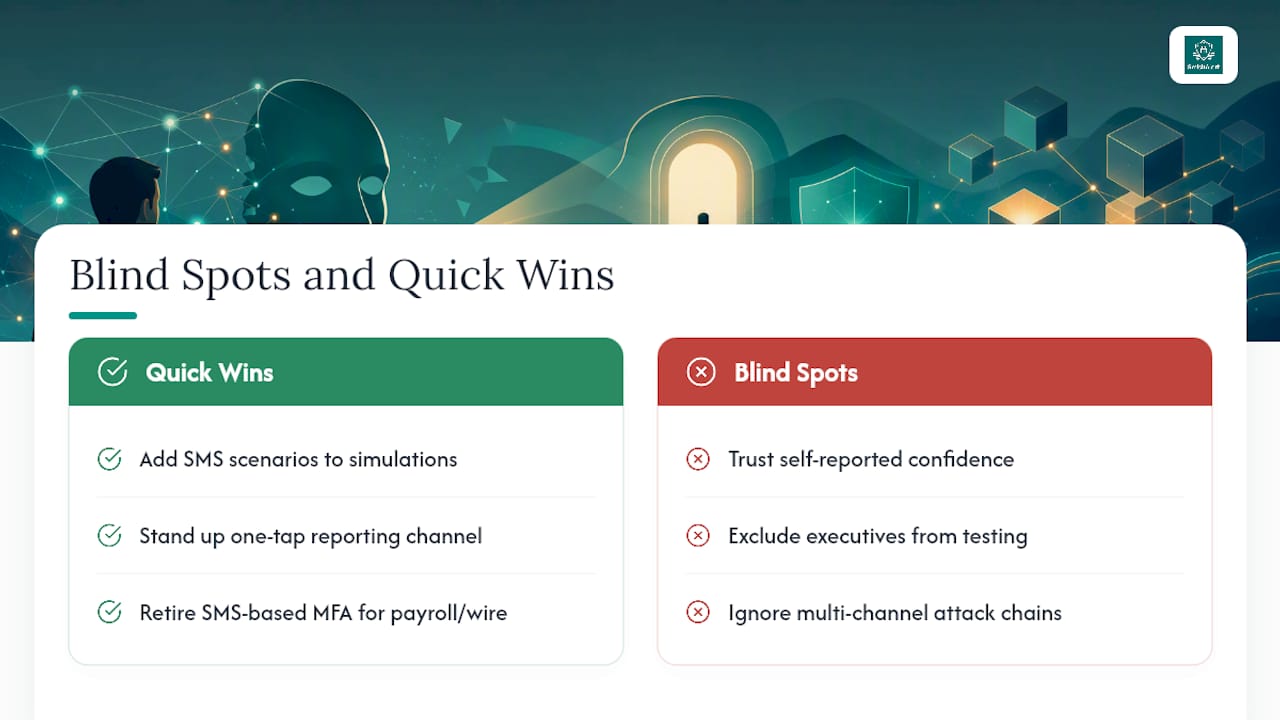
The biggest mistake security teams make isn’t skipping mobile testing, it’s trusting self-reported confidence over actual telemetry. Employees consistently overestimate their own vigilance. The second blind spot is executive under-coverage: leadership gets excluded from testing “out of respect” even though executives are the highest-value targets on the entire roster. The third is ignoring multi-channel chains, testing SMS and email as if attackers don’t combine them.
Quick wins cost almost nothing: add SMS scenarios to your next simulation cycle, stand up a one-tap reporting channel, and retire SMS-based MFA on any account tied to payroll or wire approval. None of that requires a large budget. It requires admitting that mobile has been the blind spot the whole time.
— Sophie
Getting Started: A SmishAlert Pilot Checklist
SmishAlert’s platform turns everything covered above into a working pilot instead of a spreadsheet exercise, capturing real messaging-based threats, correlating them into campaigns, and producing the telemetry a self-reported survey never delivers.

Before starting a pilot, line up four things: the stakeholder group (security, IT, HR, legal), a sample of employees weighted toward finance and executive roles, documented consent and opt-out paths, and the specific metrics you’ll track, click rate, reporting rate, time-to-report, and campaign patterns. SmishAlert’s 30-day pilot runs against that exact structure, and the fee credits toward your first annual subscription if you move forward.
Once the pilot closes, evaluate output against the benchmarks discussed earlier: does your click-to-compromise rate sit near the 9 to 14 percent smishing range, and is your reporting rate improving week over week? If a specific threat type shows up repeatedly, credential harvesting or executive impersonation, scope coverage for that vector specifically as you scale. Security teams without MDM in place can review how to deploy mobile phishing protection without MDM before committing to a rollout. Ready to see where your organization stands right now? Start with the two-minute readiness check and use the results to scope your pilot’s sample size and priority scenarios.
Sources
- Mobile smishing and mobile-first attack trends — Vectra
- A systematic deconstruction of human-centric privacy & security threats on mobile phones (2024)
- Framework for evaluating smartphone users’ information security awareness (arXiv)