
Fix iOS Consent in 5 Steps to Deploy SMS Filtering with MDM for SOCs
Yes, you can deploy SMS filtering to managed devices by pushing an on-device message filter or MTD agent through your MDM. The tradeoff is platform-enforced consent: iOS requires a one-time user grant, while BYOD devices carry visibility gaps that no console setting closes. Confirm your enrollment type (supervised versus unsupervised, corporate versus BYOD) before you build a rollout plan.
TL;DR:
- On iOS, user consent is required for SMS filtering, which can limit coverage if users do not complete the manual setup step.
- Deployment success depends on communication strategies, especially for BYOD devices where silent installation and enforcement are limited.
- Filtering effectively detects known patterns, but targeted or well-crafted smishing messages often bypass these measures and require contextual reporting.
- A pilot program measuring filter activation, report volume, and time to triage provides a clearer picture of real coverage and effectiveness.
- Pairing on-device filtering with a cross-channel, human-in-the-loop system like SmishAlert enhances detection of sophisticated threats.
Table of Contents
- Prerequisites and Capabilities: MDM vs. MTD vs. On-Device Filters
- iOS Deployment Checklist: Push, Configure, Validate
- Android Considerations: Permissions and Agent Behavior
- End-User Enrollment: Reducing Support Friction
- Known Limitations and Privacy Constraints
- Where SmishAlert Fits Into an MDM Deployment
- What the Deployment Checklist Doesn’t Tell You
- Try SmishAlert Before You Scale the Rollout
- Key Docs for Deployment
- Sources
- FAQ
Prerequisites and Capabilities: MDM vs. MTD vs. On-Device Filters
Enrollment type sets the ceiling on what you can enforce. Supervised, corporate-owned devices let you silently push apps and lock configuration profiles. Unsupervised or BYOD devices require the user to install the app and grant permissions manually, and they can remove the profile at will.
MDM and mobile threat defense (MTD) solve different problems. MDM handles distribution, managed configuration, and compliance enforcement. It cannot detect or block a smishing link on its own, which is why security teams typically pair it with an MTD agent or a dedicated platform that adds active detection and enforcement.
Platform privacy models differ sharply too. iOS routes filtering through the IdentityLookup message filter extension, which runs on-device and requires explicit user consent. Android’s runtime permission model works differently, and coverage depends on which permissions the agent can obtain.
Before a full rollout, run a pilot group and instrument it:
- Track app install success and permission grant rates separately.
- Log filter provider activation status per device, not just app presence.
- Capture message filter hits and false positive reports from day one.
- Compare supervised versus BYOD outcomes to size your visibility gap.
iOS Deployment Checklist: Push, Configure, Validate
iOS SMS filtering runs through the IdentityLookup message filter extension, an on-device architecture that never sends message content off the phone. Your MDM package needs to bundle an app containing that extension, since iOS has no native standalone filter you can toggle from a profile alone.
Here is the sequence that works in most enterprise consoles:
- Add the app to your MDM console and confirm it includes the message filter extension.
- Assign automatic delivery so the app installs without a user visiting the App Store.
- Set managed app configuration keys where your vendor supports them (tenant ID, reporting endpoint, policy mode are common examples).
- Push the configuration profile to your pilot group and confirm installation status in the console.
- Notify users of the one-time setup step they must complete manually.
That last step is the part MDM cannot automate. The user has to open the app once, then go to Settings > Messages > Unknown & Spam (or Apps > Messages on newer iOS versions) and select the filter as their provider. Vendor documentation confirms this is a manual, one-time action that no configuration key can force. Skip the user notification step and adoption stalls at whatever percentage of your workforce happens to explore Settings unprompted, which in practice is low.
Pro Tip: Build the Settings path into your onboarding email with a screenshot, not just a link to a support article. Users skip links. They follow screenshots.
Validate the deployment by pulling filter activation status from your MDM or MTD console rather than trusting install counts, since app presence and permission grant are two different metrics. Collect screenshots from a handful of pilot devices to confirm the toggle actually flipped, and keep a rollback plan ready in case the managed configuration conflicts with an existing profile — for deeper insights, see our AI agent monitoring for enterprise SOC teams. For more on how OS-level filtering interacts with enterprise agents, see this breakdown of the mobile OS role in filtering SMS threats.
Android Considerations: Permissions and Agent Behavior
Android agents typically request SMS read permission and sometimes contacts access to distinguish known senders from unknown ones. Users see a runtime permission dialog rather than a Settings toggle, and denial is a single tap.
When SMS permission is unavailable or denied, agents fall back to alternate detection: URL analysis on links extracted from notification content, or intent interception where the platform allows it. Coverage is narrower than a fully permissioned deployment.
Deployment steps:
- Push the agent through MDM as a managed app with silent install on supervised devices.
- Set managed configuration keys for reporting endpoint and detection sensitivity where supported.
- Prompt users for the runtime permission during first launch rather than assuming grant.
- Verify functioning with test messages containing known-bad URL patterns and confirm the agent flags them in your console.
Android generally surfaces alerts rather than moving messages to a junk folder the way iOS can, a difference worth noting in rollout messaging to end users.
End-User Enrollment: Reducing Support Friction
The one-time consent prompt is the single biggest source of help-desk tickets in an SMS filter rollout, so plan the user experience as carefully as the technical push.
- Send a pre-rollout email showing the exact Settings path with a screenshot, not a description.
- Stage the rollout by department instead of pushing to everyone at once, so support volume stays manageable.
- Add an automated reminder at 72 hours for devices that installed the app but never completed the Settings step.
- Integrate a report button inside the app so flagged messages route to your SOC in near real time rather than sitting in a user’s inbox.
Staged rollout with in-console messaging beats a single mass push almost every time. It gives your help desk a chance to catch pattern issues (a particular iOS version, a particular carrier) before they multiply across the whole fleet. For policy language you can adapt for the announcement email, see this guide on mobile messaging policy best practices.
Known Limitations and Privacy Constraints
On-device filtering has real edges. iOS scans messages from unknown senders only; anything from a saved contact bypasses the filter entirely, which matters when an attacker spoofs a known number. Consent is mandatory, not optional, and BYOD devices can have the app removed at any time with no console alert.
Carrier-level filtering reduces mass-volume smishing but sophisticated, targeted campaigns routinely get through anyway. Treat SMS as an untrusted channel for anything sensitive.
- Never use SMS as the sole factor for account recovery or password resets.
- Require secondary verification for high-risk actions initiated via a text link.
- Expect false positives and false negatives; neither MDM nor MTD alone eliminates both.
- Correlate device-level filter hits with SOC telemetry rather than treating them as standalone signals.
Filters blocking most junk SMS still leave a meaningful slice of targeted, well-crafted messages reaching an inbox, because attackers targeting a specific executive or finance team member design around generic pattern detection. That gap is exactly where human reporting and cross-channel correlation earn their keep. For device-level configuration hardening, see personal SMS safety best practices.
Where SmishAlert Fits Into an MDM Deployment
Technical filtering catches known-bad patterns. It does not catch a well-crafted executive impersonation message from an unrecognized number that never trips a pattern match. That gap is where reporting, correlation, and human judgment take over from the filter extension.
SmishAlert feeds user-reported messages, on-device filtering signals, and cross-channel data (SMS, iMessage, WhatsApp) into one correlation layer, so a SOC analyst sees a campaign pattern instead of fifty disconnected tickets.
The value of on-device filtering multiplies when every flagged or reported message routes into a system that can spot the same lure hitting twenty employees in one afternoon, not just the one who reported it.
During a pilot, track filter activation rate, user report volume, and time from report to SOC triage. Those three metrics tell you more about real coverage than install counts ever will.
What the Deployment Checklist Doesn’t Tell You
Most MDM vendor documentation reads like SMS filtering is a checkbox: push the profile, done. It isn’t. The consent requirement on iOS means your actual coverage rate depends less on your MDM console and more on how well you communicate the one-time Settings step to end users, and that’s a change-management problem, not a technical one.
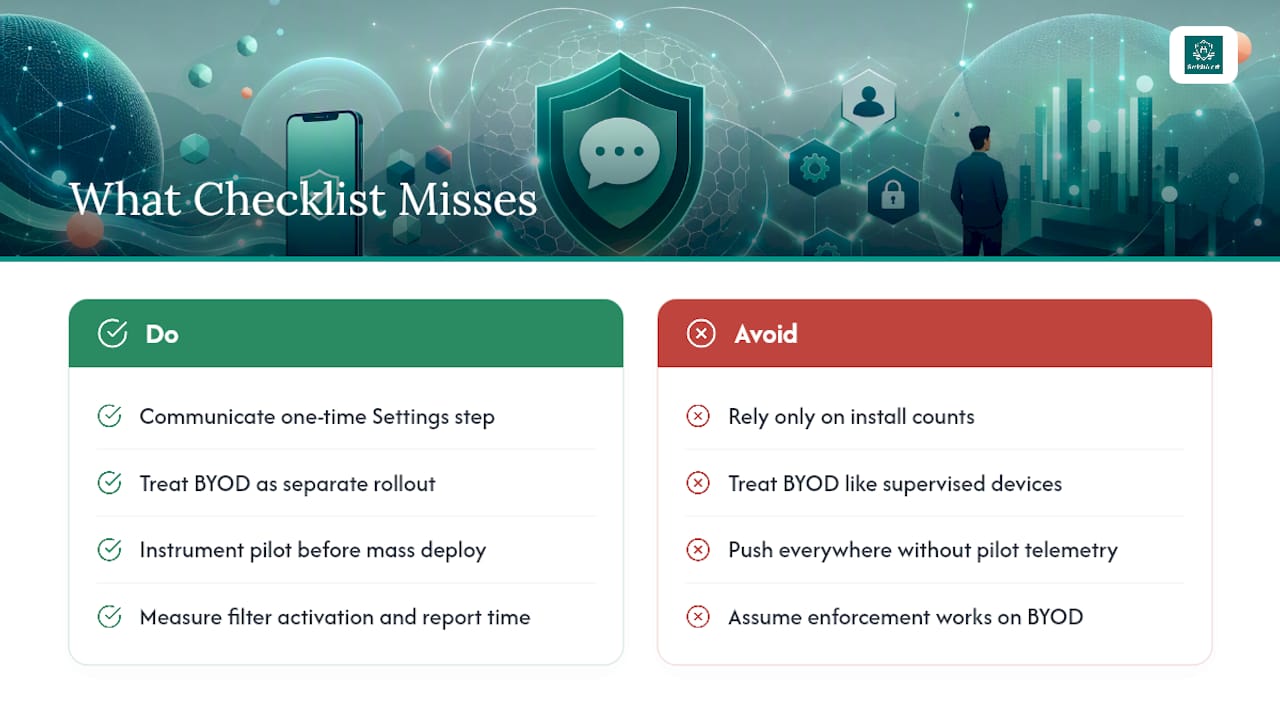
The conventional advice undersells BYOD. Teams often treat unsupervised devices as a smaller version of the same rollout when they are structurally different: no silent install, no forced configuration, and a user who can uninstall the whole thing without triggering an alert. If a meaningful share of your fleet is BYOD, build your success metrics around adoption and reporting behavior, not enforcement, because enforcement isn’t available to you there.
What should come first is instrumentation, not deployment speed. Teams that push the agent everywhere in week one and skip pilot telemetry end up unable to answer a basic question six months later: is this thing actually working, or just installed? Measure filter activation and report-to-triage time from day one, even if that means a slower initial rollout.
— Sophie
Try SmishAlert Before You Scale the Rollout
Deploying a filter extension through MDM solves the technical half of the problem. Closing the visibility gap on unrecognized senders, BYOD devices, and cross-channel lures (iMessage, WhatsApp, not just SMS) takes a layer built specifically for that job. A correlation layer that sits on top of your MDM-deployed filtering integrates what the extension catches with what employees report, so your SOC sees campaigns instead of isolated tickets.

A 30-day pilot typically scopes to a defined device group, connects reporting into your existing SOC workflow, and measures three things: filter activation rate, report volume, and time from report to triage. That gives you a real before-and-after instead of a guess. Start with the SmishAlert Self-Eval, a two-minute readiness check that flags where your current stack has blind spots, or review the full platform capabilities before scoping a pilot with your team.
Key Docs for Deployment
Bookmark Apple’s IdentityLookup documentation for the extension architecture, Workspace ONE’s smishing protection guide for MTD-specific deployment notes, and SmishAlert’s guide on deploying phishing protection without MDM for BYOD-heavy environments.
Sources
- SMS and MMS Message Filtering
- Enabling the SMS filter extension on iOS devices
- MDM vs. MTD: What Your Mobile Security Is Missing
- Smishing Protections
FAQ
Can the MDM company read my SMS messages?
Standard MDM platforms do not read SMS content; they manage device configuration and app deployment. On-device filters like Apple’s IdentityLookup extension process messages locally and never transmit content to a remote server.
What does “filtered by SMS filter” mean?
It means a message from an unrecognized sender was evaluated by the active filter provider your device is using, which then classified it as junk or legitimate based on pattern analysis. Messages from saved contacts bypass this check entirely.
What is SMS filtering?
SMS filtering is the process of evaluating incoming text messages, usually from unknown senders, to flag or block ones that show signs of phishing, spam, or fraud. On iOS it runs through the IdentityLookup extension; on Android it typically runs through an app with SMS permission.
What is Mint Mobile’s SMS gateway?
This refers to a carrier-level messaging infrastructure used for sending and routing text messages, separate from device-side or MDM-deployed filtering tools. Carrier filtering reduces mass spam volume but does not replace enterprise-grade detection for targeted smishing.
Does deploying SMS filtering through MDM stop targeted smishing attacks?
It reduces exposure but doesn’t eliminate it, since carrier and on-device filters catch known-bad patterns, not novel, targeted lures. Pairing MDM-deployed filtering with a reporting and correlation platform like SmishAlert closes more of that gap than filtering alone.