
How Attackers Exploit Personal Devices: A Security Leader's Guide

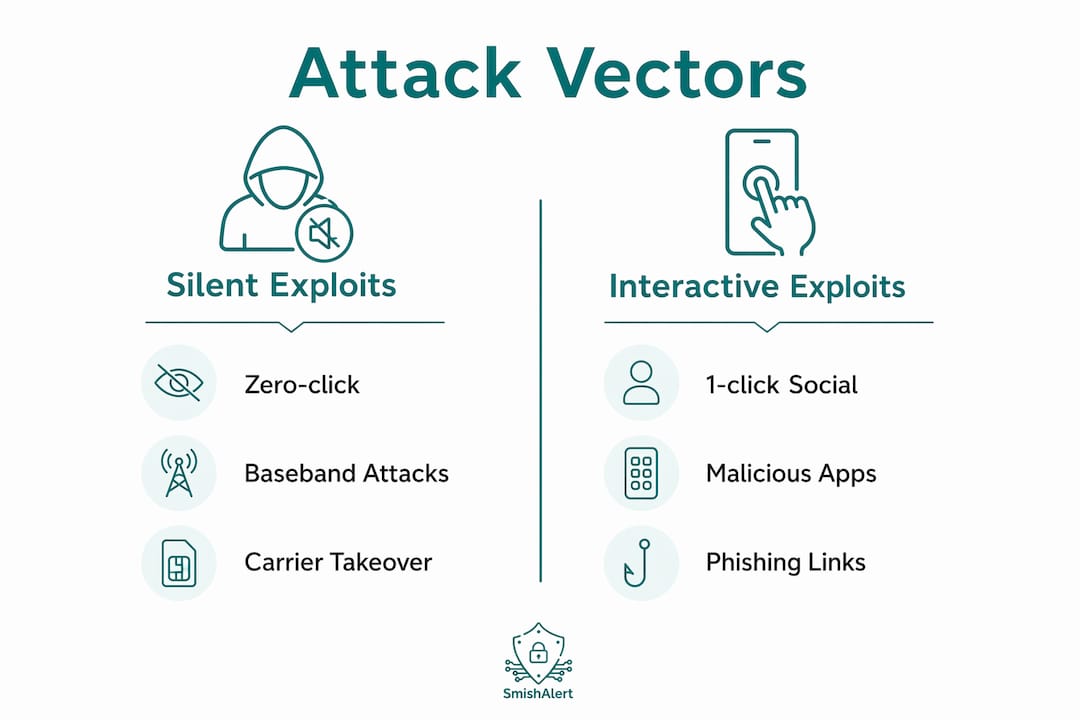
Attackers reach corporate messaging channels through personal devices via four primary vectors: zero-click exploits, triggered social engineering, SIM swapping, and network or physical injection. Security teams that treat mobile endpoints as out-of-scope are operating with a blind spot that adversaries actively exploit. CISA guidance on layered device protection and Amnesty International Security Lab forensic analysis of Pegasus-class toolkits both confirm that personal devices are now a primary enterprise attack surface, not a peripheral concern.
The highest-priority exploit categories security teams must assume are active:
- Zero-click exploits targeting message-processing services (iMessage, WhatsApp call handling, silent push notifications) with no user interaction required
- 1-click smishing and social engineering using crafted links, QR codes, and malicious attachments delivered via SMS, iMessage, or WhatsApp
- SIM swapping and carrier-based takeover that defeats SMS-based two-factor authentication
- Malicious apps and sideloading that introduce spyware or credential-harvesting payloads
- Network injection and man-in-the-middle attacks via rogue Wi-Fi hotspots and compromised Bluetooth or NFC interfaces
- OS-level and firmware compromise that renders app-layer encryption irrelevant once kernel control is achieved
Table of Contents
- How attackers exploit personal devices: the technical breakdown
- The attack lifecycle: from first message to corporate breach
- Why personal devices make messaging channels uniquely exploitable
- Detection signals security teams should monitor
- Layered mitigations and controls to deploy now
- Incident response playbook for suspected mobile compromise
- Escalation pathways: how smishing leads to payroll fraud and corporate breach
- How to prioritize mitigations and build a risk-based roadmap
- Triggered social engineering: 1-click smishing and malicious links
- Key Takeaways
- The messaging threat is a board-level risk, not a mobile security footnote
- Smishalert gives your SOC visibility into messaging-based threats
- Useful sources and further reading
How attackers exploit personal devices: the technical breakdown
Understanding attacker methods on personal devices starts at the OS layer, not the app layer.
Zero-click and silent exploitation
Zero-click attacks require no user interaction. A specially crafted iMessage, a missed WhatsApp call, or a silent push notification can trigger exploit code during background message processing. The CERT-FR CTI report documents that mobile attack chains typically target system-level services first, then chain sandbox escapes and privilege escalation to reach kernel-level control. Users see nothing. Detection requires network-side or cloud-side telemetry, not endpoint alerts.
1-click social engineering
When zero-day exploits are unavailable, Amnesty Security Lab analysis shows attackers fall back to 1-click social engineering: a crafted SMS link, a malicious QR code embedded in a WhatsApp message, or a weaponized attachment. The landing page harvests credentials or silently installs a payload. The attack surface here is the human, not the OS.
SIM swapping and carrier takeover
SIM swapping lets attackers port a victim’s phone number to a new SIM by social-engineering the carrier. Once they control the number, SMS-based 2FA codes route to the attacker. Every account tied to that phone number becomes accessible.
Malicious apps, sideloading, and baseband attacks
Apps distributed outside official stores, or legitimate apps with unpatched vulnerabilities, introduce spyware and credential-harvesting payloads. Baseband firmware attacks target the radio processor directly, operating below the OS and bypassing MDM controls entirely.
Network and physical vectors
Unsecured Wi-Fi, rogue hotspots, and Bluetooth or NFC interfaces enable man-in-the-middle interception. Physical access, including state-level actor assistance, can enable local firmware tampering that standard MDM cannot detect or remediate.

Pro Tip: For executive BYOD, provision a separate hardened device with its own carrier account and management profile. Mixing personal and corporate use on a single device expands the blast radius of any single compromise.
The attack lifecycle: from first message to corporate breach
These compromises rarely stop at the personal device. The chain typically moves through five stages:
- Initial vector delivery — Zero-click exploit or 1-click smishing message arrives via SMS, iMessage, or WhatsApp.
- Sandbox escape and privilege escalation — Exploit code breaks out of the app sandbox and escalates to kernel-level access, granting persistent OS control.
- Credential and session harvesting — Attacker captures authentication tokens, browser-stored credentials, and messaging content before or after encryption.
- Lateral pivot to corporate resources — Harvested credentials authenticate to corporate SSO, VPN, or SaaS platforms. The attacker now operates inside the enterprise perimeter.
- Persistence and exfiltration — Covert daemons maintain access; data exfiltrates over encrypted channels to attacker infrastructure.
The critical insight for detection teams: OS-level compromise defeats end-to-end encryption at the application layer. Once an attacker controls the operating system, they read messages before encryption and after decryption, regardless of which messaging app the employee uses. App-layer security controls are insufficient when the OS is compromised.
The escalation from smishing to browser credential theft can complete within hours of initial delivery. Dwell time before detection is typically measured in days to weeks, not minutes.
Why personal devices make messaging channels uniquely exploitable
Personal devices combine three conditions that enterprise-managed endpoints typically avoid: they connect to untrusted networks, they run personal app ecosystems with minimal vetting, and they operate almost entirely outside corporate visibility.
BYOD-specific risk drivers that security leaders must account for:
- Unsecured Wi-Fi usage — employees connect to public hotspots where network injection and MiTM attacks are straightforward
- Administrative account usage — personal devices often run with full admin rights, giving malware unrestricted access
- Personal app ecosystems — sideloaded apps, outdated software, and unvetted third-party keyboards create persistent entry points
- Sensor and permissions abuse — microphone, camera, location, and contact access granted to personal apps can be co-opted for covert exfiltration
- Physical access exposure — personal devices travel to higher-risk environments than corporate laptops
CISA recommends full-disk encryption, secure backups, and avoiding administrative accounts for daily use as baseline controls. The deeper problem, as Amnesty Security Lab forensic work confirms, is that OS-level compromise renders app-layer encryption irrelevant. An employee using Signal on a compromised device is not protected. The personal device corporate risk extends directly into enterprise messaging channels.
Detection signals security teams should monitor
The most reliable signals for mobile compromise and active smishing campaigns are cross-channel. No single telemetry source provides complete visibility.
High-value telemetry to instrument:
- Unexpected message-processing failures or crashes on iOS/Android
- Unexplained device restarts, particularly following receipt of a message
- Background network connections to newly registered or short-lived domains
- Anomalous SIM profile change events in carrier or MDM logs
- Mass link clicks originating from a single domain across multiple employees
- Correlated employee reports of suspicious messages through Smishalert’s reporting channel
| Telemetry Source | Anomaly to Hunt | Threat Severity |
|---|---|---|
| MDM logs | Unexpected profile changes, device re-enrollment events | High |
| Mobile EDR | Covert outbound connections, suspicious daemon creation | Critical |
| Carrier alerts | SIM swap or port events, unexpected number transfers | Critical |
| SIEM events | Auth failures followed by success from new device/IP | High |
| Smishalert reports | Correlated smishing campaigns, spoofed sender patterns | High |
| DNS/proxy logs | Queries to short-lived domains, DGA-pattern hostnames | Medium |
Pro Tip: Smishing campaigns leave a correlation signature: multiple employees receive messages from the same spoofed sender or domain within a short window. Configure your SIEM to alert on three or more employee-reported messages sharing a domain or sender pattern within 24 hours.
Layered mitigations and controls to deploy now
Adopt layered defenses across device hardening, carrier protections, detection, and user controls. Prioritize controls that reduce high-impact risk with minimal deployment friction.
- Enforce device encryption on all BYOD devices accessing corporate messaging or resources.
- Deploy MDM/MAM policies that enforce minimum OS versions, screen lock, and remote wipe capability.
- Restrict administrative privileges — no personal device should run daily use under an admin account.
- Implement on-device message filtering for iOS (using the CallKit and IdentityLookup frameworks) and cross-channel reporting for Android.
- Replace SMS-based 2FA with FIDO2 hardware keys or authenticator apps for all corporate accounts.
- Enforce secure, encrypted backups so forensic artifacts are available post-incident.
- Register SIM port freeze or port-lock with carriers for executive and high-risk employee accounts.
- Integrate Smishalert for campaign correlation, employee reporting, and SIEM/API-connected alerting across SMS, iMessage, and WhatsApp.
Additional policy controls:
- BYOD minimum-security baseline requiring biometric lock, encrypted storage, and current OS patch level
- Executive device handling policy mandating provisioned, hardened devices with separate carrier accounts
- Incident reporting flow that routes suspicious messages directly to the SOC via Smishalert’s reporting channel
Pro Tip: Start your BYOD smishing protection pilot with your highest-risk population: executives, finance, HR, and payroll staff. These roles are the most targeted and the most likely to have access that enables downstream fraud.
Incident response playbook for suspected mobile compromise
Treat suspected mobile compromise as high-priority. Delay in containment allows credential reuse and lateral movement to compound.
- Isolate the device — disconnect from corporate Wi-Fi and VPN, revoke active SSO sessions, and suspend corporate account access.
- Preserve forensic artifacts — capture iOS sysdiagnose or Android bug report, preserve carrier change logs, and image the device before any wipe.
- Collect message artifacts — export suspicious messages, sender metadata, and any links or attachments through Smishalert’s incident reporting workflow.
- Rotate all credentials — reset passwords and revoke OAuth tokens for every corporate account accessible from the device.
- Trigger enterprise-wide lookback — query SIEM for auth events from the compromised account over the prior 30 days; check for lateral movement indicators.
- Escalate per the matrix below.
Escalation matrix:
- Legal and compliance — involve immediately if regulated data (PHI, PII, financial records) may have been exfiltrated
- HR — involve when the compromised device belongs to an executive or when insider-threat indicators are present
- Carrier support — contact to freeze the SIM, reverse any unauthorized port, and document the chain of custody
- Vendor remediation — engage MDM and EDR vendors for forensic support if device-level persistence is suspected
Pro Tip: Physical device compromise and local network injection can defeat remote MDM controls. For high-risk executives, maintain chain-of-custody procedures and consider provisioning replacement devices rather than attempting remote remediation of a suspected firmware-level compromise.
Escalation pathways: how smishing leads to payroll fraud and corporate breach
Real incident archetypes show three common escalation paths that security teams should instrument and monitor.
Pathway 1: Smishing to credential harvesting to payroll fraud
- Employee receives an SMS impersonating HR or a payroll vendor.
- Employee clicks the link and enters credentials on a spoofed login page.
- Attacker authenticates to the payroll platform and redirects direct deposit.
Impact indicators: unexpected payroll change requests, login from new device or geography, employee reports of account lockout.
Pathway 2: Zero-click to stealthy data exfiltration
- Silent exploit delivered via iMessage triggers during background processing.
- Attacker achieves kernel-level persistence; messaging content, contacts, and credentials exfiltrate covertly.
- Corporate SSO credentials harvested; attacker accesses cloud storage and email.
Impact indicators: anomalous outbound DNS queries, unexpected cloud storage access, device restarts with no user action.
Pathway 3: SIM swap to account takeover
- Attacker social-engineers the carrier to port the executive’s number.
- SMS-based 2FA codes route to the attacker; corporate email and banking accounts accessed.
- Wire transfer or vendor payment redirected.
The escalation pattern security teams most often miss: the initial smishing message is reported by the employee, but the credential-harvesting page visit is never correlated to it. Without cross-channel campaign correlation, the two events look unrelated in the SIEM. Smishalert’s campaign correlation connects the reported message to downstream authentication anomalies, closing that visibility gap.
How to prioritize mitigations and build a risk-based roadmap
Prioritize controls that reduce high-impact, low-effort risks first: carrier protections, credential hygiene, and critical executive device controls deliver the fastest risk reduction before broader rollout.
| Timeframe | Initiative | Owner | Success Metric |
|---|---|---|---|
| 30 days or more | SIM port freeze for executives; replace SMS 2FA with FIDO2; deploy Smishalert reporting | IT Security, Carrier Account Manager | All executive accounts enrolled; no SMS 2FA on critical systems |
| 3 months or more | MDM/MAM policy enforcement for BYOD; on-device iOS message filtering; SIEM integration | IT, SOC | BYOD compliance rate; mean time to detect smishing campaign |
| 9 months or more | Hardened provisioned devices for executives; mobile EDR deployment; audit-ready IR reporting | CISO, Legal, IT | Percent of execs on hardened devices; incidents with complete forensic record |
Key metrics to track:
- Number of smishing campaigns detected and correlated per quarter
- Mean time from employee report to SOC alert
- Percent of executive accounts with SIM port freeze active
- Number of SIM port events detected and reversed
- Time to containment for suspected mobile compromise incidents
Pro Tip: Define pilot success criteria before you start: a 30-day Smishalert assessment should answer three questions — how many employees received a suspicious message, how many reported it, and how many clicked before reporting. Those three numbers define your human attack surface baseline.
Triggered social engineering: 1-click smishing and malicious links
1-click smishing remains the most operationally common attack method against enterprise employees. Attackers craft messages that impersonate known senders — HR systems, payroll vendors, IT helpdesks, or executives — and include a link, QR code, or attachment designed to harvest credentials or install a payload on click.
The message content is engineered for urgency: a payroll update required, a package delivery failed, an IT password expiring. Employees under time pressure click without verifying the sender. The landing page mimics a corporate login portal with enough fidelity to capture credentials before the employee realizes the deception. Smishalert’s credential-harvesting detection surfaces these campaigns at the message layer, before the click reaches the landing page.
QR codes embedded in messages add a layer of evasion: URL scanners in email gateways and SMS filters often cannot resolve the destination without rendering the image. Attackers also rotate domains rapidly, using newly registered hostnames that have no reputation history in threat intelligence feeds.
Key Takeaways
Personal devices are a direct attack path into enterprise messaging channels, and the controls that close that gap must operate at the carrier, OS, and detection layers simultaneously.
| Point | Details |
|---|---|
| Zero-click exploits need no user action | Attacks trigger during message processing; user caution alone cannot prevent them. |
| OS compromise defeats app encryption | Attackers who control the OS read messages before encryption and after decryption, regardless of the app used. |
| SIM swapping bypasses SMS 2FA | Replace SMS-based authentication with FIDO2 or authenticator apps for all corporate accounts. |
| Cross-channel correlation closes the visibility gap | Correlating employee-reported messages with SIEM auth anomalies reveals campaigns that look unrelated in isolation. |
| Smishalert surfaces messaging threats before compromise | On-device filtering, campaign correlation, and SIEM integration give SOC teams the telemetry needed to detect and respond to messaging-based attacks. |
The messaging threat is a board-level risk, not a mobile security footnote
The conventional framing of mobile security as a device management problem misses the actual threat model. Attackers are not trying to steal the device. They are using the device as an entry point into the human layer of the enterprise, specifically the messaging channels where employees make decisions about payroll, vendor payments, and credential resets.
What makes this urgent in 2026 is the convergence of two trends: zero-click exploit toolkits are becoming more accessible beyond nation-state actors, and enterprise messaging has expanded to include WhatsApp, iMessage, and SMS channels that no email gateway or DLP tool touches. The attack surface grew faster than the detection capability. Security leaders who have invested heavily in email security and endpoint protection often discover their messaging channels are completely unmonitored when the first smishing campaign lands.
The forward trajectory is toward more automated, AI-assisted social engineering at scale, where attackers generate personalized smishing messages using data harvested from prior breaches. Detection must adapt to match: correlation across channels, behavioral baselines for employee reporting patterns, and rapid campaign attribution will matter more than any single point control.
Smishalert gives your SOC visibility into messaging-based threats
Most security teams have strong coverage for email and endpoint threats. Messaging channels on personal devices — SMS, iMessage, WhatsApp — are a different problem. Smishalert is built specifically for that gap.

Smishalert’s platform captures employee-reported suspicious messages, correlates them into campaigns, and surfaces indicators directly into your SIEM or SOAR environment. On-device iOS message filtering catches threats before the employee clicks. Android and cross-channel reporting give SOC teams the telemetry to detect coordinated smishing campaigns across your entire workforce, including executives on personal devices.
When evaluating a vendor for this problem, ask whether the solution covers all three layers: detection at the message layer, campaign correlation across employees, and audit-ready incident reporting for legal and compliance. Smishalert covers all three, with a 30-day paid assessment that credits toward the first annual subscription.
Request your social engineering exposure assessment to establish your organization’s messaging threat baseline and identify active campaigns targeting your employees.
Useful sources and further reading
The sources below underpin the technical claims in this article and provide authoritative follow-up for security teams conducting deeper research or policy development.
- CISA — How to Protect the Data Stored on Your Devices: Baseline device protection guidance including encryption, backup, and administrative account controls.
- Amnesty International Security Lab — Inside Pegasus: Forensic analysis of zero-click, 1-click, network injection, and physical compromise vectors used by Pegasus-class spyware.
- CERT-FR CTI Report — Mobile Phones: Technical breakdown of mobile attack chains targeting system-level services and exploit chaining to kernel-level persistence.
- WUST Blog — Can Your Phone Be Hacked Without You Touching It?: Accessible technical explanation of zero-click attack mechanics and OS-level compromise implications.
- McAfee — 7 Tips to Protect Your Smartphone from Getting Hacked: Practical guidance on SIM swapping mechanics and carrier-level defenses.
- Smishalert Threat Intelligence — Live Campaign Examples: Real-world smishing campaign indicators and telemetry trends for SOC reference.
- Smishalert — Remote Mobile Device Threat Examples: 2026 Guide: Operational examples of OS-targeting attacks and messaging-channel exploitation.