
Group Text Phishing: How to Spot and Stop It

Group text phishing puts you in a fake conversation designed to make a scam feel real. The moment you get one, the correct response is simple: don’t click any link, don’t reply to the thread, leave the group, block the sender, and report the message by forwarding it to 7726. These five steps close most of the risk before it has a chance to do damage.
TL;DR:
- Fast action is critical: immediately report suspicious group texts by forwarding to 7726, blocking the sender, and leaving the group to prevent further damage.
- Recognize warning signs such as unfamiliar participants, urgent requests for money or verification codes, mismatched links, and fabricated social proof within the thread.
- Using messaging app privacy settings, unknown-sender filters, and carrier-level tools can significantly reduce the likelihood of being added to scam groups.
- Falling victim to a scam link can lead to rapid financial theft, account takeover, or long-term distrust of legitimate notifications, making prevention essential.
- Reporting suspicious messages early helps detect organized campaigns that target hundreds or thousands of victims simultaneously, potentially stopping scams before extensive harm occurs.
Table of Contents
- What Group Text Phishing Looks Like: Warning Signs to Check
- Why Scammers Use Group Texts and What Tactics They Rely On
- What to Do the Moment You Get a Suspicious Group Text
- How to Stop Getting Added to Scam Group Texts
- The Real Cost of Falling for a Group Text Scam
- How SmishAlert Tracks Group-Text Scam Campaigns
- Why Pausing Before You Respond Still Matters Most
- SmishAlert for Security Teams Managing Messaging Risk
- Where to Report and Learn More
- Sources
What Group Text Phishing Looks Like: Warning Signs to Check
Group text phishing rarely looks like the crude spam texts you’ve learned to ignore for years. It’s engineered to look like a real conversation you accidentally got looped into, which is exactly what makes it effective.
Start with the group itself. If you’re suddenly part of a thread with three or four unfamiliar phone numbers, generic display names, or a mix of foreign area codes, that’s your first flag. Legitimate group chats, whether it’s a work project or a family thread, don’t materialize out of nowhere with strangers already talking.
Watch for these patterns in the messages themselves:
- Urgency and pressure: “Your package is on hold,” “Your account will be suspended in 24 hours,” or “Confirm this transaction now” are all built to short circuit careful thinking.
- Requests for money, gift cards, or verification codes: No legitimate courier, bank, or employer asks for a one time passcode through a group text.
- Shortened or mismatched links: A link claiming to go to USPS or your bank that resolves to a strange domain is a hard giveaway.
- Unusual attachments: Images or files from numbers you don’t recognize, especially inside an otherwise text-only thread.
- Fabricated social proof: Other “participants” in the group replying with fake urgency, thanking someone for clicking, or confirming the offer is real.
That last tactic deserves attention because it’s the piece most people miss. Security researchers who study smishing attacks note that SMS-based scams already produce far higher click-through rates than email phishing, largely because text messages feel more personal and less scrutinized. Add two or three fake participants vouching for the message, and the group format turns a lone red flag into what looks like peer confirmation.
Pro Tip: If a group thread includes someone claiming to be a coworker or relative, verify through a separate channel, a phone call or a known email address, before you respond in the thread itself. Scammers count on you trusting the group over your own instincts.
Why Scammers Use Group Texts and What Tactics They Rely On
Group messaging didn’t become a scam vehicle by accident. It solves three problems attackers have always had: reach, cost, and credibility.
On the reach and cost side, sending a scam to a thousand people individually used to take real infrastructure. Now attackers lean on VoIP numbers, disposable SIM-based accounts, and RCS or iMessage workarounds that let them blast group threads at a volume email spam filters and older SMS filters were never built to catch. Investigative reporting on a China-based smishing operation found that these groups actively route around carrier filtering by exploiting iMessage and RCS protocols, then use the harvested data for mobile-wallet tokenization fraud against bank customers.
On credibility, the group format itself does the persuasion work that a single text message can’t. A lone phishing text asking you to click a link is easy to dismiss. A group thread where two or three other “people” appear to already be participating, replying, agreeing, or expressing urgency, mimics the social proof of a real conversation. Some of this is automated: organized campaigns often rely on bots and short-lived phone numbers to populate threads with fake participants purely to manufacture that appearance of legitimacy, which also makes the operation harder to trace back to its source.
The tactics converge in a few recognizable patterns:
- Credential harvesting links disguised as delivery notifications, bank alerts, or account verification requests.
- One-time passcode theft, where the scammer triggers a real login attempt and asks you, inside the group, to “confirm” the code you just received.
- Investment and pump-and-dump schemes, where organized networks use messaging groups to coordinate victim trades and coerce victims into pumping real stocks.
What to Do the Moment You Get a Suspicious Group Text
Speed matters here, but so does order. Doing things in the right sequence keeps you safe and preserves what you might need for a report later.
- Do not click any link in the message, even if it looks like it’s from a bank, courier, or coworker.
- Do not reply to the thread, including typing “STOP” or “unsubscribe.” Replying to unsolicited texts confirms your number is active, and the FTC’s own guidance warns this often results in more spam, not less.
- Do not call any phone number listed in the message. Scammers sometimes include a fake “customer service” line staffed by the same operation.
- Take a screenshot of the message thread, the sender’s number, and the timestamp before you do anything else. This becomes your record if you need to report identity theft or unauthorized charges later.
- Leave the group. On an iPhone, open the thread, tap the group name, and select “Leave this Conversation.” On Android Messages, open the conversation, tap the three-dot menu, and choose “People & options,” then leave the group. WhatsApp and Signal both offer a similar “Exit Group” option under group settings.
- Block the sender using your phone’s native block feature or the messaging app’s block function.
- Report the message. Forward the text to 7726 (spells “SPAM” on your keypad), which routes it to your carrier for network-level filtering. Most messaging apps also include a “Report Junk” or “Report Spam” option directly in the thread, use it in addition to forwarding.
- File a report with the FTC at Reportfraud if the message asked for money, personal information, or a verification code, or if you suspect you may have already interacted with it.
Pro Tip: Keep a running note, just the sender’s number, the time you received it, and a short description, before you delete anything. If the same group or number targets other people you know, that record helps investigators connect the pattern faster.
How to Stop Getting Added to Scam Group Texts
Reacting well to one scam text is good. Configuring your phone so fewer of them reach you in the first place is better.

Each major messaging platform gives you some control over who can add you to a group. On WhatsApp, go to Settings > Privacy > Groups and restrict who can add you to “My Contacts” or “My Contacts Except.” iMessage users can enable Settings > Messages > Filter Unknown Senders, which separates messages from numbers not in your contacts into a distinct list and disables link previews and read receipts for them. Android Messages users should turn on Spam Protection under Messages > Settings, which flags likely spam automatically and lets you block RCS group invites from unknown numbers.
Carrier-level tools matter too, and they work independently of whatever app you’re using. Every time you forward a scam text to 7726, you’re feeding data that helps your carrier’s filtering systems catch similar messages before they reach other customers. Most major US carriers also offer free or low-cost call and text filtering apps that block known scam numbers at the network level, worth checking if you’re getting hit repeatedly.
Third-party filtering apps add another layer, particularly useful if you’re managing a phone for a less tech-savvy relative. They typically work by cross-referencing incoming numbers against known scam databases and flagging suspicious links automatically.
| Where to look | What it controls | Best for |
|---|---|---|
| Messaging app privacy settings | Who can add you to a group | Everyone, takes under a minute |
| iOS/Android unknown-sender filters | Sorting unrecognized numbers into a separate list | Reducing daily exposure |
| Carrier spam protection | Network-level blocking based on reported numbers | Long-term volume reduction |
| Third-party filtering apps | Automatic scam detection and link scanning | Elderly or less tech-savvy users |
The Real Cost of Falling for a Group Text Scam
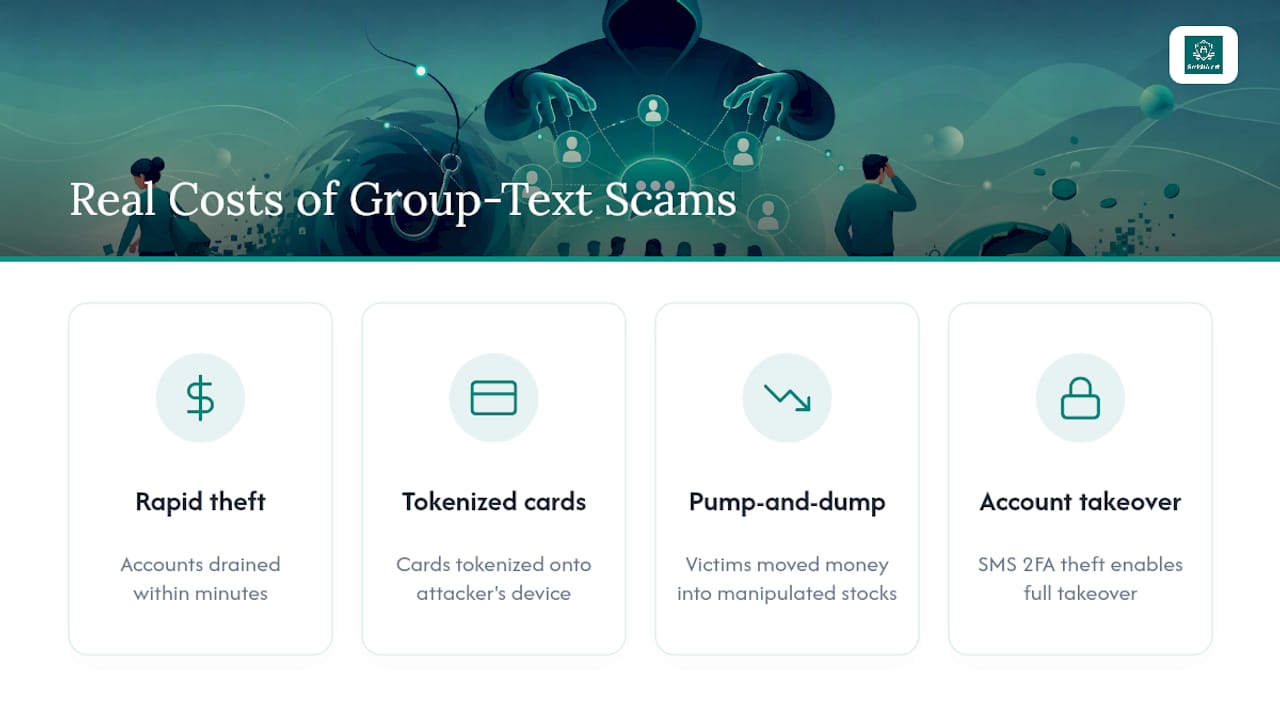
The consequences of one bad tap go well beyond an awkward moment. If a phishing link in a group text harvests your banking credentials, attackers can move fast, sometimes within minutes, to drain accounts or make unauthorized purchases before you notice anything wrong.
The mobile-wallet fraud documented in the KrebsOnSecurity investigation into a China-based smishing operation shows how sophisticated this has become: victims who entered card details on a fake site had those cards tokenized into a mobile wallet on the attacker’s own device, letting the scammer make purchases as if they physically held the card. Investment-focused group scams carry a different but equally damaging risk. Coordinated pump-and-dump networks convince victims to move real money into manipulated stocks, and by the time the group goes quiet, the loss is already locked in.
Beyond direct financial harm, one-time passcode theft can lead to full account takeover on email, banking, or social media, since so many services still rely on SMS-based two-factor authentication. Reporting from Kaspersky on the scale of modern messaging heists points to a broader effect too: repeated exposure to convincing scam texts makes people distrust legitimate notifications from banks, delivery services, and even their own employer, which has its own quiet cost over time.
How SmishAlert Tracks Group-Text Scam Campaigns
Enterprise security teams face the same core problem individuals do, just at scale and with higher stakes: one convincing group text can compromise payroll systems or executive credentials in minutes. Smishalert works by collecting reports of suspicious messages directly from employee devices, then correlating those reports across an organization to identify when the same campaign is hitting multiple people at once, often before any single victim would have recognized the pattern on their own.
That correlation matters because industrialized smishing operations rarely target one person. They run the same script against hundreds or thousands of numbers simultaneously, which means the fastest way to shrink the damage window is catching the pattern early and getting takedown requests moving before more employees interact with it.
The individual habits in this article, reporting fast, preserving evidence, avoiding replies, are the same habits that make enterprise detection work. If your workplace has a way to report suspicious texts to IT or security, use it. One reported message can protect dozens of coworkers who haven’t seen it yet.
Why Pausing Before You Respond Still Matters Most
The habit that saves people from group text phishing isn’t sophisticated. It’s pausing long enough to ask whether a message makes sense before reacting to it. Scammers are betting on speed, on you seeing an urgent-sounding thread and responding before your skepticism catches up. That’s the entire mechanism, and it works because urgency is a genuinely effective way to short-circuit judgment, in scams and in legitimate situations alike.
Verification through a second channel is the single habit worth building into muscle memory. If a group text claims to be your bank, call the number on the back of your card, not the one in the message. If it claims to be a coworker, message them directly outside the thread. This one step defeats most group text phishing attempts regardless of how convincing the fake participants look.
If you have relatives or friends who are less familiar with these tactics, especially older family members who may not know that replying “STOP” can backfire, share these steps with them directly. A five-minute conversation now is worth far more than a recovery process later.
— Sophie
SmishAlert for Security Teams Managing Messaging Risk
Everything above helps you personally, but organizations face a different scale of exposure: hundreds or thousands of employees, each a potential entry point for payroll fraud, executive impersonation, or credential theft delivered straight to a personal or work phone. Smishalert’s platform gives security teams visibility into that risk by capturing employee-reported messages, correlating them into campaigns, and surfacing threats that traditional email security tools never see because they happen entirely outside the corporate perimeter.
For teams evaluating whether their current mobile exposure is a blind spot, Smishalert’s self-eval takes about two minutes and gives a clear picture of where the gaps are. Security leaders can also explore solutions for specific attack types, including executive impersonation and credential harvesting, to see how detection maps to their organization’s actual risk profile.
This is built for security teams and managed service providers, not individual consumers looking to protect a personal phone. If that’s your situation, the reporting and blocking steps above remain your best defense. If you’re responsible for protecting an organization, request a 30-day exposure assessment to see what’s already reaching your employees’ devices.
Where to Report and Learn More
A handful of official channels handle group text phishing reports better than anywhere else, and each serves a slightly different purpose.
- Reportfraud takes detailed complaints and feeds federal enforcement efforts against scam operations.
- Forwarding to 7726 routes the message straight to your carrier’s spam-filtering systems.
- CTIA’s consumer guidance explains carrier-level filtering tools and how to use them.
- Investigative outlets like KrebsOnSecurity regularly document how phishing operations impersonate trusted brands and adapt their tactics, useful reading if you want to stay ahead of new scam formats.
Sources
- Reportfraud
- China-based SMS phishing triad pivots to banks — KrebsOnSecurity
- Protecting yourself from spam text messages — CTIA