
Field Worker Mobile Threat Exposure Examples IT Teams See

Field workers face a predictable set of mobile threat exposures that cause credential theft, data leakage, and operational downtime. The 2025 Verizon Mobile Security Index reports that 85% of organizations saw an increase in mobile device attacks, and NIST’s mobile threat catalog in SP 1800-21 names the exact mechanisms behind most of them: SMS-based credential theft, malicious app installs, rogue device-management profiles, and OS-level compromise. Detection platforms like Smishalert exist specifically because these exposures happen outside the corporate network perimeter, where legacy email security has no view at all.
The core categories worth knowing cold are: mobile phishing and smishing, malicious or side-loaded apps that exfiltrate through permissions, lost or stolen devices, insecure public Wi-Fi, credential theft tied to weak MFA design, rogue MDM or VPN profiles, rooted or jailbroken devices, and vulnerable in-house field apps that expose backend systems. Each one maps to a specific, observable impact.
- Mobile phishing/smishing — credential theft, fraudulent wire or gift card requests
- Malicious or counterfeit apps — permission-based data exfiltration, token theft
- Lost or stolen devices — customer PII exposure, unauthorized account access
- Insecure public Wi-Fi — man-in-the-middle credential capture
- Weak MFA design — push-fatigue account takeover
- Rogue MDM/VPN profiles — traffic interception, certificate-based surveillance
- Rooted/jailbroken OS — bypassed sandboxing, malware persistence
- Vulnerable in-house apps — backend system compromise via exposed APIs
Pro Tip: Require number-matching MFA on every account a field device can reach, and enforce an OS-patch baseline (no device older than one minor version) before it touches customer data. Both changes can go live in a single change window and close two of the highest-frequency exposure paths immediately.
Key Takeaways
Mobile threat exposure for field workers concentrates in messaging channels, unmanaged BYOD devices, and weak MFA design, and closing those three gaps stops most real-world incidents.
| Point | Details |
|---|---|
| Messaging visibility is the biggest blind spot | Traditional perimeter tools miss SMS and messaging-app phishing, which drives roughly a third of mobile threats. |
| Number-matching MFA beats push approval | Simple push MFA invites fatigue attacks; number-matching closes that gap for accounts touching sensitive data. |
| COPE fits high-risk roles better than BYOD | Devices touching payment systems or PII warrant corporate ownership, not personal-device containerization alone. |
| Fast reporting shortens every incident | A one-tap report button cuts detection time from hours to minutes for smishing and lost-device events. |
| Operational downtime is already measurable | Downtime from mobile incidents rose 16 points to 63% of organizations in a single year, per Verizon’s 2025 index. |
Table of Contents
- What Are Real Examples of Field Worker Mobile Threat Exposure?
- Why Are Field Workers a Bigger Mobile Risk Than Office Staff?
- What Do the Numbers Say About Mobile Risk in the Field?
- What Technical Controls Actually Reduce Field Mobile Risk?
- What Onboarding and Training Actually Change Field Behavior?
- How Do You Detect and Respond to a Field Mobile Incident?
- How Should Security Teams Prioritize Which Mobile Risks to Fix First?
- What Should Security Teams Fix in the Next 90 Days?
- A Practitioner’s Note on Rolling This Out
- Frequently Asked Questions
- Sources
What Are Real Examples of Field Worker Mobile Threat Exposure?
Abstract categories don’t help a SOC analyst triage a ticket at 2 p.m. on a Tuesday. What helps is knowing what the attack actually looks like when it lands on a technician’s phone. Below are the scenarios that show up most often in field operations, each with the signals that reveal it and the moves that stop it from spreading.
Smishing that spoofs a dispatch system. A technician gets a text that looks exactly like the company’s job-routing platform: “Your next job has changed, confirm your login to view details.” The link goes to a cloned portal that harvests credentials in real time. Field-service reporting shows smishing now outpaces email phishing for technicians by a wide margin, with mobile phishing accounting for roughly one-third of all mobile threats, largely because dispatch and scheduling texts are routine enough that nobody questions a spoofed version.
- Indicators: sender number doesn’t match the known dispatch shortcode, urgency language, link domain slightly misspelled
- Immediate steps: block the sender at the carrier/MDM level, force a password reset, check for other logins from that account in the last hour
- Longer-term control: deploy a reporting mechanism that lets the technician forward the suspicious text with one tap instead of describing it verbally to a help desk
Vishing that requests credential re-authentication. A caller claiming to be IT support tells a field worker their account was flagged for suspicious activity and asks them to “verify” by reading back a one-time code. This is push-fatigue and OTP theft executed by voice instead of text, and it works because field workers are used to remote troubleshooting calls.
- Indicators: caller pressures for immediate action, requests a code sent seconds earlier, caller ID is spoofed or unavailable
- Immediate steps: hang up and call IT back on a known number, invalidate the session tied to that OTP, flag the account for monitoring
- Longer-term control: move to number-matching MFA so a spoken code can’t complete a login on its own
A side-loaded counterfeit utility app. A technician downloads what looks like a battery-optimization or barcode-scanning tool from a link shared in a crew group chat, bypassing the official app store. NIST’s threat catalog documents this exact pattern in SP 1800-21: malicious apps installed via direct URL rather than a vetted store, often requesting permissions far beyond what the tool needs.
- Indicators: app requests contact list, SMS, or location access it has no functional reason to need; app was installed outside the managed catalog
- Immediate steps: isolate the device from corporate Wi-Fi and VPN, uninstall and image-check the device, rotate any credentials cached on it
- Longer-term control: block sideloading at the OS policy level and publish an approved app catalog technicians can search instead of guessing
Device theft with cached customer data. A utility worker’s phone is stolen from a truck cab during a job. The device has no passcode timeout configured, and cached customer addresses, account numbers, and service history sit unencrypted in a local app database.
- Indicators: device goes offline unexpectedly, last known location doesn’t match the crew’s route, no remote check-in at shift end
- Immediate steps: trigger remote wipe through the mobile device manager, revoke all active sessions, notify the affected customers per breach policy
- Longer-term control: enforce full-disk encryption and short auto-lock timers as a condition of device enrollment
A rogue VPN or certificate profile. An attacker convinces a field worker to install a “network fix” profile, often through a phishing link disguised as an IT troubleshooting step. That profile routes all traffic through an attacker-controlled proxy, a classic man-in-the-middle setup that NIST’s guidance flags directly as a rogue MDM/EMM threat vector.
- Indicators: unfamiliar configuration profile appears in device settings, unexplained battery drain, certificate warnings in browser sessions
- Immediate steps: remove the profile immediately, check DNS and proxy settings for tampering, force re-authentication on all accounts used since installation
- Longer-term control: lock down who can install configuration profiles at the OS management layer
A compromised in-house field app leaking tokens. A homegrown work-order app stores an authentication token in plaintext or a poorly secured local cache. A researcher, or an opportunistic attacker with brief physical access, extracts the token and uses it to hit the backend API directly, no phishing required.
- Indicators: API calls from unfamiliar IP ranges using a valid technician token, unusual query patterns against the work-order database
- Immediate steps: revoke the token, force app re-authentication fleet-wide, patch the storage vulnerability
- Longer-term control: run periodic penetration tests against in-house mobile apps, not just the customer-facing ones
Two industry patterns worth flagging separately: a healthcare clinician tapping a phishing link inside a mobile inbox between patient visits, and a field technician processing a payment over a customer’s home Wi-Fi network because the cellular signal in the basement is too weak to trust. Both are ordinary, low-suspicion moments that attackers count on.
Pro Tip: Put a laminated card in every truck or field kit with three lines: what a phishing text looks like, the number to call, and the one button to press to report it. Technicians won’t read a security policy document. They will glance at a card taped to the dashboard.
Why Are Field Workers a Bigger Mobile Risk Than Office Staff?
Field workflows create an operational blind spot that traditional perimeter defenses were never built to see. A technician working from a truck, a job site, or a customer’s living room isn’t behind the corporate firewall, isn’t on the managed network, and often isn’t thinking about security at all because the job in front of them demands full attention.
Several factors compound that blind spot:
- BYOD and shared devices. Personal phones used for work rarely get the same patch discipline as corporate hardware, and crew members sometimes hand a device to a colleague mid-shift.
- Public or customer Wi-Fi. Weak cellular coverage pushes technicians onto whatever network is available, often unencrypted and unmonitored.
- High cognitive load. Field workers juggle driving, customer interaction, and paperwork, leaving little bandwidth to scrutinize a text message before tapping it.
- Device sharing within crews or families. A single device sometimes serves both work and personal use across multiple people, multiplying the number of hands with access.
- Lack of patch discipline. Devices out of physical IT reach for weeks at a time miss update cycles that office equipment gets automatically.
- Role-based data overexposure. A technician’s app often caches far more customer data locally than the job actually requires, just for offline convenience.
The scale of the gap: roughly 70% of BYOD devices used for work are unmanaged by IT, meaning most field organizations have no visibility into patch status, installed apps, or configuration on the majority of devices touching customer data.
That combination changes how detection and policy should be designed. Perimeter-based tools that only inspect corporate network traffic miss the messaging channels, most notably SMS, iMessage, and WhatsApp, where field-targeted social engineering actually happens. Prioritizing contextual, low-friction controls (a one-tap report button, automatic policy enforcement rather than a training slide) matters more here than it does for a desk-bound workforce that already sits behind layered network defenses.
What Do the Numbers Say About Mobile Risk in the Field?
Mobile incidents are rising fast, and they’re translating directly into measurable business disruption, not just theoretical risk. The Verizon Mobile Security Index found that 63% of organizations experienced significant operational downtime tied to mobile-related security incidents in 2025, a 16-point jump from the prior year.
The figure that should reset budget conversations: operational downtime from mobile incidents jumped 16 percentage points in a single year. That’s not a slow-building risk. It’s an active, worsening exposure.
These numbers point in one direction: visibility that covers messaging channels outside the traditional network perimeter is no longer optional. Detection built only for network-layer threats misses the exact channel, SMS and messaging apps, where field-targeted attacks now concentrate.
What Technical Controls Actually Reduce Field Mobile Risk?
Start with device hygiene, then layer up. Trying to deploy every control simultaneously is how field rollouts stall, so sequence matters as much as the controls themselves.
1. Baseline device hygiene and patching. This stops the largest share of OS-vulnerability exploitation documented in NIST’s mobile threat catalog. Friction point: field devices go weeks without connecting to a network that can push updates, so enforce patch compliance as a condition of app access rather than relying on background updates alone. Detection signal: track the percentage of fleet devices more than one patch cycle behind.
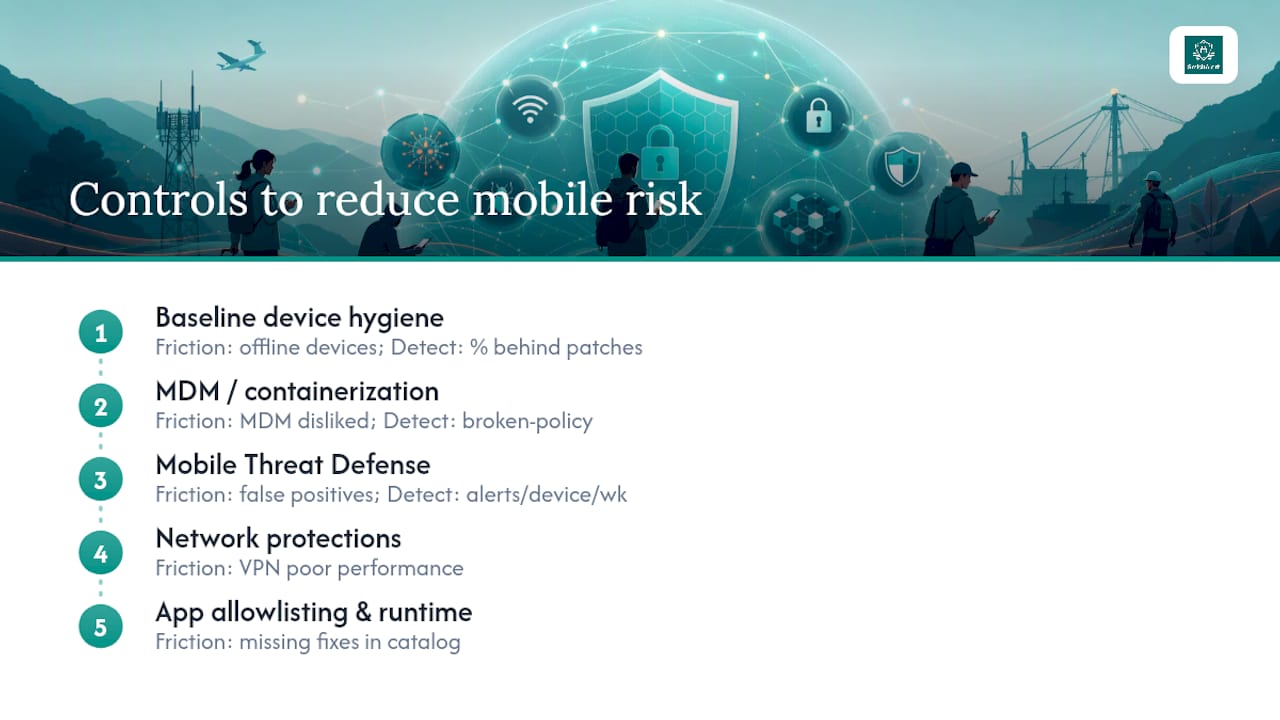
2. MDM/EMM or containerization. This separates work data from personal use on BYOD devices and enables remote wipe when a device is lost. Friction point: technicians resent full-device management on personal phones, so containerization (a walled work profile) usually gets better adoption than full MDM enrollment on BYOD hardware. Detection signal: monitor for containers that report broken policy compliance.
3. Mobile Threat Defense and messaging visibility. Enterprise MTD tools catch app-level anomalies, sideloading attempts, and rooted/jailbroken states in real time. This is also where messaging-specific detection belongs, since MTD platforms rarely inspect SMS or messaging-app content the way a purpose-built tool does. Friction point: false positives on legitimate field apps can erode trust fast if tuning isn’t done early. Detection signal: alert volume per device per week should trend down, not up, as tuning matures.
4. Network protections. A cellular-first policy with enforced VPN for necessary Wi-Fi use closes off the public Wi-Fi man-in-the-middle exposure almost entirely. Friction point: VPN performance on weak cellular signal frustrates technicians trying to load a work order quickly.
5. App allowlisting and runtime protections. Blocking sideloading and restricting installs to an approved catalog removes the counterfeit-app exposure at the source. Friction point: technicians want a quick fix from a forum link when something breaks, and an approved catalog needs to actually contain that fix or they’ll route around the control.
For MFA specifically, design matters more than presence. Simple push approval invites MFA fatigue, where an attacker spams approval requests until a tired technician taps “yes” by reflex. Number-matching MFA, which requires entering a code shown on the login screen rather than a single tap, closes that gap. SMS-based one-time codes carry their own well-documented weaknesses, including SIM-swap interception, so treat SMS OTP as a fallback rather than a primary factor for any account with access to customer or payment data.
Pro Tip: Pair every new restriction with a productivity trade. If you block sideloading, ship a pre-approved app catalog with the tools crews actually ask for, and add lightweight single sign-on so technicians aren’t juggling five separate logins. A control that saves time gets adopted; one that only adds friction gets worked around.
What Onboarding and Training Actually Change Field Behavior?
Technical controls stop a lot, but policy and training close the gaps that technology alone can’t reach, particularly around judgment calls in the moment a phishing text arrives.
A tight onboarding checklist for new hires or role changes should cover:
- Device issuance decision: COPE (corporate-owned, personally enabled) for roles touching payment systems or sensitive PII, BYOD acceptable for lower-risk roles with containerization enforced
- Minimum OS version and patch level required before app access is granted
- A one-hour mobile security orientation covering smishing recognition, not a generic annual training video
- A one-tap incident reporting shortcut installed on the device before day one
Just-in-time microtraining beats annual refreshers for smishing recognition specifically. A short, role-targeted nudge delivered right after a near-miss report sticks better than a slide deck reviewed once a year. This is where role-based risk modeling pays off: the HWPRE taxonomy developed from a 300-participant healthcare worker study found substantial variation in phishing susceptibility by role and demographic, which means a one-size-fits-all phishing program wastes training budget on roles that don’t need it while under-training the roles that do. A dispatcher and a home-health nurse face different attack patterns and need different examples in their training module.
Off-boarding deserves the same rigor as onboarding. When a technician leaves or changes roles, the checklist should include immediate remote wipe of the work container, credential rotation on every account the device accessed, and revocation of any certificate profiles issued to that device. Lost or stolen device procedures should mirror that same sequence, executed within minutes rather than hours.
Pro Tip: Put a physical, laminated “what-to-do” card in every field kit or truck cab listing the three immediate steps for a lost device or suspicious text: call this number, report through this button, don’t try to fix it yourself. During an actual incident, nobody remembers page four of the security handbook.
How Do You Detect and Respond to a Field Mobile Incident?
Detection works best when it combines three signal types: endpoint behavior, network anomalies, and user reports. No single source catches everything, and field environments make each one noisier than a typical office deployment.
The alerts worth prioritizing for field devices:
- App install anomalies, particularly installs from outside the approved catalog
- Root or jailbreak detection triggers, which almost always indicate deliberate tampering or malware persistence
- New or unrecognized Wi-Fi SSID connections, especially ones matching common public network naming patterns
- Unusual data egress volume or destination, which can indicate a compromised app phoning home
- Unexpected MFA prompts the user didn’t initiate, a strong signal of an active credential-stuffing attempt
- Repeated credential lockouts on a single account within a short window
When an incident is confirmed, a short runbook keeps response fast and consistent:
- Isolate the device from corporate Wi-Fi and VPN access immediately.
- Revoke active sessions and MFA tokens tied to that device and account.
- Remote wipe if the device can’t be physically recovered within the hour.
- Rotate credentials for every account the device had access to.
- Preserve logs and screenshots before any wipe action destroys evidence.
- Trigger re-enrollment with fresh credentials and a clean device image before returning it to service.
Pro Tip: In low-connectivity environments, don’t wait for a stable connection to document an incident. Have the technician take an immediate local screenshot of the suspicious text or app permission screen, then queue it for secure upload the moment signal returns. Evidence captured five minutes late is often evidence lost.
How Should Security Teams Prioritize Which Mobile Risks to Fix First?
Not every exposure deserves the same urgency, and treating them all as equally critical burns resources that should go toward the highest-impact fixes first. A simple framework works well here: rank each exposure by likelihood × impact × detectability.
A lost device with cached customer PII, for instance, is high likelihood (devices get left in trucks constantly) and high impact (regulatory exposure, customer notification obligations), but detectability is usually strong if remote wipe telemetry is configured correctly. A rogue in-house app vulnerability, by contrast, might have lower likelihood but catastrophic impact and very poor detectability, since nobody’s watching backend API calls for anomalies until something breaks visibly.
| Exposure Category | Priority | Rationale |
|---|---|---|
| Smishing/mobile phishing | Critical | High frequency, direct path to credential theft, weak detectability without messaging visibility |
| Lost or stolen devices | High | High frequency, strong mitigation available through remote wipe, moderate detectability |
| Rogue MDM/VPN profiles | High | Lower frequency but severe impact through full traffic interception |
| Malicious sideloaded apps | Medium | Moderate frequency, mitigated well by allowlisting once enforced |
| Vulnerable in-house apps | Medium | Lower frequency, high impact when it occurs, requires dedicated testing to detect |
| Insecure public Wi-Fi | Medium | High frequency but largely neutralized by cellular-first and VPN policy |
To classify a new exposure quickly, ask:
- Does this device access payment or financial systems?
- Is the affected app privileged with elevated permissions?
- Is the worker operating in a high-risk physical environment (unattended vehicle, public-facing job site)?
- How many other devices share this same exposure path?
- Can this be detected automatically, or does it depend on user reporting?
- What is the cost and disruption of the fix relative to the risk it removes?
- Does a regulatory or contractual obligation apply if this exposure is exploited?
- Is there an existing control that partially covers this gap already?
Ownership should follow risk tier. Critical and high-priority items belong with the SOC and IT security leadership, since they require fast technical response and policy authority. Medium items often sit best with IT operations for implementation, with field operations managers owning the rollout communication so technicians understand why a new restriction landed on their device.
What Should Security Teams Fix in the Next 90 Days?
A focused quarter beats a scattered year. Here’s the sequence that closes the highest-impact gaps first, in order:
- Enforce an OS patch baseline across all field devices, blocking app access for anything more than one cycle behind.
- Roll out number-matching MFA for every account with access to payment, customer PII, or backend systems.
- Ban sideloading at the policy level and publish an approved app catalog covering the tools crews already request.
- Require a cellular-first connectivity policy with enforced VPN for any necessary Wi-Fi use.
- Deploy a lightweight Mobile Threat Defense or message-visibility pilot for executives and field team leads first, then expand.
Quick wins to expect along the way:
- A one-tap incident reporting button cuts the time between a phishing attempt and a SOC alert from hours to minutes.
- Number-matching MFA measurably reduces successful push-fatigue account takeovers within the first patch cycle.
- An approved app catalog drops sideloading incidents close to zero once adoption crosses a critical mass of crews.
- Remote wipe drills cut real incident response time once the process has been rehearsed rather than improvised.
Each item should carry an owner, a target date, and a measurable outcome, whether that’s percentage of fleet compliant, average time to revoke access, or number of reported incidents closed within the SLA window.
A Practitioner’s Note on Rolling This Out
Sequencing matters more than most security teams expect going in. The instinct is to fix everything at once: patch baseline, MDM enrollment, MFA overhaul, app catalog, all in the same quarter. Field operations pushes back hard on that approach, and reasonably so, because every new control adds friction to a job that’s already measured on speed and completion rate.
The rollouts that stick start with the control that saves the field team time, not the one that feels most urgent to the SOC. A one-tap incident report button, for example, gives technicians something useful before it asks anything of them. That earns enough goodwill to introduce a less popular change, like blocking sideloading, a few weeks later without triggering a workaround culture.
Expect pushback framed as productivity concern even when the real objection is unfamiliarity. The fix isn’t to argue the policy is right. It’s to trade a small, visible improvement, faster VPN performance, a better app catalog, a simpler login, for the enforced control riding alongside it.
Pro Tip: Measure compliance rate, average time to revoke access, and incident volume after every control goes live, not just once a year. A control that isn’t moving those three numbers within thirty days needs retuning, not more time to “settle in.”
Instrumentation is what separates a program that improves from one that just accumulates policy documents nobody reads. Track the numbers, adjust fast, and treat the first ninety days as a pilot you’re actively tuning rather than a rollout you’re waiting to finish.
Frequently Asked Questions
What is the most common mobile threat exposure for field workers? Smishing remains the highest-frequency exposure, outpacing email phishing for technicians and accounting for roughly one-third of all mobile threats field organizations report.
How does BYOD increase mobile threat exposure compared to company-owned devices? BYOD devices typically lack the patch enforcement and container isolation of managed hardware.
Can public Wi-Fi really compromise a field worker’s device? Yes. Unencrypted or poorly secured public networks allow man-in-the-middle attacks that intercept login credentials and session data, particularly when a device isn’t routed through an enforced VPN.
What should happen in the first five minutes after a field device is reported lost or stolen? Isolate the device from corporate access, revoke active sessions and MFA tokens tied to it, and trigger remote wipe through the mobile device manager if it can’t be recovered quickly.
Is number-matching MFA necessary if a team already uses push notifications? Push-only MFA is vulnerable to fatigue attacks, where an attacker spams approval requests until someone taps “yes” by accident. Number-matching requires entering a code, which closes that specific gap.
How is field worker mobile threat exposure different from office worker exposure? Field workers operate outside the corporate network perimeter, rely on public or cellular connectivity, and face higher cognitive load that reduces scrutiny of suspicious messages, creating exposure patterns that office-based network defenses were never designed to catch.
Sources
- Mobile security: Verizon says attacks soar, AI-powered threats raise alarm
- NIST.SP.1800-21
- Healthcare Workers Phishing Risk Exposure (HWPRE) taxonomy and HWEPSI (doctoral research)
- Field Technician Phone Security | Mobile Device Tips
For teams ready to move from awareness to action, Smishalert’s self-evaluation tool offers a two-minute readiness check that maps directly to the exposure categories covered here, and the solutions overview details how on-device message filtering and cross-channel reporting close the messaging visibility gap for BYOD, COPE, and executive devices alike.