
SOCs: 6 First Week Moves to Boost Employee Smishing Reporting Rates

Security teams enable employee smishing reporting by doing three things in order: publish one low-friction reporting path (a one-click add-in, a dedicated inbox, or forwarding to short code 7726), train staff to never reply or click and to verify urgent requests through known internal channels, and triage every report fast enough that reporting rate becomes the metric that tells you whether the program is working.
TL;DR:
- Implement a single, easily memorable reporting endpoint, such as forwarding to 7726, to maximize employee engagement and carrier-level blocking.
- Prioritize triage and response speed, aiming for initial responses within one hour and containment within four hours for high-severity incidents.
- Use realistic, frequent simulations focused on reporting rather than clicking to reinforce positive habits and measure culture change effectively.
- Track reporting rate and response time over volume to gauge program success, as a higher report volume indicates a healthier security culture.
- Keep reported messages secure, masked, and retained only as long as necessary, with clear access and privacy policies to comply with legal and regulatory standards.
Table of Contents
- What Should You Implement First for Employee Smishing Reporting?
- Designing Low-Friction Employee Reporting Channels
- Building a Triage and Escalation Playbook
- Training and Simulations That Increase Reporting
- Which Metrics Actually Prove the Program Works?
- What Should Employees Do When They See a Suspicious Text?
- How Messaging-Focused Visibility Closes the BYOD Gap
- Handling Reported Messages Without Creating a Privacy Problem
- Communication Templates That Get Employees Reporting
- Closing the Loop With Employees Who Report
- Measuring False Positives to Keep Triage Fast
- Legal and Compliance Considerations for Workplace Smishing Reports
- Why the Best Reporting Programs Win on Simplicity, Not Sophistication
- How Smishalert Strengthens Your Employee Reporting Program
- Sources
What Should You Implement First for Employee Smishing Reporting?
Most organizations overbuild the technical stack and underbuild the habit. Employees will report smishing consistently only when the path is obvious and the culture around it is safe. Six moves, done in the first week, get you there.
- Pick one reporting endpoint. A single mailbox, ticket queue, or add-in button, not three competing options, and communicate it to every device holder.
- Enable forwarding to 7726. Show staff how to forward suspicious texts to the SPAM short code, which lets carriers begin blocking the sender.
- Assign triage ownership. Name the team and set a basic response-time target in writing.
- Run one pilot simulation. Keep it small, realistic, and framed around rewarding reports, not catching people.
- Announce a no-blame policy. Have a visible leader say it out loud, not bury it in a wiki page.
- Wire reports into your existing SOC or ticketing workflow. Reporting only matters if it feeds action.
Designing Low-Friction Employee Reporting Channels
The channel you choose determines whether employees actually use it. A dedicated mailbox or ticketing queue is easy to stand up and gives you structured intake, but it adds a step: someone has to remember the address, open a new email, and attach the suspicious message. A one-click reporting add-in removes that friction entirely and tends to produce higher volume, though it requires more setup on managed devices. Mobile forwarding to 7726 sits outside your corporate tooling but works on any phone, managed or not, and it’s the fastest way to get a number blocked at the carrier level.
- Dedicated mailbox/ticketing: strong for audit trails, weaker for speed on personal devices.
- One-click add-ins: lowest friction, best for high report volume, needs deployment support.
- Forward to 7726: works everywhere, feeds carrier-level blocking, doesn’t reach your SOC automatically.
Replying to a smishing text, even with “STOP,” confirms the number is active and tells the attacker they’ve reached a responsive target, which is exactly why the University of Illinois advisory on smishing tells employees never to respond. Forwarding, by contrast, preserves the original message intact, which matters for both carrier action and your own investigation.
Wherever possible, auto-create a ticket from the forwarded message, attach the original text, and push it into your SIEM through an API so triage analysts see it without manual re-entry. Start the rollout with finance, HR, and executive assistants, since they’re disproportionately targeted, then expand once the workflow holds up under real volume.
Pro Tip: Give every reporting channel a visible champion inside high-risk teams. A finance director who forwards a suspicious payroll text on day one and gets a fast, friendly response will do more to drive adoption than any all-hands email.
Building a Triage and Escalation Playbook
Reports are worthless if they sit in a queue. A working triage process starts with a fixed intake checklist and moves through defined priority levels with named owners at each step.
- Collect the basics on intake. The original message, a screenshot, device context (managed or BYOD), and whether the employee clicked or replied.
- Sort by severity. Low-severity reports (obvious spam, no employee action) get logged and closed. Medium-severity reports (a live link, a plausible executive impersonation) trigger domain or number blocking. High-severity reports (credentials entered, device compromised) trigger immediate containment.
- Set service level targets. A reasonable first target is first response within one hour during business hours and containment action within four hours for confirmed high-severity cases.
- Escalate through a defined matrix. SOC for blocking and correlation, the identity team for credential resets, payroll or finance for fraud attempts involving money movement, legal for anything touching regulated data, and a short executive notification template for campaigns targeting leadership directly.
Pairing this with phishing-resistant MFA shrinks the blast radius even when a credential-harvesting link gets clicked, since a stolen password alone stops being enough to authenticate.
Training and Simulations That Increase Reporting
Training programs fail when they’re built to catch people instead of teach them. The fix is realistic, frequent, role-based content that mirrors what’s actually landing in employee inboxes and text threads, not generic phishing templates from three years ago.
- Keep simulations short and run them monthly or quarterly, not once a year.
- Base scenarios on live smishing themes: fake package delivery, payroll updates, executive gift-card requests.
- Score simulations on report rate, not click rate, and make that the number leadership sees first.
- Give immediate, private coaching to anyone who clicks, no public callouts, no disciplinary tone.
- Share anonymized lessons learned organization-wide after each simulation cycle.
Simulations should reward the employee who forwards a suspicious message, not just penalize the one who clicks, and that reframing alone tends to lift reporting volume over time. A structured awareness cadence works best when leadership visibly participates rather than delegating the whole thing to a training platform.
Which Metrics Actually Prove the Program Works?
Two numbers matter more than every other dashboard tile combined: reporting rate and time-to-first-response. Everything else is supporting detail.
- Reporting rate — the frequency of reports from employees over time rather than a single snapshot.
- Time-to-first-response — how long between report and triage acknowledgment.
- Confirmed campaign percentage — what share of reports turn out to be real threats versus noise.
- Simulation reporting rate vs. simulation click rate — the ratio between these two tells you more about culture health than either number alone.
Security vendors and practitioners increasingly treat reporting rate as the primary culture signal, stronger than a low click rate by itself, because a workforce that stays quiet after a near-miss is riskier than one that reports constantly. The biggest measurement mistake is optimizing only for fewer clicks. A team with zero clicks and zero reports isn’t safer, it’s blind.
What Should Employees Do When They See a Suspicious Text?
Give employees four steps they can follow without thinking twice, because hesitation during a live smishing attempt is where damage happens.
- Don’t reply, don’t click. Forward the message to 7726 and to your organization’s reporting channel immediately.
- Capture evidence. Screenshot the message, note the sender number and time received, and keep the original text on the device.
- If you clicked or entered credentials, disconnect the device from Wi-Fi and cellular data, then report it to IT right away and follow the credential-recovery steps IT provides.
- Verify anything urgent through a known channel. Call a number from your internal directory or use the official company portal, never a link or number inside the suspicious message itself.
The Reportfraud and the FCC’s smishing guidance both reinforce the same sequence for consumers, and mirroring that externally validated pattern internally makes training easier to remember because it doesn’t contradict what employees already hear in the news.
How Messaging-Focused Visibility Closes the BYOD Gap
Employee reporting catches what people notice. It misses everything that arrives on a personal device your security stack never sees, which is most smishing traffic today. A messaging-focused platform like Smishalert closes that gap by capturing cross-channel reports from SMS, iMessage, and WhatsApp, correlating them into campaigns rather than treating each report as an isolated incident, and feeding the results directly into SOC workflows.
- Cross-channel report ingestion across SMS, iMessage, and WhatsApp, not just corporate email.
- Campaign correlation that links dozens of individual reports into one traceable attack pattern.
- SIEM and API integration so triage analysts don’t manually re-key mobile reports.
- Audit-ready reporting formats and on-device filtering options for managed and BYOD phones alike.
Findings referenced in Smishalert’s Threat Signal research point to executive and finance-targeted smishing as the fastest-growing category, which lines up with why those groups belong in your first pilot. A managed visibility layer doesn’t replace employee reporting, it shortens the time between “someone noticed” and “the whole campaign is blocked.”
Handling Reported Messages Without Creating a Privacy Problem
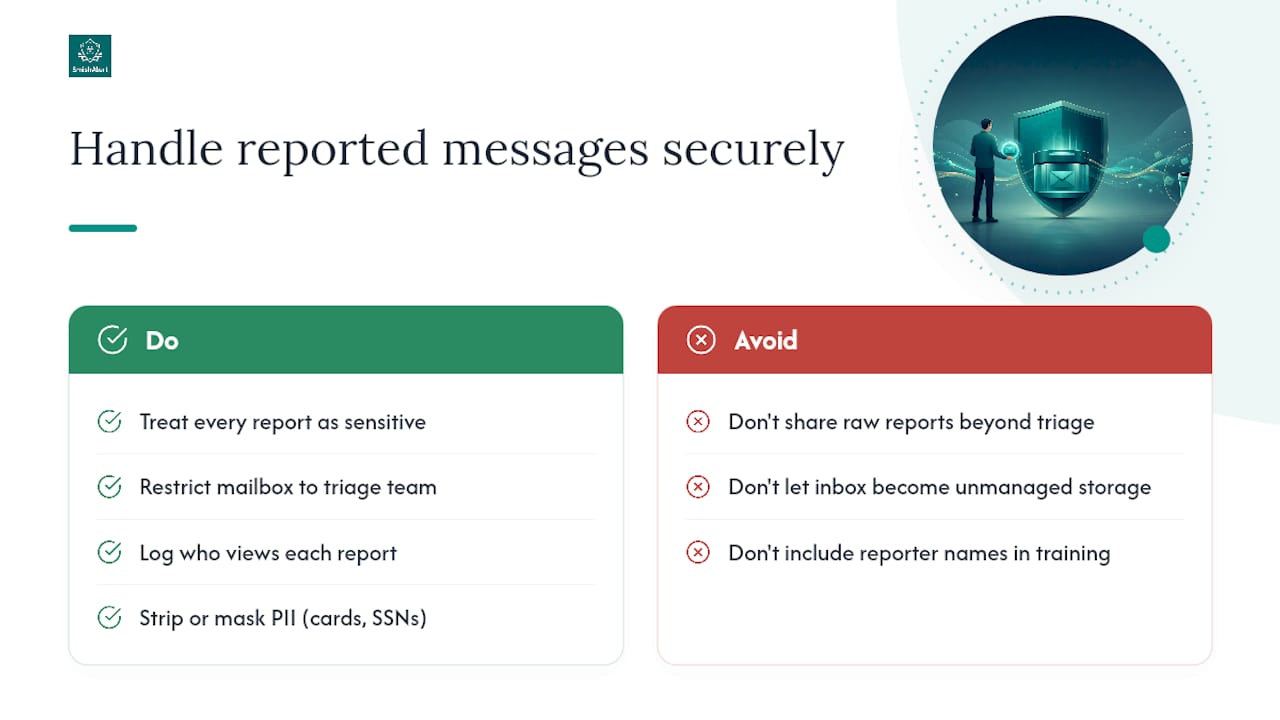
Reported smishing messages often contain personal information, sometimes the employee’s own credentials if they clicked before reporting, sometimes a customer’s data if the message referenced an account. Treat every reported message as sensitive data from the moment it lands in your queue.
Restrict access to the reporting mailbox or ticket queue to the triage team only, and log who views each report. Strip or mask any payment card numbers, Social Security numbers, or health information before the report gets shared beyond the immediate triage group, especially if it’s being used in a training example later. If the organization operates under HIPAA, GLBA, or similar frameworks, reported messages that reference protected data may themselves need to be handled under those rules, not just general IT hygiene.
Retention matters too. Keep reported messages only as long as the investigation and any related legal hold require, then purge them on a fixed schedule rather than letting a reporting inbox turn into an unmanaged data store. Document this retention policy so it survives if the person who set up the mailbox leaves.
Anonymize examples before using them in company-wide training. An employee who reported a suspicious payroll text shouldn’t see their name attached to it in next quarter’s awareness deck, and knowing that in advance makes people more willing to report the next one.
Communication Templates That Get Employees Reporting
Most reporting programs fail silently because nobody tells employees what to do or why it matters. A short, direct message beats a long policy document every time.
Launch announcement, from leadership: “Starting this week, if you get a suspicious text or email, forward it to [reporting address] or use the [Report] button. You won’t get in trouble for reporting something that turns out to be nothing. We’d rather see 100 false alarms than miss one real attack.”
Reminder after a real incident: “Last week, three employees reported a text impersonating our CEO asking for gift cards. Because they reported it fast, we blocked the number before anyone else received it. That’s exactly how this is supposed to work.”
New-hire onboarding line: “If a text or email ever asks you to act urgently, click a link, or share a password, stop and forward it to [reporting address] first. Verification takes thirty seconds. Recovering from a compromised account takes weeks.”
The common thread across all three: name the action, remove the fear, and show a real outcome. Templates that lean on threats or compliance language get ignored. Templates that show a colleague’s report actually stopping something tend to get remembered.
Closing the Loop With Employees Who Report
Nothing kills a reporting program faster than silence after someone does the right thing. If an employee forwards a suspicious text and never hears anything back, they’ll assume reporting doesn’t matter and stop bothering the next time.
Send a short acknowledgment within the same business day, even if it’s just “Got it, we’re reviewing.” Follow up within a week with the outcome, confirmed threat, blocked and shared with the team, or false positive and here’s why. When a report leads to a blocked campaign, tell the reporter specifically, not just the wider team in a generic newsletter. That direct feedback loop is what turns a one-time reporter into someone who checks every suspicious message from then on.
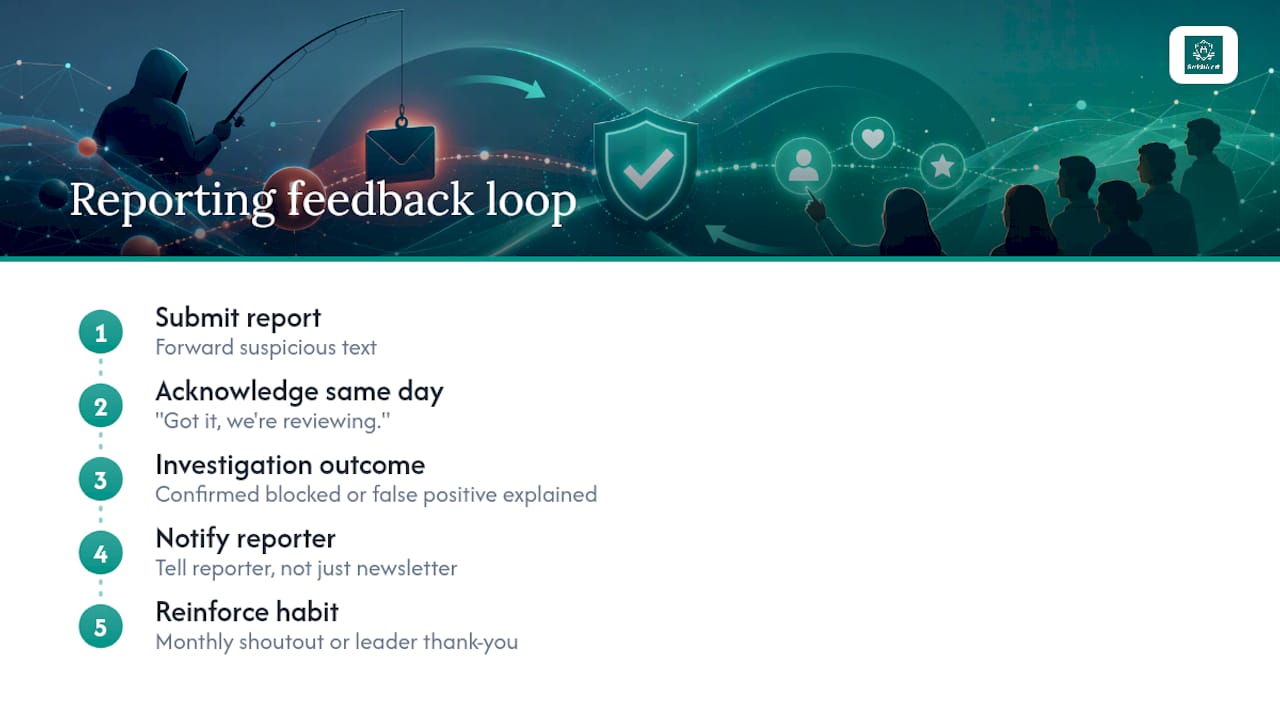
Consider a lightweight recognition mechanism, a monthly shoutout, a small reward, or simply a leader’s thank-you message, tied to reporting volume and quality rather than to catching a specific “gotcha” simulation. The goal is reinforcing the habit, not gamifying it into a competition that rewards volume over accuracy.
Measuring False Positives to Keep Triage Fast
A reporting program that generates 200 reports a week and burns out your triage team is not healthier than one generating 50 well-targeted reports, so tracking report quality matters as much as tracking volume.
- False-positive rate: the share of reports that turn out to be legitimate messages, tracked monthly to catch drift.
- Repeat-reporter accuracy: whether the same individuals consistently report real threats versus routine spam.
- Time-to-triage-close: how long low-severity reports sit before resolution, a proxy for backlog health.
- Report completeness: what percentage of reports arrive with a usable screenshot or forwarded original versus a vague description.
Rising false positives usually mean training is unclear about what counts as suspicious, not that employees are careless. Use those numbers to sharpen training examples rather than to discourage reporting; punishing over-reporting is the fastest way to talk yourself back into under-reporting, which is the exact problem you started trying to fix.
Legal and Compliance Considerations for Workplace Smishing Reports
Smishing reporting touches several compliance obligations depending on your industry and the data involved in the attack. If a reported message references customer financial data, healthcare information, or payment card details, your incident response may trigger breach notification requirements under frameworks like GLBA or HIPAA, separate from the reporting workflow itself.
Document your retention and access policies for reported messages before an incident happens, not during one. Regulators and auditors increasingly expect organizations to show they have a defined process for handling employee-reported phishing, not just a technical control stack. Coordinate with legal counsel on when a smishing report involving a confirmed executive impersonation or wire-fraud attempt needs to be reported externally, since some incidents cross into law enforcement territory quickly, particularly anything involving attempted fund transfers.
Employee monitoring laws in some jurisdictions affect how you can review personal-device content, even when an employee voluntarily forwards a message from their own phone. Build your BYOD reporting policy with that in mind, and make clear to employees what you will and won’t access on their personal device as part of the reporting process.
Why the Best Reporting Programs Win on Simplicity, Not Sophistication
The programs that work aren’t the ones with the most detection rules. They’re the ones where a scared employee knows exactly what button to press and trusts that pressing it won’t backfire on them. Simplicity, honest measurement, and a little empathy do more than another layer of tooling. Start with a small pilot, watch the reporting rate move, and adjust training based on what people actually send you, not what a template predicted they would.
— Sophie
How Smishalert Strengthens Your Employee Reporting Program
Employee reporting tells you what people notice. Smishalert tells you what the whole organization is actually facing, across SMS, iMessage, and WhatsApp, on managed devices and personal phones alike, correlated into campaigns instead of scattered one-off tickets your SOC has to piece together manually.

That correlation is the piece most reporting programs are missing. A single employee report is a data point. Fifteen reports across finance, HR, and three executive assistants, tied to the same spoofed number within a two-hour window, is an active campaign that needs containment now, not next week. Smishalert’s campaign correlation and reporting workflows feed that pattern directly into your existing SIEM, so triage analysts aren’t manually stitching together mobile reports from a shared inbox.
For teams running a BYOD fleet or supporting executives who won’t accept MDM enrollment, Smishalert’s on-device filtering and audit-ready reporting close a visibility gap that email security tools were never built to see. If you’re not sure where your current program stands, run the two-minute self-eval to see where the gaps are before you scale training or add headcount.
Sources
- How to recognize and report spam text messages | Consumer Advice (FTC)
- Reportfraud
- Avoid the temptation: smishing scams | FCC
- The Ultimate Guide to Preventing Smishing Attacks | Living Security