
Smishing-Resistant Onboarding Communications: CISO Checklist

Onboarding communications must be treated as a security control, not a convenience function. Every provisioning message sent to a new hire is a template attackers can study, clone, and weaponize. The seven controls below are the highest-impact actions your security team can apply immediately to design smishing-resistant onboarding communication and close the window before it becomes a breach.
- Use verified A2P/registered sender channels for all SMS-based provisioning messages so recipients can distinguish legitimate senders from spoofed numbers.
- Standardize sender identity and templates across HR, IT, and management so new hires learn one canonical pattern from day one.
- Set channel expectations in the offer letter — specify which channels will and will not be used for credential, payroll, or banking requests.
- Require out-of-band (OOB) verification for any message requesting credential changes, payroll updates, or financial actions, regardless of how legitimate it appears.
- Enforce reception filtering and DMARC/SPF/DKIM on corporate messaging infrastructure to shift detection burden from human judgment to infrastructure.
- Run a first-week smishing simulation followed by immediate just-in-time training, aligned with NIST Cybersecurity Framework (CSF) PR.AT-1 awareness controls.
- Instrument reporting and campaign correlation using a platform like Smishalert so individual reports aggregate into detectable attack patterns.
Pro Tip: Publish the channel expectations list as a one-page attachment to the offer letter, signed by HR. New hires who receive it before day one arrive with a mental model that makes attacker messages immediately suspicious.
Key Takeaways
Designing smishing-resistant onboarding communication requires combining verified sender controls, standardized templates, explicit channel expectations, and instrumented reporting before the first message reaches a new hire.
| Point | Details |
|---|---|
| Onboarding = security control | Treat every provisioning message as a security artifact with a verified sender, approved template, and OOB verification step. |
| First week is highest risk | Attackers target new hires in the first five business days, when urgency is normalized and organizational context is lowest. |
| Infrastructure over human judgment | DMARC/SPF/DKIM, reception filtering, and on-device filtering shift detection burden away from new hires who lack the context to spot fakes. |
| Pilot with metrics | Measure reporting rate, click rate, and time-to-detection against defined thresholds before committing to full rollout. |
| Smishalert for detection | Smishalert provides cross-channel detection, campaign correlation, and on-device iOS filtering specifically suited to onboarding-window threat visibility. |
Table of Contents
- Why the onboarding window is uniquely vulnerable to smishing attacks
- Core design principles for smishing-resistant onboarding messages
- What technical controls backstop secure onboarding messaging?
- Operational governance: who sends what, when, and how to handle exceptions
- Playbook and safe message templates for common onboarding scenarios
- How to run a 30–90 day pilot and measure success
- Implementation timeline and cost buckets for the first 90 days
- How Smishalert supports onboarding window detection and what to validate in a pilot
- One-page implementation checklist for the first 90 days
- Why treating onboarding as a security control changes the program’s outcome
- Smishalert gives security teams visibility where onboarding attacks actually happen
- Sources
Why the onboarding window is uniquely vulnerable to smishing attacks
New hires are high-value targets for a specific, predictable reason: they cannot distinguish a legitimate provisioning message from a crafted one. They have no baseline for what IT actually sounds like, no familiarity with HR’s communication cadence, and no peer network to ask. Behavioral research confirms that the first months of employment are a demonstrable adjustment period where knowledge alone changes behavior very little. Training must be early, short, repeated, and tied to the actual work environment to affect behavior.
Attackers exploit this gap systematically. LinkedIn announcements, press releases, and job board postings signal role, start date, and seniority. A threat actor who knows a new CFO joins on Monday can send a spoofed IT provisioning message on Tuesday morning and receive a credential before the target has spoken to a single colleague. The attack surface compounds because new employees receive a high volume of legitimate provisioning messages during their first week — account setup, benefits enrollment, payroll registration, and vendor invites — making one more urgent-looking message easy to miss.
The attack timing is not random. Smishing campaigns targeting new hires typically occur early during their first days, when urgency is normalized and the new hire has the least organizational context to apply skepticism.
Stat to track: Organizations that pair awareness programs with layered infrastructure controls — SPF/DKIM/DMARC, reception filtering, and sandboxing — measurably reduce the message-based attack surface new hires face by shifting detection from human judgment to infrastructure.
Core design principles for smishing-resistant onboarding messages
Secure onboarding communications follow a small set of anti-smishing design principles that make attacker impersonation structurally harder.
- Single verified sender identity. Every SMS or messaging-app contact from IT uses one registered number or handle. Attackers cannot blend in when there is only one legitimate pattern.
- No links in high-risk messages. Payroll setup, credential provisioning, and banking-change requests should direct recipients to a named internal portal, not a URL. A message that says “log in at workday.yourcompany.com” is harder to spoof than one with a shortened link.
- Remove urgency cues. Phrases like “respond within 2 hours or your account will be locked” are attacker hallmarks. Legitimate IT messages state a deadline without threatening consequences.
- Explicit OOB verification steps. Every message that requests action on a sensitive account should include a verification instruction: “If you did not request this, call the IT helpdesk at [direct number].”
- Template consistency. HR and IT messages follow a published format — same greeting, same sign-off, same portal reference. Deviation from the template is itself a detection signal.
- Role-specific threat notes. Finance, HR, and executive new hires receive a brief note in their onboarding packet explaining the specific attack types targeting their role (payroll fraud, executive impersonation, vendor compromise).
Smishing defenses are as much policy and process as technology: setting explicit channel expectations and never requesting credentials by text are foundational controls that cost nothing to implement.
Pro Tip: Embed the OOB verification step directly into the existing HR ticket-close workflow. When IT marks an account provisioned, the system automatically appends the helpdesk callback number to the confirmation message. No separate confirmation step required.
What technical controls backstop secure onboarding messaging?
Infrastructure controls reduce attacker plausibility before a message reaches a new hire’s device.
| Control | What it stops | Owner | Deployment notes |
|---|---|---|---|
| A2P/Verified SMS registration | Sender spoofing on SMS provisioning messages | IT/Messaging vendor | Register all outbound onboarding numbers with carriers via 10DLC or Verified SMS |
| DMARC/SPF/DKIM enforcement | Email-to-SMS gateway spoofing and domain impersonation | Security/IT | Enforce reject policy; monitor DMARC aggregate reports weekly |
| Reception filtering | Malicious links and known-bad sender patterns reaching inboxes | Security | Tune rules for onboarding-period sender patterns; review weekly during pilot |
| On-device iOS filtering | Smishing messages filtered before the user sees them | Security/MDM | Deploy via Smishalert’s on-device iOS filtering for managed and BYOD devices |
| MDM/conditional access | Unmanaged devices accessing corporate resources | IT | Enforce for corporate devices; document BYOD exceptions with compensating controls |
| SSO/MFA on messaging apps | Unauthorized device linking and account takeover | IT/IAM | Govern messaging apps as access-controlled systems with SSO, MFA, and rapid revocation on offboarding |
| App-based OTP (not SMS OTP) | SIM-swap and interception of SMS one-time passwords | Security | Prefer authenticator apps or hardware tokens for high-risk onboarding flows |
BYOD environments require explicit compensating controls. Where MDM is unavailable, mobile phishing protection can be deployed without MDM using agent-based or profile-based approaches that preserve device privacy while maintaining visibility.
Operational governance: who sends what, when, and how to handle exceptions
Ambiguity in sender ownership is an attacker’s best friend. Closing that gap requires explicit role assignments.
Sender role ownership:
- HR owns benefits enrollment, payroll portal invitations, and policy acknowledgment requests — sent from a single named HR inbox or registered number.
- IT owns account provisioning, MFA setup instructions, and device enrollment — sent from the IT helpdesk number or ticketing system only.
- Hiring manager owns schedule and team introduction messages — sent from corporate email only, never personal mobile.
Timing rules:
- High-risk messages (payroll, credential setup) are sent only during business hours, on weekdays.
- No provisioning message is sent via personal messaging apps, WhatsApp, or iMessage from individual employees.
- Any exception requires Security team approval and is logged.
Verification and escalation flow:
- New hire receives a message requesting sensitive action.
- New hire checks the sender against the published sender list in their onboarding packet.
- If the sender matches, the new hire proceeds. If not, they call the IT helpdesk directly.
- IT helpdesk confirms or flags the message as suspicious.
- Security team receives the report, correlates with other reports, and opens an incident if warranted.
Frictionless reporting tools and explicit permission to report measurably increase early reporting rates. New hires need to be told it is expected and safe to flag suspicious messages — not just permitted.
Playbook and safe message templates for common onboarding scenarios
The following templates apply the design principles above. Each is safe-by-design: no shortened links, no urgency language, explicit OOB verification, and a single canonical sender identity.
IT account setup (SMS): Payroll portal invitation (SMS): Benefits enrollment (email only — no SMS): Send via corporate email from the named HR benefits address. No links to external enrollment platforms via SMS.
Vendor onboarding invite: Pro Tip: Tag each approved template in your HR information system (HRIS) with a “security-reviewed” label and a version date. When IT or HR drafts a new onboarding message, the HRIS workflow requires selecting an approved template or routing the draft to Security for review.
Role-specific simulations run in the first week, followed by immediate just-in-time training, make these templates far more memorable. A new hire who has already encountered a simulated smishing message reads the real template with a different level of attention.
How to run a 30–90 day pilot and measure success
A structured pilot validates controls before full rollout and gives leadership defensible metrics.
Pilot setup steps:
- Select a cohort of 25–50 new hires joining during the pilot window.
- Enable verified A2P sender registration and reception filtering for the cohort.
- Deploy on-device filtering (iOS/Android) via Smishalert for cohort devices.
- Publish the sender list and OOB verification steps in cohort onboarding packets.
- Run a simulated smishing message in week one; record click rate and reporting rate.
- Collect metrics weekly for 30–90 days.
- Present results to CISO and HR leadership at day 30 and day 90.
| Metric | Definition | Target threshold |
|---|---|---|
| Reporting rate | % of simulated smishing messages reported vs. received | by week 4 |
| Click rate on simulated messages | % of cohort who clicked a simulated smishing link | <10% by week 8 |
| Time-to-detection | Minutes from first report to Security team awareness | <30 minutes |
| Blocked messages | Count of messages blocked by reception filtering per week | Baseline + trend |
| Campaign correlation events | Number of reports linked to a single campaign by Smishalert | Track from week 1 |
Baseline measurement is non-negotiable. Without a pre-pilot click rate and reporting rate, you cannot demonstrate improvement to leadership or justify full rollout budget.
Implementation timeline and cost buckets for the first 90 days
Phased timeline:
- Weeks 0–2: Publish sender policy, draft and approve templates, assign sender role ownership, brief HR and IT leads.
- Weeks 2–6: Register A2P/10DLC senders, tune reception filters, deploy on-device filtering for pilot cohort, configure Smishalert reporting integration.
- Weeks 6–12: Execute pilot, run week-one simulation, collect metrics, review at day 30.
- Weeks 12–90: Evaluate pilot results, present to leadership, phase rollout to all new hires, expand Smishalert coverage to full employee population.
Cost buckets:
- Staffing/time: Security analyst time for policy drafting, template review, and pilot management (estimated 0.25–0.5 FTE for 90 days).
- A2P/10DLC registration: Carrier registration fees for verified SMS sender numbers (fees vary by carrier and volume; budget for initial registration plus monthly throughput fees).
- Tooling: On-device filtering licenses, MDM expansion if required, and Smishalert pilot engagement (Smishalert’s paid 30-day pilot fee is credited toward the first annual subscription).
- Simulation platform: If not already licensed, budget for a smishing simulation capability or use Smishalert’s built-in campaign correlation to identify real attacks during the pilot window.
Pro Tip: Frame the pilot cost to leadership as a one-time assessment with a credited path to annual subscription. The pilot fee is not sunk cost — it is the measurement instrument that justifies the program budget.
Stat to track: Behavioral science research shows that training delivered early, in short bursts, and tied to the actual work environment produces measurably better behavior change than a single onboarding session. Budget for repeated micro-training touchpoints, not a one-time module.
How Smishalert supports onboarding window detection and what to validate in a pilot
Smishalert maps directly to the controls described above. Its core capabilities relevant to onboarding windows include:
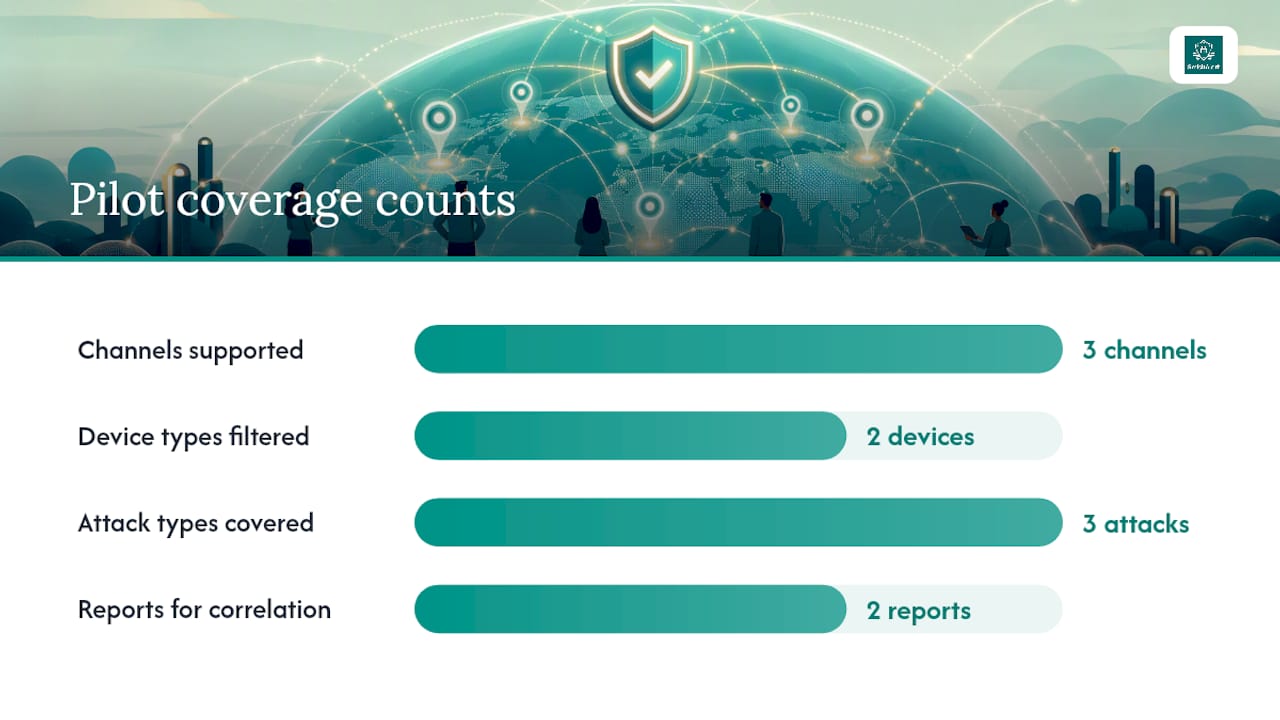
- Cross-channel detection across SMS, iMessage, and WhatsApp — the three channels most commonly used in new-hire social engineering campaigns.
- On-device iOS filtering that intercepts smishing messages before the user sees them, covering both managed and BYOD devices.
- Campaign correlation that links individual reports from multiple new hires into a single attacker campaign, giving Security teams early warning of coordinated targeting.
- SIEM/API integration for feeding smishing telemetry into existing SOC workflows and audit-ready incident reporting for compliance-sensitive environments.
- Cross-channel reporting that gives security directors a unified view of messaging-based threats across the organization’s human attack surface.
Pilot validation checklist for Smishalert:
- Confirm campaign correlation fires within 30 minutes of two or more reports from the same cohort.
- Verify on-device iOS filtering blocks a test smishing message on both managed and BYOD devices.
- Validate that the reporting workflow integrates with your SIEM or ticketing system without manual intervention.
- Confirm detection-to-block latency meets your target threshold from the pilot metrics table.
- Review Smishalert’s social engineering attack coverage to confirm it covers executive impersonation, payroll fraud, and credential harvesting — the three attack types most common in onboarding windows.
Pro Tip: Run the 2-minute readiness self-assessment before the pilot kickoff meeting. It surfaces gaps in your current messaging visibility that the pilot should be designed to close.
One-page implementation checklist for the first 90 days
Quick wins (Weeks 0–2) — Owner: Security + HR
- Draft and publish sender policy (who sends what, via which channel). Owner: Security. SLA: 5 business days.
- Approve and tag message templates in HRIS. Owner: HR + Security. SLA: 5 business days.
- Add channel expectations page to offer letter template. Owner: HR. SLA: 3 business days.
- Brief hiring managers on the one-page manager guide. Owner: Security. SLA: 10 business days.
Pilot enablement (Weeks 2–6) — Owner: IT + Security
- Register A2P/10DLC sender numbers with carriers. Owner: IT. SLA: 10 business days.
- Tune reception filters for onboarding sender patterns. Owner: Security. SLA: 5 business days.
- Deploy on-device filtering for pilot cohort. Owner: IT. SLA: 5 business days.
- Configure Smishalert reporting integration with SIEM. Owner: Security. SLA: 10 business days.
Pilot execution (Weeks 6–12) — Owner: Security
- Run week-one smishing simulation for cohort. Owner: Security. SLA: Day 5 of each new hire’s first week.
- Collect and review pilot metrics at day 30 and day 90. Owner: Security. SLA: Ongoing.
- Present results to CISO and HR leadership. Owner: Security Director. SLA: Day 30 and Day 90.
Pro Tip: Paste this checklist into your onboarding runbook as a named section: “Smishing-Resistant Onboarding Controls.” Assign a DRI (directly responsible individual) to each item at the kickoff meeting so ownership is never ambiguous.
Why treating onboarding as a security control changes the program’s outcome
The conventional framing treats onboarding security as a training problem. Run the module, check the box, move on. That framing consistently underperforms because it places the entire detection burden on a new hire who has no organizational context, no peer network, and no baseline for what legitimate messages look like.
The more effective framing treats onboarding communications themselves as a security control. When HR and IT publish a sender list, standardize templates, and set channel expectations before day one, they remove the ambiguity that attackers depend on. A new hire who arrives knowing that IT will never request credentials by text and that payroll changes are processed only through the named HR portal is structurally harder to compromise than one who received a 30-minute security awareness module.
The programs that produce measurable results combine both: early, role-specific simulations with immediate just-in-time training layered on top of infrastructure controls that reduce attacker plausibility before a message reaches the new hire at all. The pilot metrics in this article exist precisely to make that combination measurable and defensible to leadership.
Smishalert gives security teams visibility where onboarding attacks actually happen
Onboarding-window smishing attacks do not announce themselves in your SIEM. They arrive as individual text messages on personal devices, often on a new hire’s first or second day, and they go unreported because new hires do not yet know they are expected to report them. By the time a pattern is visible, credentials may already be compromised.

Smishalert closes that gap. Its cross-channel detection covers SMS, iMessage, and WhatsApp. Its on-device iOS filtering intercepts messages before the user sees them. Its campaign correlation links individual reports into attacker campaigns in near real time, giving your SOC the early warning that manual reporting alone cannot provide. For compliance-sensitive organizations in healthcare, finance, and professional services, the audit-ready incident reporting means every onboarding-window event is documented without additional analyst effort.
The paid 30-day pilot is credited toward the first annual subscription, so the assessment cost is not sunk. Run the 2-minute readiness check to identify your current visibility gaps, then contact Smishalert to scope a pilot for your next onboarding cohort.
Sources
- Cybersecurity Onboarding Training for New Employees | PhishSkill
- The Vulnerable First Months | 2LRN4
- How should security teams govern encrypted messaging apps in sensitive environments?