
3 Budget Moves to Stop Cross-Channel Phishing for SOCs

Cross-channel phishing is a coordinated attack that spreads a single social engineering script across email, SMS, phone calls, and collaboration platforms so no one channel sees the full picture. The primary defense is not better filtering on any single channel. It is correlating signals across channels by timestamp and identity, then requiring independent verification before any privileged request gets approved. If a message asks for credentials, money, or access changes, pause it, report it through one central channel, and verify the requester through a separate, known contact method before acting.
TL;DR:
- Cross-channel phishing scenes combine email, SMS, calls, and collaboration messages within short timeframes, exploiting trust built across multiple platforms.
- Existing security tools mainly focus on individual channels, leaving gaps in detecting coordinated multi-platform campaigns that share common identifiers and timestamps.
- Implementing centralized telemetry and correlation rules focused on behavior, timing, and shared identifiers can improve detection of these complex threats.
- Channel-specific controls, like passkeys, verified callback policies, and QR code restrictions, are essential to prevent initial successful engagement.
- Consolidating reporting paths and training all staff in recognizing multi-channel attack sequences can strengthen organizational defense and response.
Table of Contents
- What Is Cross-Channel Phishing, and How Does It Work?
- Why Traditional Defenses Fall Short Against Cross-Channel Attacks
- Building a Correlation Architecture That Catches Coordinated Campaigns
- Channel-Specific Controls That Actually Close the Gaps
- Governance: Reporting Paths, Verification, and Training Cadence
- How to Run Cross-Channel Phishing Simulations That Actually Prove Something
- What SmishAlert Sees That Inbox Tools Miss
- Where Security Budgets Need to Go in 2026
- Get Visibility Into the Channels Your Security Stack Can’t See
- Key References and Primary Sources
- Sources
- FAQ
What Is Cross-Channel Phishing, and How Does It Work?
Cross-channel phishing works because no single security tool sees the entire attack. An adversary might start with a reconnaissance email that gets ignored, then follow up with a text message referencing the same fake invoice, then place a phone call that sounds like it’s clearing up “the email you got earlier.” Each touchpoint alone looks marginal. Stacked together within a tight window, they form a convincing, almost theatrical case for compliance.
A typical sequence plays out like this: an attacker scrapes a target’s job title and reporting structure from LinkedIn, then sends a spoofed email from a “vendor” flagging an overdue invoice. Minutes later, an SMS arrives from a number matching the vendor’s area code, referencing the same invoice number. If the target hesitates, a phone call follows, sometimes using AI-generated voice cloned from a public earnings call or webinar. If the target still needs convincing, a message lands in Slack or Microsoft Teams, appearing to come from a coworker who “already approved this.” Each step exploits the credibility built by the one before it. That’s sequential social proof at work, and it’s precisely why multi-channel phishing outperforms single-channel attempts.
OSINT tools and generative AI have made this kind of personalization cheap. An attacker no longer needs a skilled writer or a native English speaker. They need a scraped org chart, a voice sample, and a few automated scripts that fire messages on a schedule. The result is a campaign that feels less like spam and more like an ongoing conversation with a real person, because from the target’s point of view, it is one continuous story told across four different apps.
This is also why timing is one of the strongest available detection signals. A vendor email and a “confirming” text arriving eleven minutes apart, from different systems, referencing the same fake invoice, is a pattern no single tool tracks in isolation but becomes obvious once the timestamps sit side by side.
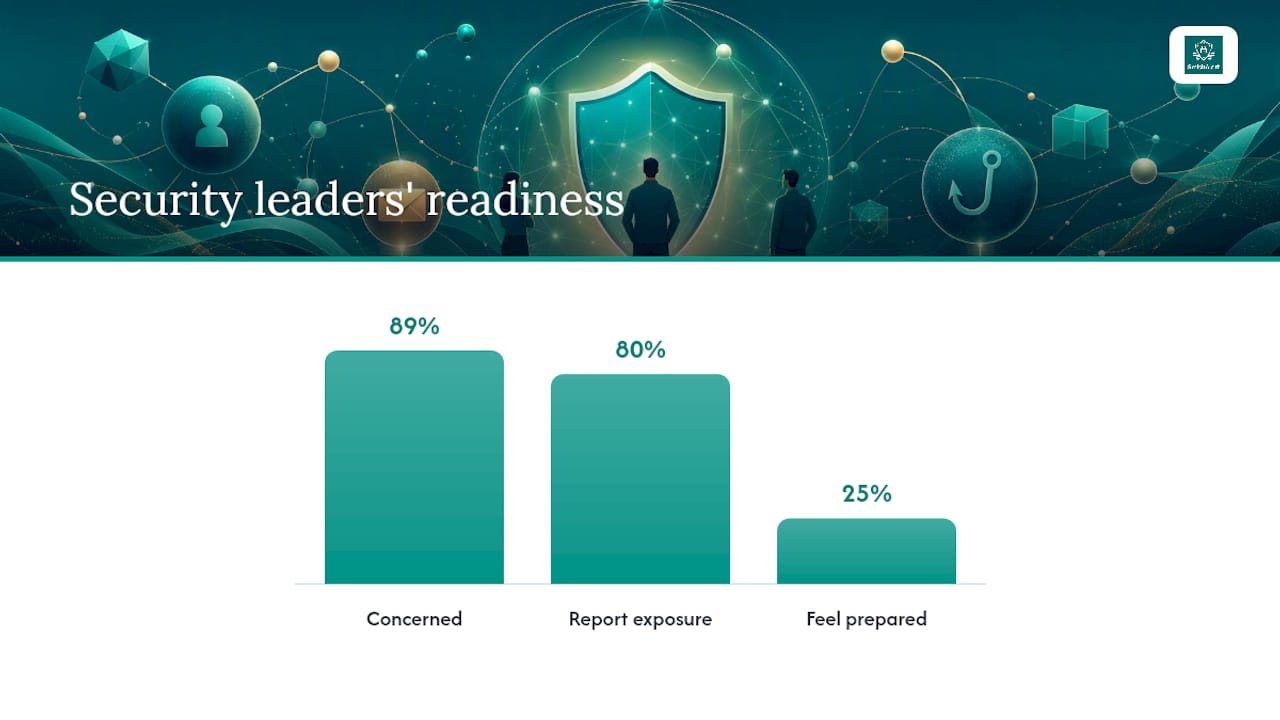
Security decision-makers are aware of the scale of this problem, even if their tooling hasn’t caught up. According to Cloudflare’s research, 89% of security decision-makers are concerned about multichannel phishing, 8 in 10 report exposure across multiple channels, and only 1 in 4 feel fully prepared to respond.
Common cross-channel sequencing patterns include:
- Email reconnaissance followed by an SMS “confirmation” referencing the same fraudulent detail
- A vishing call using cloned or AI-generated voice to add urgency after a text goes unanswered
- A collaboration-app message impersonating a colleague to legitimize a request already denied by email
- QR codes embedded in physical mail or posters that redirect to a credential-harvesting page after digital channels get flagged
Why Traditional Defenses Fall Short Against Cross-Channel Attacks
Most security stacks were built to stop a single channel’s worst-case scenario, not a campaign that hops between four of them. Email gateways do URL rewriting and sandboxing reasonably well, but that protection stops at the inbox. It has no visibility into the SMS message referencing the same link twenty minutes later, and no visibility into the Teams message that follows.
Endpoint detection and response tools face a similar blind spot. EDR is built to catch malware behavior on managed endpoints, not credential theft happening inside a browser session on a personal phone. Bring-your-own-device policies compound the problem: if an employee reads a phishing SMS on a personal iPhone and enters credentials into a cloned login page, EDR never sees it, because there’s no agent on that device and no process to inspect.
Identity systems have their own gap. Once an attacker has a valid session token or a stolen password, many identity and access management setups treat that session as legitimate until something else trips an alarm. Illicit consent grants, where a user approves a malicious OAuth app thinking it’s a routine permission request, are a well-documented example. Microsoft’s guidance on detecting and remediating illicit consent grants exists precisely because this kind of abuse slips past traditional email controls entirely.
Industry reporting backs up the scale of the shift. IT Pro’s coverage of multi-channel phishing cites a significant reported increase in Microsoft Teams-based attacks in a recent measured window, evidence that attackers are actively hunting for the channels where defenses are thinnest.
Gaps that let cross-channel campaigns slip through unnoticed:
- URL rewriting and sandboxing apply to email only, leaving SMS links and QR codes unscanned
- EDR agents rarely cover personal or BYOD devices where smishing and vishing usually land
- Session and token theft in a browser often looks identical to a legitimate login to identity tools
- Consent-based abuse of connected apps bypasses credential checks altogether
Building a Correlation Architecture That Catches Coordinated Campaigns
Catching a cross-channel campaign means treating every channel’s telemetry as part of one dataset, not five separate ones. That requires pulling signals into a common view and giving analysts (or automation) a way to spot when isolated events actually belong to the same incident.
Start with what to ingest. A workable architecture pulls in email header and URL data, SMS phishing reports (ideally from a dedicated mobile reporting tool), telephony and call logs, collaboration platform APIs (Teams, Slack, Zoom), browser telemetry from managed devices, and identity and authentication logs showing logins, MFA challenges, and privilege changes.
Normalization is where most correlation efforts break down. Every one of those sources uses different identifiers, timestamp formats, and event structures. Standardize on a few anchors: a canonical timestamp (UTC, to the second), a shared identifier per person (email address or employee ID, not username, since usernames vary by system), and session linking wherever possible, so a login event and a subsequent privilege change can be tied to the same authenticated session rather than treated as coincidence.
Pro Tip: Build your correlation window around behavior, not convenience. A 15 to 30 minute window catches most coordinated sequences, based on how tightly attackers space their follow-up touches, according to research on temporal correlation as a practical detection heuristic. Widen it for slower-moving vendor-impersonation campaigns that unfold over days.
A correlation rule that actually catches something looks less like a single-event alert and more like a chain: an inbound email referencing a vendor invoice, an SMS from an unfamiliar number citing the same invoice number within 30 minutes, followed by a new-device login attempt, followed by a request to change payroll banking details. No single event in that chain crosses a severity threshold on its own. Together, they’re a near-certain compromise attempt.
Design rules that weight three things instead of leaning on any single event’s severity score:
- Temporal proximity — how close together, in time, do the events land across different systems?
- Shared identifiers — does the same email address, phone number, or account touch multiple channels in the sequence?
- Action intent — does the sequence end in a credential submission, a privileged request, or a financial change?
Once a correlation rule crosses its threshold, SOAR playbooks should act without waiting for an analyst to manually assemble the timeline. That typically means isolating the affected account or session, forcing reauthentication with a second factor, and notifying both the security team and the employee involved, all within minutes of the threshold being met. AI-driven cross-channel campaigns move fast enough that manual triage alone can’t keep pace with the automation attackers already use.
Channel-Specific Controls That Actually Close the Gaps
Correlation catches coordinated campaigns after they start moving. Channel-specific controls are what keep individual touchpoints from succeeding in the first place, and each channel needs its own defensive posture.
Email remains the entry point for most sequences, so the fundamentals still matter: DMARC, DKIM, and SPF records stop basic spoofing, and URL rewriting catches known-bad links at click time. The bigger shift is toward phishing-resistant authentication. Passkeys remove the password entirely from the equation, which neutralizes a huge share of credential-harvesting attempts regardless of how convincing the lure email looks. Microsoft’s guidance on multifactor authentication is a useful baseline for teams not yet ready for a full passkey rollout.
SMS and smishing need their own reporting path, since most employees have no idea who to forward a suspicious text to, if anyone. Shortlink scanning catches the URL-shortener tactic attackers use to hide malicious destinations, and mobile filtering tools can flag known smishing patterns before an employee even opens the message. Vendors and SSO providers should also notify security teams directly when they detect impersonation attempts using their branding. Smishalert’s guide to SMS phishing prevention covers this ground in more tactical detail.
Voice and vishing call for a policy, not just awareness training: mandatory callback verification for any high-risk request, using a number pulled from an internal directory, never a number provided in the suspicious call itself. Vendor payment changes and executive requests for wire transfers should require this callback step without exception, regardless of how urgent or senior the caller sounds.
Collaboration tools like Teams and Slack need governance most companies still treat as an afterthought. That means reviewing third-party app consent requests before they’re approved, restricting link previews that can mask malicious destinations, and layering conditional access policies on top of SSO so a stolen session token doesn’t automatically grant access from an unrecognized device or location.
Browsers and QR codes are the newest weak point. Managed browser extensions or browser isolation tools can block credential entry on unrecognized domains, and a clear organizational policy on scanning QR codes from unverified physical sources (posters, flyers, unsolicited mail) closes a vector most security awareness programs still ignore entirely.
Controls worth prioritizing across the stack:
- Passkeys or phishing-resistant MFA on every account with financial or administrative access
- A single, well-publicized reporting address for suspicious SMS, calls, and collaboration messages
- Mandatory callback verification for vendor and executive payment requests
- App consent reviews and conditional access policies inside collaboration platforms
- Browser-level blocking of credential entry on unrecognized or newly registered domains
Governance: Reporting Paths, Verification, and Training Cadence
Technical controls only work if the humans around them know what to do when something looks off. That starts with collapsing every reporting path into one destination. Employees shouldn’t have to figure out whether a suspicious text goes to IT, a suspicious call goes to security, and a suspicious Teams message goes nowhere at all. One funnel, one triage process, and analysts who treat everything arriving through it with equal seriousness regardless of channel.
Privileged requests need a policy layer that doesn’t bend under pressure. Any request to change payroll details, wire funds, or grant elevated access should require independent callback verification using a contact method pulled from an internal directory, never a number or address supplied in the request itself. Build a documented exception process for genuine emergencies, but make that exception process harder to invoke than the standard path, not easier.
Training cadence matters more than training content. Executives, finance teams, and anyone with payment authority face a dramatically different threat profile than the general workforce and should get scenario-based training more frequently, built around the specific sequences attackers actually use against high-value targets.
Four governance changes worth making this quarter:
- Consolidate SMS, voice, and collaboration-app reporting into the same intake process used for email
- Mandate independent callback verification for every privileged financial or access request
- Increase training frequency for finance and executive roles, with scenarios modeled on real cross-channel sequences
- Update incident response playbooks so temporally correlated events across channels get treated and triaged as a single incident, not several unrelated tickets
That last point deserves emphasis. A SOC that opens separate tickets for a suspicious email, a suspicious text, and a suspicious login an hour later has already lost the thread connecting them. The playbook needs to force that connection automatically.
How to Run Cross-Channel Phishing Simulations That Actually Prove Something
Email-only phishing tests have told security teams the same limited story for over a decade: how many people click a link. A simulation combining email, SMS, and a vishing call measures something far more useful: whether someone approves a fraudulent action even after multiple, independently suspicious touches have already occurred.
Build these scenarios in stages. Start with a realistic pretext, a vendor invoice, a payroll change, an IT password reset, and script each channel’s message to build believably on the last, exactly the way a real attacker would. Get legal and HR sign-off before running any exercise that includes simulated voice calls or deepfake audio; consent and disclosure requirements vary by organization and jurisdiction, and skipping that step turns a training exercise into a liability.

Vishing and deepfake-based tests need tighter operational guardrails than a typical email simulation. Cap the number of participants per test, brief a small escalation team in advance so a confused employee has somewhere to call and confirm it’s a drill, and never simulate a request involving real financial movement, even in a sandboxed test environment.
The metrics that matter go beyond click rate. Track time-to-report, how fast an employee flags a suspicious message after receiving it. Track incident escalation rate, how often a report actually reaches the security team versus getting ignored or handled informally. Track click-to-compromise, whether a click led to actual credential entry or session compromise, not just a link visit. Track recovery time, how long it took to contain the simulated incident once flagged.
Pro Tip: Run your first combined simulation on a small pilot group, IT and security staff work well, before rolling it out to finance or executive teams. It surfaces scripting problems and escalation gaps without burning credibility on your highest-risk population.
Prioritize cadence by risk. Finance and executive groups warrant quarterly scenario testing; the general workforce can run on a semiannual cycle without losing much signal.
What SmishAlert Sees That Inbox Tools Miss
Most security stacks stop watching the moment a message leaves the corporate email environment. SmishAlert exists for everything that happens after that point: SMS, iMessage, WhatsApp, and other mobile channels where employees actually spend their attention and where attackers increasingly move once they know email is being watched.
The platform gives security teams visibility into messaging-based social engineering across managed, BYOD, and executive devices, correlating reported messages into campaigns rather than treating each report as an isolated event. That correlation output feeds directly into SIEM and SOAR workflows, which means a smishing report on one employee’s phone can trigger the same investigation and containment steps as a suspicious email, rather than sitting in a separate, disconnected queue that no one checks until damage is already done.
In practice, that shows up as anonymized campaign patterns SOC teams can act on directly: a wave of payroll-fraud texts hitting a specific department within the same hour, or a cluster of executive-impersonation messages sharing the same spoofed number across multiple targets. Smishalert’s threat intelligence feed tracks these live patterns, giving teams real material to build correlation rules and simulation scenarios around, instead of guessing at what a modern smishing campaign actually looks like.
Where Security Budgets Need to Go in 2026
The pattern across every finding here points the same direction: attackers have already adapted to multi-channel operations, and most defensive budgets haven’t caught up. AI-generated voice cloning is cheap enough now that vishing follow-ups will keep becoming a standard part of the sequence rather than an edge case, and continuous, low-stakes simulation will matter more than the occasional big annual phishing test.
If a security budget only has room for three moves in 2026, they should be cross-channel telemetry (so SMS and voice reports feed the same correlation engine as email), passkeys on every account touching money or elevated access, and automated SOAR playbooks that act on correlation thresholds instead of waiting on manual triage.
None of this requires abandoning existing tools. It requires refusing to let email be the only channel with a security budget behind it. CISOs who keep treating messaging apps and phone calls as someone else’s problem are the ones who’ll be explaining a payroll-fraud incident to their board this year.
— Sophie
Get Visibility Into the Channels Your Security Stack Can’t See
Email security tools have had a decade to mature. Coverage for SMS, iMessage, and WhatsApp is still catching up, and that gap is exactly where cross-channel campaigns land their final move. This gap is closed by giving security teams visibility into mobile messaging similar to what they have in the inbox, without requiring a rebuild of existing SIEM or SOAR infrastructure.

The platform captures reported messages across managed, BYOD, and executive devices, correlates them into campaigns rather than isolated reports, and feeds that data directly into existing security tooling. It’s built specifically to surface the attack types covered in this article, from credential harvesting delivered by SMS to executive impersonation attempts that never touch a corporate inbox. Organizations serious about closing this gap can also review architectural guidance from Contentelli on structuring defenses around modern control points.
Teams that want to see their own exposure before committing to anything can request a 30-day social engineering exposure assessment. The pilot fee credits toward a first annual subscription if the team moves forward, and it produces a concrete picture of what’s currently landing on employee phones, unseen by every tool watching the inbox.
Key References and Primary Sources
- Cloudflare’s multichannel phishing research on security-leader preparedness and exposure
- IT Pro’s reporting on multi-channel phishing risk, including collaboration-platform attack growth
- Verizon’s DBIR healthcare snapshot on the human element in breaches
- Microsoft’s guidance on illicit consent grants and identity-based remediation
- Adaptive Security’s analysis of AI-driven cross-channel phishing threats
Sources
- Multichannel phishing | Cloudflare
- Multi-channel phishing attacks: How to manage the risk | IT Pro
- Detect and remediate illicit consent grants | Microsoft
FAQ
What Are the Four Types of Phishing?
The four commonly cited types are email phishing, spear phishing (targeted at a specific person), smishing (SMS-based), and vishing (voice-based); cross-channel phishing combines several of these into one coordinated campaign rather than relying on just one.
What’s the Difference Between Cross-Channel and Omnichannel Phishing?
Cross-channel phishing describes an attacker deliberately sequencing distinct channels, like email, then SMS, then a call, to build credibility for a single scam. Omnichannel is more often used to describe a unified customer or security experience across channels, not an attack pattern, so the two terms aren’t interchangeable in a security context.
Can I Get Phished Just by Opening an Email?
Opening an email itself rarely causes compromise, but some messages use tracking pixels or exploit rendering flaws, and the real risk comes from clicking embedded links or downloading attachments; treat any unexpected request for credentials or payment changes as suspicious regardless of how the email looks.
Is It Illegal to Phish Someone?
Phishing is illegal in the United States and most jurisdictions worldwide, typically prosecuted under fraud, wire fraud, or computer crime statutes, and penalties often include significant fines and prison time depending on the scale and financial harm caused.