
Create a Mobile Device Acceptable Use Policy: IT Guide

An effective mobile device acceptable use policy (AUP) must define device scope and user roles, bind minimum technical controls to resource access, and make BYOD privacy and remote-wipe rules explicit before a single employee connects a personal device to corporate systems. Convene IT security, HR, legal, and data owners in the first week and produce one artifact: a policy skeleton covering scope, access tiers, and enforcement triggers. NIST SP 800-124r2 and NIST SP 1800-22 both establish that mobile policy without enforced technical controls is not a policy — it is a suggestion.
Table of Contents
- Why mobile device threats demand a formal AUP now
- How to create a mobile device acceptable use policy step by step
- Core AUP clauses: a ready-to-adapt template
- What technical controls must the AUP require?
- How to handle BYOD privacy, consent, and remote wipe
- Mobile incident response: what to do when a device is compromised
- Why messaging threats must shape your AUP requirements
- Onboarding and offboarding: making the AUP operational
- Policy governance: versioning, review cadence, and ownership
- 30/60/90 implementation checklist
- Key Takeaways
- The part most AUPs get wrong
- Smishalert helps you see what your AUP cannot block
- Authoritative sources and suggested searches
Why mobile device threats demand a formal AUP now
The mobile attack surface has expanded well beyond lost devices. Smishing campaigns, credential-harvesting landing pages delivered via SMS, executive impersonation over iMessage, and rogue apps on personal devices all represent threat vectors that sit entirely outside the corporate perimeter. An AUP that ignores messaging-based attacks leaves a visible gap in your human-layer defenses.
U.S. organizations face overlapping regulatory pressure that makes a documented mobile policy non-negotiable:
- HIPAA: Covered entities and business associates must protect electronic protected health information (ePHI) on mobile devices, including encryption and remote-wipe capability.
- CCPA/CPRA: California-regulated organizations must disclose what employee and consumer data is collected on devices and how it is used.
- GLBA: Financial services firms must address mobile access to customer financial data in their information security programs.
- FTC Safeguards Rule: Applies to non-bank financial institutions and requires documented controls for mobile access to customer records.
Aligning your mobile policy with NIST and ISO 27001 provides a governance baseline that satisfies most of these frameworks simultaneously. Legal review remains mandatory for sector-specific obligations, particularly in healthcare and financial services.
How to create a mobile device acceptable use policy step by step
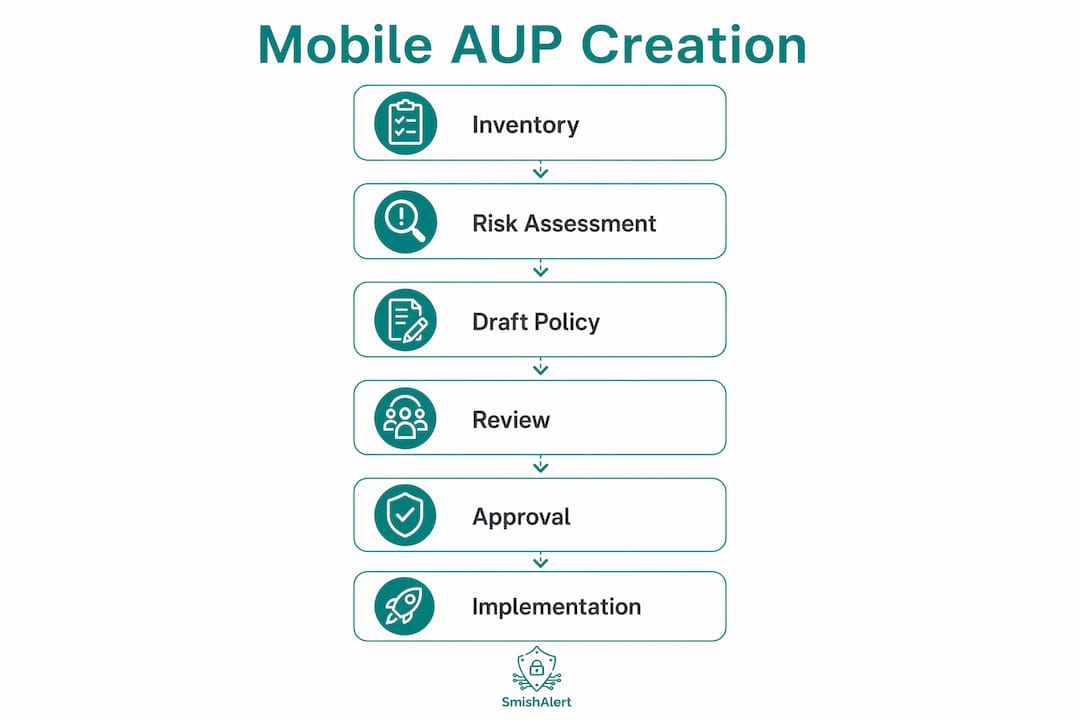
Drafting a defensible AUP follows a repeatable sequence. Skipping steps — especially the risk-tiering and legal review stages — produces policies that either over-restrict low-risk users or leave high-risk access uncontrolled. Stakeholder consultation at the scoping stage directly improves practical applicability and employee compliance.
- Inventory and scope — Catalog every device type accessing corporate resources: corporate-owned, COPE (corporate-owned, personally enabled), BYOD, and contractor devices.
- Define risk tiers — Map user roles to access risk. Email and calendar access is low-risk; production database or source code access is high-risk and requires escalating controls.
- Map technical controls — Assign MDM enrollment, encryption, MFA, and patching requirements to each tier before writing policy language.
- Legal and privacy review — Submit BYOD consent language, remote-wipe clauses, and monitoring disclosures to legal counsel.
- Stakeholder signoff — Obtain approval from IT security, HR, legal, and senior business data owners.
- Rollout plan — Define enrollment deadlines, training delivery, and the enforcement date when non-enrolled devices lose access.
| Step | Owner | Output |
|---|---|---|
| Inventory and scope | IT Security | Device register with categories |
| Risk tiering | IT Security + Business Data Owners | Access tier matrix |
| Technical controls mapping | IT Security | Controls-to-tier table |
| Legal/privacy review | Legal + HR | Approved consent and wipe language |
| Stakeholder signoff | CISO + HR + Legal | Signed approval record |
| Rollout plan | IT Security + Communications | Enrollment timeline and training schedule |
Core AUP clauses: a ready-to-adapt template
Each clause below is written for direct adaptation. Implementation notes follow each block.
-
Purpose and scope: “This policy governs all mobile devices — corporate-owned, COPE, BYOD, and contractor — that access [Organization] systems, data, or networks.” Note: List specific device types and OS platforms in an appendix to avoid ambiguity.
-
Device definitions: Define corporate-owned (organization purchases and controls), COPE (organization owns, personal use permitted within limits), BYOD (employee-owned, enrolled via MDM), and contractor (third-party owned, restricted to approved apps only).
-
Acceptable uses: Business communications, approved productivity apps, and access to corporate resources through managed channels. Personal use on BYOD is permitted within the limits of the enrolled container.
-
Prohibited behaviors: Jailbreaking or rooting enrolled devices; installing unapproved apps that access corporate data; connecting to corporate systems over public Wi-Fi without VPN; forwarding corporate email to personal accounts; photographing or screen-capturing confidential data.
-
Minimum technical controls: MDM enrollment required before resource access is granted; full-device encryption enabled; screen lock with PIN or biometric; OS and app updates applied within 30 days of release; MFA required for any access above the low-risk tier.
-
App and data handling: Only apps on the approved list may access corporate data. Third-party app permissions must be reviewed at enrollment and annually thereafter. Apps requesting access to contacts, location, or microphone beyond their stated function must be denied or removed.
-
Network use: VPN or zero-trust network access (ZTNA) is required when connecting to corporate systems from any untrusted network. Public Wi-Fi use for accessing confidential or restricted data is prohibited without an active VPN session. Legal flag: specify approved VPN clients to avoid ambiguity.
-
Monitoring and privacy statement: “[Organization] may monitor network traffic, app inventory, device compliance status, and corporate container activity on enrolled devices. Personal data outside the corporate container is not accessed or collected.” Legal flag: this language requires BYOD-specific consent; see Section 6.
-
Remote wipe and data separation: Corporate data may be selectively wiped from the corporate container upon device loss, theft, termination, or policy violation. Full-device wipe requires separate signed consent. Legal flag: obtain signed consent before enrollment for any program where full wipe is possible.
-
Incident reporting: Employees must report lost or stolen devices, suspected smishing messages, and unauthorized access attempts to the IT security team within two hours of discovery.
-
Exceptions and approvals: Exceptions to any control require written approval from the CISO and must be documented with a compensating control and expiration date.
-
Enforcement: Violations may result in access revocation, disciplinary action up to termination, and legal action where applicable. GSA guidance establishes a clear escalation path from warning to access removal to remote wipe for government-issued devices — a model worth adopting in the private sector.
-
Acknowledgement: “I have read, understood, and agree to comply with this policy.” Signature, printed name, date, device identifier.
Pro Tip: Keep the employee-facing document under three pages. Move detailed technical specifications — MDM configuration baselines, approved app lists, VPN client requirements — to a linked technical appendix that IT teams maintain separately.
What technical controls must the AUP require?

Policy language without enforced controls is the most common failure mode in mobile security programs. NIST SP 800-124r2 explicitly recommends centralized EMM/MDM to automate detection and remediation of noncompliant devices, converting compliance from voluntary to automatic.
| Control | Minimum Setting | Enforcement Mechanism |
|---|---|---|
| Device enrollment | MDM required before access | Conditional access policy blocks unenrolled devices |
| Encryption | Full-device encryption enabled | MDM compliance check at enrollment |
| Screen lock | PIN (6+ digits) or biometric; 5-minute timeout | MDM policy push |
| MFA | Required for medium/high-risk access | IAM/SSO conditional access rule |
| OS patching | Applied within 30 days of release | MDM compliance alert; access blocked after 60 days |
| App controls | Approved list enforced; sideloading blocked | MDM app allowlist/denylist |
| VPN/ZTNA | Required for untrusted networks | Per-app VPN or ZTNA client enforced via MDM |
| MTD/antivirus | Mobile threat defense agent installed | MDM required app |
| Telemetry | Limited to compliance status and app inventory | MDM configuration; documented in privacy statement |
Each row in this table maps directly to a policy clause. If your AUP references a control that your MDM cannot enforce, document the compensating control and the manual verification schedule.
How to handle BYOD privacy, consent, and remote wipe
The tension between employee privacy and organizational security is sharpest in BYOD programs. NIST SP 1800-22 identifies this balance as the primary challenge and recommends privacy-preserving technical solutions — specifically, containerization that separates corporate data from personal data — combined with explicit written consent.
A compliant BYOD consent statement must include:
- The scope of monitoring (network traffic, app inventory, compliance status — not personal data)
- The data types collected and who has access (IT security team, not HR or management)
- Remote wipe conditions: selective container wipe triggers (loss, theft, termination) vs. full-device wipe triggers (only with separate signed consent)
- Employee’s right to unenroll and the data removal process upon unenrollment
Selective vs. full wipe decision criteria:
- Selective container wipe: Default for all BYOD programs. Removes only the corporate container and its data. Appropriate for loss, theft, termination, and policy violations.
- Full-device wipe: Reserved for corporate-owned and COPE devices, or BYOD where the employee has signed a separate full-wipe consent form. Remote wipe on BYOD carries legal and employee-relations complexity; limit full wipes to cases where corporate data cannot otherwise be protected.
Pro Tip: Reimbursement policy and leadership modeling matter. When executives receive BYOD stipends but bypass MDM enrollment, compliance across the organization degrades quickly. Publish a clear reimbursement schedule and confirm that all leadership devices are enrolled before the policy goes live.
Mobile incident response: what to do when a device is compromised
A mobile IR workflow needs to be in your runbooks before an incident occurs, not drafted during one.
- Detection — User reports suspicious message, MDM flags non-compliance, or SIEM alert triggers on anomalous mobile access.
- Containment — Disconnect device from corporate resources via MDM; block the user’s SSO session; preserve device state before any wipe.
- Evidence preservation — Capture MDM logs, device compliance history, and message content (screenshots with timestamps for smishing). For BYOD, document the legal hold scope before requesting device access.
- Eradication/remediation — Remove malicious apps, revoke compromised credentials, re-enroll the device against a clean baseline.
- Recovery — Restore access after verification; confirm MFA is active and compliance checks pass.
- Post-incident review — Document the attack chain, update the AUP or technical controls if a gap is identified, and brief affected users.
Smishing-specific triage steps:
- Collect the original message (do not delete it): sender number, URL, timestamp.
- Submit to threat intelligence for campaign correlation — a single smishing hit often signals a broader campaign targeting multiple employees.
- Notify affected users with a clear, non-alarmist message explaining what to do and what not to do (do not click the link, do not enter credentials, report any follow-up messages).
- For VIP or executive targets, escalate immediately to the CISO and consider out-of-band communication to confirm the executive’s account status.
- Log the incident in your SIEM and update your smishing indicator list.
Why messaging threats must shape your AUP requirements
Messaging-based social engineering — executive impersonation, payroll fraud redirects, credential-harvesting links delivered via SMS or WhatsApp — operates entirely outside email security controls. An AUP that only addresses email leaves these vectors unaddressed.
Three use cases that change specific policy wording:
- Executive impersonation: The AUP should require employees to verify any financial or credential request received via SMS or messaging app through a secondary channel before acting. A policy clause that says “verify out-of-band” is enforceable; one that says “be cautious” is not.
- Mass smishing campaigns: When threat intelligence identifies an active campaign targeting your industry, the AUP’s incident reporting clause must specify a reporting channel (a dedicated alias or ticketing queue) so volume does not overwhelm the helpdesk.
- Credential-harvesting landing pages: The AUP should prohibit entering corporate credentials on any site reached via a link in an unsolicited message, regardless of how legitimate the page appears.
Pro Tip: Aggregated smishing campaign data should feed directly into your annual policy review. If the threat pattern shifts — for example, attackers moving from SMS to WhatsApp — the policy’s reporting and blocking guidance needs to reflect that shift before the next training cycle.
Onboarding and offboarding: making the AUP operational
Enrollment checklist for new devices:
- MDM profile installed and compliance check passed
- Required apps deployed (VPN client, MTD agent, approved productivity suite)
- Data access approvals confirmed against the user’s risk tier
- Signed AUP acknowledgement form collected and stored in HR records
- BYOD consent form (if applicable) signed and filed separately
Offboarding flow:
- Revoke SSO and IAM access on the employee’s last day, before device return or wipe
- Selective container removal for BYOD devices; full wipe for corporate-owned devices
- Confirm corporate data removal with MDM log
- Coordinate with HR to retain the signed acknowledgement form per your records retention schedule
Acknowledgement forms should capture: employee name, device identifier (IMEI or serial number), policy version number, date signed, and supervisor name. Retain for the duration of employment plus the applicable statute of limitations in your jurisdiction.
Policy governance: versioning, review cadence, and ownership
A mobile AUP that is not reviewed regularly becomes a liability. ISO 27001-aligned templates and NIST guidance both require periodic review and updates after significant changes in the technology environment.
Sample version header:
| Field | Value |
|---|---|
| Document title | Mobile Device Acceptable Use Policy |
| Version | 1.x |
| Author | [Name, Title] |
| Policy owner | CISO / VP of IT Security |
| Published date | [Date] |
| Next review date | [Date + 12 months] |
| Approved by | [Name, Title] |
Review triggers beyond the annual cycle:
- Major OS platform update (iOS or Android) that changes MDM capability
- New regulatory guidance affecting mobile data handling (e.g., updated HIPAA guidance)
- A confirmed smishing campaign or mobile compromise incident
- Addition of a new device category or messaging platform to the approved list
Governance metrics to track:
- MDM enrollment rate (target: 100% of devices with corporate data access)
- Non-compliance incidents per quarter (devices failing compliance checks)
- Smishing reports submitted by employees (a rising number indicates awareness is working)
- Mean time to remediate non-compliant devices
30/60/90 implementation checklist
-
Days 1–30 (Foundation)
- IT Security: Complete device inventory; publish policy skeleton for stakeholder review
- Legal/HR: Complete BYOD consent and remote-wipe language review
- IT Security: Configure MDM compliance policies and conditional access rules
- Quick win: Enable mandatory MFA for all medium/high-risk access immediately
-
Days 31–60 (Rollout)
- IT Security: Begin phased MDM enrollment; target 50% of devices enrolled
- Communications/HR: Distribute AUP to all employees; collect signed acknowledgements
- IT Security: Block known malicious messaging domains at the network layer
- Training: Complete first mobile security awareness session for all staff
-
Days 61–90 (Enforcement)
- IT Security: Achieve 100% enrollment or document exceptions with compensating controls
- InfoSec: Verify MDM compliance reports; remediate non-compliant devices
- HR: Confirm all signed acknowledgements are filed
- CISO: Review metrics dashboard; set next review date
Key Takeaways
An effective mobile device AUP requires MDM enrollment as a prerequisite for access, explicit BYOD consent language, and a smishing reporting channel — none of these elements are optional in a U.S. organization facing today’s messaging threat environment.
| Point | Details |
|---|---|
| Convene the right team first | IT security, HR, legal, and data owners must align on scope and tiers before drafting begins. |
| MDM enrollment gates access | Making enrollment a prerequisite converts compliance from voluntary to automatic and closes the human-technical gap. |
| BYOD consent must be explicit | Signed consent covering monitoring scope, data types, and wipe conditions is legally required before BYOD enrollment. |
| Smishing needs its own clause | Reporting channels and out-of-band verification requirements must be written into the AUP, not left to training alone. |
| Smishalert extends AUP coverage | Smishalert provides messaging threat visibility that informs policy updates and gives security teams early warning of active campaigns. |
The part most AUPs get wrong
The most common failure in mobile policy programs is not the policy document itself — it is the gap between what the document says and what the technical environment actually enforces. A clause requiring MFA means nothing if the IAM system does not block access for non-compliant devices. A remote-wipe provision is unenforceable without MDM. Security teams spend significant effort writing policy language and then discover the controls to back it up were never configured.
The second failure is leadership behavior. When a CISO or VP requests an MDM exemption for their personal device, the signal to the rest of the organization is that the policy is optional for people with authority. Management must lead by example — when leadership bypasses mobile security controls, organization-wide compliance collapses regardless of how well the policy is written. The most effective way to secure executive buy-in is to enroll leadership devices first, publicly, before the broader rollout begins.
The third failure is treating the AUP as a one-time project. Mobile threats evolve faster than annual review cycles. Smishing campaigns shift platforms, new OS features change what MDM can and cannot control, and regulatory guidance updates. Build the review triggers into the governance calendar from day one, not as an afterthought.
Smishalert helps you see what your AUP cannot block
A well-constructed mobile device policy, backed by MDM and MFA, stops a significant portion of mobile risk. What it cannot stop is a smishing message that lands on an employee’s personal device before they know to report it.

Smishalert gives security teams visibility into messaging-based social engineering threats — executive impersonation, credential-harvesting campaigns, payroll fraud attempts — that operate entirely outside the corporate perimeter. Where your AUP defines the rules, Smishalert surfaces the attacks that test those rules in real time. Security teams use that campaign intelligence to update policy language, sharpen training content, and detect emerging threats before they result in credential compromise or financial loss. Explore Smishalert’s solutions to see how messaging threat visibility complements the policy and technical controls your team is building, or take the two-minute readiness check to benchmark your current AUP against common gaps.
Authoritative sources and suggested searches
| Source | Type | URL |
|---|---|---|
| NIST SP 800-124r2 | Federal standard — mobile device management | nvlpubs.nist.gov |
| NIST SP 1800-22 | Federal practice guide — BYOD | csrc.nist.gov |
| GSA CIO-IT Security-12-67 | Government procedural guide — mobile apps | gsa.gov |
| Open Security Architecture AUP | Template — ISO/NIST-aligned | opensecurityarchitecture.org |
| ISO 27001 AUP Template | Template — ISO 27001 / NIST CSF | compliance.theartofservice.com |
| CISA Mobile Security Resources | Federal advisory — mobile threats | cisa.gov |
Suggested legal search terms for U.S. compliance review: “BYOD consent sample HIPAA,” “mobile device remote wipe consent CCPA,” “mobile device encryption requirements HIPAA,” “GLBA mobile device policy requirements,” “FTC Safeguards Rule mobile access controls.”
Healthcare organizations should engage HIPAA counsel before finalizing BYOD consent and remote-wipe language. Financial services firms should confirm alignment with the FTC Safeguards Rule and applicable state-level requirements. This article is general guidance, not legal advice — confirm current regulatory requirements with qualified legal counsel for your specific situation.