
How to Brief Your Travel Security Team on Messaging Threats
Tell every traveler, before they leave: confirm your itinerary in the corporate system, enable two-way read-confirmation on the designated corporate channel, and treat any unexpected message from an unfamiliar sender as suspicious until verified through the approved channel. That single instruction, delivered consistently, closes the most common gap in travel security briefing practices.
On arrival, travelers should complete five immediate steps:
- Check in via the corporate app or secure hotline within one hour of landing.
- Confirm hotel name, room number, and local contact to the duty officer.
- Enable location sharing if organizational policy permits.
- Verify that the corporate messaging app is functioning and notifications are active.
- Save the local embassy number and the on-call duty officer’s direct line.
Escalation instruction: if a traveler receives any message requesting credentials, payment, or itinerary changes, they must not respond. They contact the duty officer through the pre-approved corporate channel only, not by replying to the suspicious message.
Pro Tip: Establish a rotating daily codeword travelers include in their first check-in message. Any message claiming to be from your team that lacks the codeword is treated as unverified until confirmed by voice on the corporate hotline.
Key Takeaways
Briefing your travel security team on messaging threats requires a verified two-way communication protocol, channel-specific message templates, a defined escalation workflow with named roles and SLA targets, and continuous reference to U.S. Department of State Travel Advisories.
| Point | Details |
|---|---|
| BLUF first, always | Lead every alert with source, required action, and deadline before any context or explanation. |
| Two-way confirmation is required | One-way alerts are broadcasts; read receipts and in-app responses are what make communication functional. |
| Escalation roles must be pre-assigned | Define duty officer, travel-risk coordinator, CISO on-call, and local provider before departure, not during an incident. |
| Enroll travelers in STEP | U.S. citizens should be enrolled in the Smart Traveler Enrollment Program for embassy-pushed security updates. |
| Smishalert surfaces messaging threats | Smishalert correlates smishing, impersonation, and credential-harvesting campaigns targeting traveling employees across SMS, iMessage, and WhatsApp. |
Table of Contents
- What should a compact travel-security team brief include?
- What messaging threats should you warn travelers about?
- What physical threats belong in the brief?
- How should you craft concise safety messages that travelers act on?
- Copyable message templates for every stage of travel
- Which channels and configurations support reliable travel messaging?
- What roles, escalation triggers, and incident workflows should your team define?
- Checklist and timeline: who does what and when
- What does the research say about short alert design?
- A security lead’s short playbook
- Smishalert gives your team visibility into messaging threats during travel
- Sources
What should a compact travel-security team brief include?
A well-structured brief fits one page or a single long-form message. Security teams should populate these fields before every trip:
- Destination summary: country, city, current risk rating (reference the U.S. Department of State Travel Advisories level), and any active alerts.
- Key local contacts: embassy address and phone, local security provider, nearest hospital.
- Itinerary confirmation: flight numbers, hotel name and address, meeting locations, ground transport details.
- Communications plan: primary channel (corporate app), backup channel (SMS hotline), and check-in schedule.
- Device hygiene reminders: no public Wi-Fi for corporate apps, VPN required, screen lock enabled.
- Evacuation and safe-haven instructions: nearest safe location, rally point, and extraction contact.
The State Department’s advisory levels (Level 1 through Level 4, including “Do Not Travel”) identify specific risks such as terrorism, civil unrest, and kidnapping. Travelers should know their destination’s current level before departure. Enrolling travelers in the Smart Traveler Enrollment Program (STEP) ensures they receive embassy-pushed security updates directly, including alerts distributed via embassy WhatsApp channels and official social accounts.
Integrated travel-risk platforms combine itinerary tracking, analyst-verified intelligence, and two-way communication to automatically generate destination-specific Travel Briefs before departure, reducing the manual workload of populating these fields for every trip. Pairing that capability with a clear mobile messaging policy ensures travelers and coordinators share the same expectations about which channel is authoritative.
What messaging threats should you warn travelers about?
Business travelers are high-value targets precisely because travel creates the conditions attackers exploit: distraction, unfamiliar networks, time pressure, and a plausible reason to receive unexpected messages from “airlines,” “hotels,” or “colleagues.” The primary messaging-based threats to cover in every brief:
- Smishing (SMS phishing): fraudulent texts impersonating airlines, hotels, or corporate IT, containing credential-harvesting links or urgent payment requests.
- Executive impersonation: messages appearing to come from a senior leader requesting wire transfers, gift cards, or itinerary changes, often sent via WhatsApp or iMessage to bypass email filters.
- Credential-harvesting links: shortened or lookalike URLs embedded in messages that redirect to fake login pages for corporate VPNs, Microsoft 365, or travel booking portals.
- SIM-swap and account-takeover lures: messages urging the traveler to “verify” their phone number or re-authenticate an account, enabling attackers to intercept future MFA codes.
- Travel-disruption scams: fake flight cancellation or hotel overbooking alerts that pressure travelers to re-book through fraudulent portals.
- Vendor and supplier impersonation: messages from a “local driver” or “conference organizer” requesting location or itinerary details.
Concrete indicators travelers should recognize before responding or clicking:
- Unfamiliar sender number or display name inconsistent with known contacts.
- Urgent or threatening language demanding immediate action.
- Requests for credentials, payment, or personal identification.
- Shortened URLs or domains that do not match the organization’s known addresses.
- Grammar inconsistencies or formatting that differs from prior legitimate messages.
The verification rule is simple: one channel, one confirmation. Before responding to any unexpected message, the traveler contacts the duty officer through the pre-approved corporate channel to verify the request. Attackers rely on travelers bypassing this step under time pressure. Understanding how attackers exploit personal devices during travel helps security teams frame these threats concretely for their audiences.
What physical threats belong in the brief?
Messaging threats do not operate in isolation. Physical security risks shape the environment in which travelers receive and act on messages, and a brief that omits them leaves travelers without context for their own situational awareness.
Physical threats to address, with immediate traveler actions:
- Civil unrest and demonstrations: avoid routes near protest locations; monitor embassy alerts; do not photograph crowds.
- Terrorism: follow local authority guidance; know the nearest safe haven; do not congregate in large public spaces during elevated-threat periods.
- Violent crime: use vetted ground transport only; avoid displaying corporate devices or branded materials in high-crime areas.
- Petty theft: keep devices in front pockets or secured bags; do not use phones in crowded transit hubs.
- Kidnapping and express kidnapping: vary routes and departure times; share itinerary only with the duty officer, not on social media.
- Wrongful detention: carry embassy contact information; do not engage with unofficial law enforcement without notifying the duty officer first.
- Transportation disruption: have a backup transport contact pre-arranged; confirm ground transport through the corporate travel desk, not through unsolicited messages.
- Natural disasters: know the hotel’s evacuation plan; confirm the rally point with the duty officer on arrival.
Risk ratings from State Department Travel Advisories map directly to the guidance level in the brief. A Level 2 destination warrants heightened awareness messaging; a Level 3 warrants explicit avoidance instructions for specific areas.
OPSEC for public movement is straightforward: travelers should not post real-time location, hotel name, or meeting details on personal social media. Attackers and physical surveillance teams use open-source intelligence to track executive movements. The brief should state this explicitly, not assume travelers already know it.

How should you craft concise safety messages that travelers act on?
The structure of a travel security alert determines whether a traveler reads it and acts, or dismisses it as noise. The answer-first principle applies here without exception: lead with the required action, then the reason, then verification details.
DHS testing of imminent-threat mobile messages found that content order and source attribution materially affect whether recipients understand and take protective action. The preferred ordering for short alerts is: source → guidance → hazard → location → time. Placing the action before the explanation is not a stylistic choice; it is the structure that produces the highest comprehension and compliance rates in tested populations.
Practical dos and don’ts for travel alerts:
Do:
- Open with a clear action verb: “Move to your hotel room now.”
- Include a deadline when one exists: “Respond by 14:00 local time.”
- Identify the sending source explicitly: “This is [Organization] Security Operations.”
- Link to a longer Travel Brief only when the link source is verifiable and the channel supports it.
Don’t:
- Open with context or background before the action.
- Use ambiguous time language (“soon,” “shortly,” “as soon as possible”).
- Send the same message across all channels without adapting length and format.
- Omit the verification instruction in any alert that requests traveler action.
Research on persuasive security messaging shows that aligning message language with recipients’ rhetorical preferences increases perceived threat severity and the likelihood of protective action. For travel security, this means segmenting by traveler profile: an executive traveling to a high-risk region responds differently to a direct command than a field technician does. Small wording changes, not full rewrites, produce the behavioral difference.
Pro Tip: For high-risk destinations, send a pre-departure message in two versions: a brief, command-style SMS for travelers who prefer direct instruction, and a slightly longer in-app message with context for those who need rationale before acting. The Elaboration Likelihood Model predicts that recipients with higher engagement will process the longer version more carefully, increasing compliance.
Copyable message templates for every stage of travel
These templates are formatted for direct use. Adapt bracketed fields before sending.
Pre-departure templates
72-hour reminder (SMS, under 160 characters):
[ORG] Security: Your trip to [DESTINATION] begins in 72 hrs. Confirm itinerary in [APP]. Review Travel Brief. Reply CONFIRM or call [HOTLINE].
24-hour reminder (in-app notification):
Departure tomorrow. Action required: (1) Confirm itinerary in [APP]. (2) Save duty officer number: [NUMBER]. (3) Review destination brief. Contact [NAME] with questions.
In-transit and check-in templates
Arrival check-in (SMS):
[ORG] Security: Reply with your hotel name and room number within 1 hr of landing. Include today’s codeword. No response triggers escalation.
Routine check-in (in-app):
Daily check-in: Tap SAFE if your status is unchanged. Tap ALERT to reach the duty officer immediately. Next check-in: [TIME] local.
Threat alert template
Immediate incident alert (SMS, under 160 characters):
[ORG] ALERT: [THREAT TYPE] reported near [LOCATION]. Move to [SAFE LOCATION] now. Confirm receipt. Do NOT use public Wi-Fi. Call [HOTLINE] if unable to confirm.
Escalation template
Suspected malicious message (in-app):
Did you receive a suspicious message? Do NOT click links or reply. Forward the message to [REPORTING CHANNEL] and confirm with the duty officer at [NUMBER]. We will verify and respond within 30 minutes.
All-clear template
All-clear (SMS):
[ORG] Security: All-clear for [LOCATION]. Normal operations resume. Continue scheduled check-ins. Contact [HOTLINE] with any concerns.
Channel adaptation considerations:
- SMS: 160-character limit per segment; use action verb in the first five words; include hotline number in every message.
- In-app notification: 300–500 characters; include one-tap SAFE/ALERT response button; link to full Travel Brief.
- Email: no character limit; use subject line as the action instruction; include full context, map link, and escalation contacts.
- Voice script: read source identification first; pause after the action instruction; repeat the hotline number twice.
For teams deploying SMS security for traveling employees, pre-loading these templates into the platform before departure eliminates composition time during an active incident.
Which channels and configurations support reliable travel messaging?
Two-way multichannel communication is the operational baseline. A one-way alert system that cannot confirm receipt or collect traveler status is a liability during an active incident. Before any trip, the following features should be active and tested:
- Read confirmations and acknowledgement timestamps on every outbound alert.
- Short in-app surveys for routine check-ins (one-tap SAFE/ALERT/NEED HELP).
- Geo-targeting to send alerts only to travelers within a defined radius of a confirmed threat.
- Itinerary sync so the platform knows which travelers are in an affected area without manual matching.
- Localized sender IDs so messages display a recognizable source name in the destination country.
- Fallback voice trees for travelers who do not respond to SMS or in-app messages within the SLA window.
For high-priority alerts (active threat, evacuation instruction), SMS and voice are the most reliable channels because they do not depend on app installation or internet connectivity. In-app messaging is preferred for routine check-ins and Travel Brief delivery because it supports richer content and one-tap responses. Email is appropriate for pre-departure briefs and post-incident documentation, not for time-sensitive alerts.
Device hygiene is inseparable from channel reliability. Travelers must not use public Wi-Fi for corporate app confirmations; a compromised network can intercept session tokens and allow an attacker to spoof a “confirmed safe” response. VPN use before opening the corporate app is a non-negotiable configuration requirement, not a suggestion.
AI observability tools for enterprise security teams can help security operations centers monitor automated alert pipelines for anomalies, including false-positive suppression and alert-delivery confirmation, reducing the risk that a legitimate threat alert is filtered before reaching the traveler.
Executive protection teams using unified intelligence and communication platforms report faster response times compared to fragmented workflows, because itinerary data, threat intelligence, and communication history share a single operational view.
What roles, escalation triggers, and incident workflows should your team define?
Ambiguity about who owns an escalation is the most common failure mode in travel incident response. Define these roles before departure, not during an incident.
Core roles:
- Traveler: reports status, forwards suspicious messages, follows brief instructions.
- On-shift duty officer: monitors check-ins, receives initial escalations, owns the first 30 minutes of response.
- Travel-risk coordinator: manages itinerary data, updates Travel Briefs, coordinates with local providers.
- CISO on-call: authorizes policy exceptions, escalates to executive leadership, owns communications to the board.
- Local security provider: provides on-the-ground support, vetted transport, and safe-haven access.
- Embassy contact: last-resort escalation for wrongful detention, medical emergency, or evacuation.
Escalation triggers with thresholds:
- Traveler misses two consecutive check-ins within a four-hour window: duty officer initiates contact via all available channels.
- Traveler reports a suspected credential-harvesting or impersonation message: duty officer verifies within 30 minutes; security team initiates campaign correlation.
- Confirmed civil unrest or terrorism event within 10 km of traveler’s last known location: immediate alert sent; traveler instructed to shelter or move to safe haven.
- Traveler device reported lost or stolen: remote wipe initiated; traveler issued backup communication instructions.
- Traveler fails to respond to evacuation instruction within 15 minutes: local security provider dispatched; embassy notified.
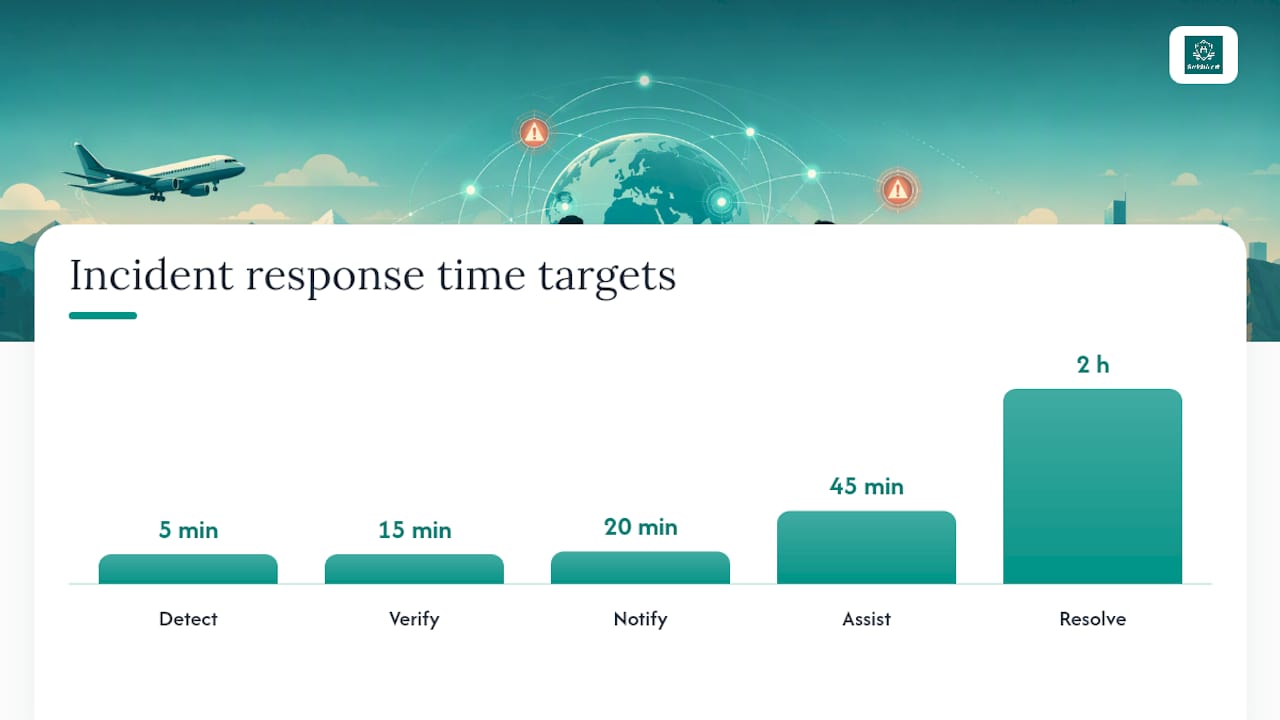
Stepwise incident workflow:
- Detect: automated platform flags missed check-in or traveler-reported suspicious message. Target: detection within five minutes of trigger.
- Verify: duty officer confirms traveler status via alternate channel. Target: verification within 15 minutes.
- Notify: travel-risk coordinator alerts CISO on-call and local security provider. Target: notification within 20 minutes of detection.
- Assist: local provider or embassy contact engaged; traveler receives direct guidance. Target: active assistance within 45 minutes.
- Resolve: incident documented in audit-ready report; all-clear sent to traveler and leadership. Target: resolution documented within two hours of closure.
Integrating itinerary tracking with escalation logic means alerts reach only the travelers actually in an affected area, rather than the entire traveling population. This precision reduces alert fatigue and keeps the duty officer’s attention on genuine incidents.
Checklist and timeline: who does what and when
The table below assigns responsibilities at the four standard milestones. Every deliverable has a named role and a verification step.
| Milestone | Task | Owner | Verification |
|---|---|---|---|
| 72 hours pre-departure | Pull State Dept. advisory; generate Travel Brief; send 72-hr reminder SMS | Travel-risk coordinator | Traveler replies CONFIRM |
| 72 hours pre-departure | Confirm itinerary sync in platform; enable geo-targeting for destination | Duty officer | Platform shows traveler in active itinerary |
| 24 hours pre-departure | Send 24-hr in-app reminder; confirm device hygiene checklist complete | Travel-risk coordinator | Traveler completes in-app checklist |
| 24 hours pre-departure | Verify local security provider contact and safe-haven address | Duty officer | Contact confirmed in platform |
| Pre-departure (day of) | Final brief delivered; codeword issued; hotline number confirmed | Duty officer | Traveler acknowledges via in-app tap |
| Pre-departure (day of) | CISO on-call briefed on destination risk level and escalation triggers | Travel-risk coordinator | Briefing logged |
| In-trip | Monitor check-ins; triage any missed responses per escalation workflow | On-shift duty officer | Platform read-receipt dashboard |
| In-trip | Update Travel Brief if threat intelligence changes; push updated alert | Travel-risk coordinator | Traveler acknowledges updated brief |
| In-trip | Shift handover: outgoing duty officer documents open items for incoming | Duty officer (outgoing) | Handover log signed in platform |
| Post-trip | Incident debrief; update brief templates based on lessons learned | Travel-risk coordinator + CISO | Debrief documented |
Shift handovers are a common gap. The outgoing duty officer must document every open check-in, pending escalation, and active threat alert before handing off. An undocumented open item during a shift change is how travelers fall through the cracks.
What does the research say about short alert design?
The evidence on short mobile alert design is specific enough to drive direct operational decisions, not just general principles.
DHS research on imminent-threat mobile messages established that short alerts have an optimized content order, and that source attribution and guidance placement materially affect whether recipients understand and act. The preferred sequence is: source → guidance → hazard → location → time. Longer messages improve interpretation and allow for personalization, which is why Travel Briefs delivered via in-app or email should include more context than an SMS alert.
WHO defines risk communication as the real-time exchange of information between experts and people at risk, with the explicit goal of enabling informed decisions that mitigate threat impacts. That definition has a direct operational implication: a one-way alert that does not enable a response is not risk communication. It is a broadcast. Two-way confirmation is not a feature; it is the mechanism that makes the communication functional.
Research finding: DHS multi-method testing showed that placing source identification and protective action guidance before hazard description in short mobile alerts produces higher comprehension and compliance rates than other orderings.
The practical reconciliation between SMS character limits and the need for clear guidance: use the SMS to deliver the action and the verification instruction, then link to the full Travel Brief only when the link source is verifiable and the channel is secure. A link from an unverified sender is indistinguishable from a credential-harvesting link, which is why source identification must appear before any link in a travel alert.
Pro Tip: When drafting a new alert template, read only the first sentence aloud. If a traveler who received only that sentence would know what to do next, the template passes. If they would need to read further to understand the required action, rewrite the first sentence.
A security lead’s short playbook
The brief matters because the gap between a traveler receiving a malicious message and acting on it is measured in seconds, not hours. The organizational controls that close that gap are not technical; they are behavioral. Travelers who know the verification protocol, know the codeword, and know which channel is authoritative will pause before clicking a credential-harvesting link. Travelers who received a generic “stay safe” email before departure will not.
Consider a scenario where an executive is traveling in a high-risk region and receives a WhatsApp message from a number saved as “Local Driver” requesting a change of pickup location to an unfamiliar address. The message is grammatically correct and references the executive’s actual hotel. Without a verification protocol, the executive changes plans. With a protocol, the executive contacts the duty officer through the corporate app, who confirms within 15 minutes that the driver’s number was spoofed and the original pickup stands.
The single tactical recommendation security leads should adopt immediately: preconfigure a one-click in-app check-in button that sends the traveler’s status, codeword, and GPS coordinates to the duty officer in a single tap. Remove every friction point between the traveler and the confirmation. The harder the check-in is to complete, the less consistently it will happen.
Smishalert gives your team visibility into messaging threats during travel
Smishalert surfaces the messaging threats that traditional email security platforms never see: executive impersonation via WhatsApp, credential-harvesting links sent through iMessage, and coordinated smishing campaigns targeting traveling employees across SMS and third-party apps. For travel-risk coordinators, that visibility means knowing whether a threat targeting your travelers is isolated or part of a broader campaign before the traveler clicks anything.

The platform’s campaign correlation connects individual suspicious message reports from traveling employees into a coherent threat picture, feeding directly into the incident workflow your duty officers are already running. On-device iOS filtering and cross-channel reporting work across managed, BYOD, and executive devices, so coverage does not drop when an employee travels on a personal phone. Audit-ready incident reports give CISOs the documentation they need after an incident closes.
Security teams that want to understand their current exposure to messaging-based social engineering can request a 30-day assessment to see exactly which threat types are reaching their travelers. For a full view of Smishalert’s coverage across executive impersonation, payroll fraud, and credential harvesting, visit the solutions page.
Sources
Security teams should monitor and cite these sources when building and updating travel briefs:
- Comprehensive Travel Risk Management Services With Real-Time Threat Monitoring
- Risk communication and community engagement
- Comprehensive Testing of Imminent Threat Public Messages for Mobile Devices
- Travel Advisories