
Mobile Threat Response Playbooks: Benefits for SOC Teams

Mobile-specific threat response playbooks cut mobile-incident mean time to respond (MTTR) and prevent smishing campaigns from escalating into enterprise-wide compromise. The key differentiator is device context: Android and iOS incidents involve OS-level sandboxing constraints, BYOD privacy boundaries, messaging-channel telemetry, and MDM signals that generic endpoint playbooks simply do not account for.
The highest-value benefits SOC and IR teams gain from mobile-specific playbooks include:
- Reduced MTTR and containment time by eliminating ad-hoc triage decisions during live incidents, resulting in faster response times
- Consistent cross-shift execution so on-call responders follow the same decision gates regardless of experience level
- Faster containment of messaging-based compromise, including smishing, credential-harvesting links, and executive impersonation via SMS or iMessage
- Audit-ready evidence collection mapped to compliance requirements from the moment a ticket opens
- Prioritized investigations using device-context signals (MDM enrollment status, app inventory, OS version) to triage severity before analyst time is spent
- Reduced unnecessary escalations by giving Tier 1 analysts clear decision gates for mobile-specific scenarios
- Regulatory defensibility through documented, repeatable procedures that satisfy HIPAA, PCI-DSS, and SOX audit requirements
Pro Tip: Position mobile playbooks one level below your overarching incident response plan (IRP) and one level above SOAR runbooks. The IRP sets policy; the playbook sets procedure; the SOAR runbook executes automation. Keeping these three layers distinct prevents the common mistake of embedding policy decisions inside automated scripts.
Key Takeaways
Mobile-specific threat response playbooks reduce MTTR, enforce consistent cross-shift execution, and give SOC teams the device-context decision gates that generic endpoint playbooks cannot provide.
| Point | Details |
|---|---|
| Map playbooks to the NIST IR lifecycle | Structure every playbook across preparation, detection, containment, eradication, recovery, and post-incident phases per NIST SP 800-61. |
| Instrument runbook success rate | Track the percentage of incidents resolved without ad-hoc escalation — this is the leading indicator of playbook maturity, not MTTR alone. |
| Start with executives and payroll | Pilot smishing playbooks on high-risk, managed devices first to maximize telemetry and minimize BYOD privacy complications. |
| Run tabletop exercises quarterly | CISA recommends TTX as the primary validation method; quarterly cadence surfaces role gaps and stale decision gates before a live incident does. |
| Smishalert adds messaging-layer detection | Smishalert’s campaign correlation and iOS message filtering provide the earliest signal in the smishing attack chain, feeding SOAR playbooks before device compromise occurs. |
Table of Contents
- What are the core benefits of mobile threat response playbooks?
- What belongs in a mobile threat response playbook?
- Who owns what during a mobile incident?
- Which tools does a mobile playbook need to function?
- How do you test mobile playbooks and measure their effectiveness?
- How do you roll out mobile playbooks from pilot to full deployment?
- How do you keep mobile playbooks accurate over time?
- Ready-to-use runbook snippets for common mobile incidents
- How Smishalert fits into a mobile threat response playbook
- The playbook pitfalls most SOC teams learn the hard way
- Smishalert gives your mobile playbook a detection layer it cannot build alone
- Sources
What are the core benefits of mobile threat response playbooks?
The operational case for mobile-specific playbooks rests on a straightforward problem: mobile incidents behave differently from desktop incidents, and responders who treat them the same way consistently miss containment windows.
Reduced MTTR through mobile-specific triggers. A playbook that opens with “user reports suspicious SMS link” and immediately routes to MDM status check, message artifact capture, and domain reputation query removes the 10–20 minutes of orientation time a responder would otherwise spend figuring out where to start. That time compounds across every shift and every analyst. NIST SP 800-61 positions playbooks as actionable procedures aligned with the IR lifecycle precisely because documented, tested procedures reduce the cognitive load that slows initial response.
Consistency across shifts and responders. CISA’s Incident Response Plan guidance recommends assigning named roles, running tabletop exercises to validate playbooks, and treating IRPs as living documents reviewed regularly. The consistency benefit is not theoretical: when a Tier 1 analyst at 2 AM follows the same decision gates as a senior responder during business hours, variance in containment outcomes drops. This matters most for messaging-based threats, where delays in isolating a compromised executive device can expose payroll systems or credential stores.
Improved decision-making under pressure. Decision gates force responders to answer specific questions before proceeding: Is the device MDM-enrolled? Has the user clicked the link? Does the domain appear in threat intel feeds? These binary checkpoints replace the open-ended judgment calls that cause responders to either over-escalate or under-contain. For iOS incidents, a gate checking whether the device has an active Message Filter extension changes the containment path entirely.
Resource optimization. Playbooks reduce unnecessary SME escalations by giving Tier 1 analysts a clear boundary: escalate when the decision gate answer is “yes, confirmed credential harvest” rather than “I’m not sure what this SMS means.” That boundary protects senior analyst time for genuinely ambiguous cases.
Regulatory and audit advantages. Every playbook step that captures a timestamp, a device identifier, and an analyst action creates an evidence trail. For organizations in regulated industries, that trail directly satisfies audit requirements without post-incident reconstruction. The CISA Federal Government Cybersecurity Incident and Vulnerability Response Playbooks standardize exactly this kind of tracking and communication guidance across agencies.
One important caveat: research by Stevens et al. found that playbooks help experienced technicians reliably but require iterative redesign, training, and organizational process changes before less-experienced responders achieve comparable outcomes. A playbook that works for your senior analysts may still fail your Tier 1 team without deliberate onboarding and tabletop validation.
Pro Tip: Design mobile playbooks around messaging-channel specifics from the start. SMS and iMessage artifacts live in different locations than email headers; WhatsApp messages may be encrypted end-to-end. iOS sandboxing limits what MDM can retrieve remotely, while Android forensic artifacts are often richer but require different collection commands. A playbook that ignores these OS constraints will stall at the evidence-collection step every time.
What belongs in a mobile threat response playbook?
A well-structured mobile playbook maps every section to the NIST SP 800-61 IR lifecycle: preparation, detection and analysis, containment, eradication, recovery, and post-incident activities. Each phase needs specific artifacts to be actionable.
Required artifacts per phase:
- Preparation: MDM/UEM enrollment verification checklist, on-device filter deployment status, approved forensic tools per OS, legal/privacy review sign-off for BYOD devices, and pre-authorized containment actions
- Detection and analysis: Trigger definitions (user report, MDM alert, SIEM correlation rule), decision gates (enrolled vs. unenrolled, iOS vs. Android, managed vs. BYOD), evidence collection checklist (message screenshots, URL artifacts, device logs, MDM last-seen timestamp), and severity classification criteria
- Containment: Device isolation procedures per MDM platform, domain block instructions for DNS/proxy, token revocation steps for SSO/IAM, and carrier coordination notes for SIM swap scenarios
- Eradication: App removal commands per OS, credential reset procedures, and verification steps confirming the threat vector is closed
- Recovery: Device re-enrollment checklist, user communication template, and sign-off gate before the device rejoins the enterprise network
- Post-incident: Blameless postmortem template, runbook success/failure log, and playbook update trigger checklist
Mobile-specific items that generic playbooks miss:
Device ownership model shapes every containment decision. On a managed device, MDM can remotely wipe or isolate. On a BYOD device, the same action may violate employee privacy agreements and create legal exposure. The playbook must branch at this gate, not leave it to analyst judgment.
iOS sandboxing limits remote artifact collection to what MDM exposes: app inventory, device configuration, last-seen timestamp, and network state. Full message content typically requires device custody or user cooperation. Android forensic artifacts are generally richer remotely, but collection commands vary by MDM platform and Android version. Aligning these collection steps with recognized security frameworks prevents gaps that appear only during a live incident.
| Trigger | Primary action | Required telemetry | Responsible role |
|---|---|---|---|
| User reports suspicious SMS/iMessage link | Capture message artifact; check MDM enrollment | Message screenshot, URL, device ID, MDM status | Tier 1 analyst (IM notified if exec device) |
| Malicious app install detected by MDM/EDR | Quarantine app; check permissions and network calls | App name, permissions list, network logs, install timestamp | Tech Manager |
| Credential-harvesting link clicked (confirmed) | Revoke SSO tokens; isolate device; notify IAM team | Browser history artifact, SSO logs, MDM isolation confirmation | Incident Manager + Tech Manager |
Who owns what during a mobile incident?
CISA recommends assigning named roles with defined responsibilities rather than relying on whoever is available. For mobile incidents, three roles beyond the standard IR team become critical: a mobile platform SME, an HR/payroll contact for executive fraud scenarios, and a legal/privacy reviewer for BYOD containment decisions.
Core role definitions:
- Incident Manager (IM): Owns the incident end-to-end. Declares severity, authorizes containment actions above Tier 1 scope, and signs off on external notifications. For mobile incidents, the IM must be reachable via a secure channel that is not SMS (given the threat vector).
- Tech Manager ™: Executes device-level forensics, MDM actions, and SOAR-driven containment. Owns the technical decision gates and escalates to IM when a gate answer triggers a severity upgrade.
- Communications Manager (CM): Drafts and sends stakeholder notifications, coordinates with HR when payroll fraud is suspected, and manages external communications if a breach notification is required.
- Legal/compliance: Reviews BYOD containment actions before execution and advises on breach notification timelines under applicable state and federal law.
- HR/payroll contact: Activated when the incident involves suspected payroll fraud, direct deposit redirect, or executive impersonation targeting finance staff.
- Mobile platform SME: Provides OS-specific guidance (iOS MDM constraints, Android forensic artifact locations) when the TM needs platform depth.
RACI-style guidance:
The IM is Accountable for all decisions above Tier 1. The TM is Responsible for device-level actions. Legal is Consulted before any BYOD containment. HR is Informed immediately when payroll systems are in scope. The CM is Responsible for all outbound communications.
Notification thresholds and recipients:
- Suspected credential harvest via messaging link: IM + TM + IAM team lead, within 15 minutes of confirmation
- Confirmed compromise of executive device: IM + CISO + Legal + CM, within 30 minutes; HR if financial systems are in scope
- Suspected payroll fraud attempt: IM + HR + Finance lead + Legal, within 15 minutes regardless of confirmation status
Notifications must travel over a secure IR channel, not SMS or the messaging platform under investigation. Many teams use a dedicated Slack workspace with MFA, a secure email alias, or a purpose-built on-call notification system to keep alert routing separate from the compromised channel. Minimum content for an early alert: incident ID, affected device/user, suspected threat type, current severity, and the IM’s name.
Which tools does a mobile playbook need to function?
A mobile playbook without the right tooling is a checklist that stalls at the evidence-collection step. The tool classes below each contribute specific telemetry or actions that feed playbook decision gates.
Tool classes and their playbook role:
- MDM/UEM (e.g., Microsoft Intune, Jamf, VMware Workspace ONE): Provides device enrollment status, app inventory, OS version, last-seen timestamp, and remote actions (isolate, wipe, lock). This is the first signal checked at most mobile decision gates.
- Mobile EDR: Detects malicious app behavior, network anomalies, and on-device indicators on both Android and iOS. Feeds SIEM with structured alerts tagged to a specific device ID.
- SIEM (e.g., Splunk, Microsoft Sentinel): Correlates MDM alerts, mobile EDR events, user reports, and network logs into a unified timeline. Tag all mobile-source alerts with a consistent field (e.g.,
source_type: mobile) to enable playbook-specific dashboards and MTTR tracking. - SOAR: Executes automated containment steps triggered by SIEM correlation rules: device isolation via MDM API, domain block via DNS/proxy, SSO token revocation via IAM API. Human checkpoints must gate high-impact actions like full device wipe.
- Messaging-visibility and threat intel platforms: Provide campaign correlation across SMS, iMessage, and WhatsApp reports. This is where smishing campaigns become visible as coordinated attacks rather than isolated user complaints. Mobile threat detection best practices detail how to instrument these signals into SOC workflows.
- On-device iOS Message Filter extensions: Apple’s Message Filter API allows approved apps to classify incoming messages before they reach the user’s inbox. This is a detection layer that operates inside the iOS sandbox and feeds reporting data without requiring MDM enrollment.
Integration patterns:
MDM status feeds the first decision gate. App inventory feeds the malicious-app-install branch. Message reporting data feeds the smishing triage branch. SOAR reads all three and executes containment when gate conditions are met. AI-assisted IR tooling can accelerate triage by correlating these signals faster than manual review.
OS constraints that shape playbook design:
iOS limits remote artifact collection to MDM-exposed data. Full message content, browser history, and app-level logs typically require device custody or user-provided screenshots. Android allows richer remote collection but artifact locations vary by manufacturer and OS version. Playbooks must document the realistic collection ceiling for each OS rather than assuming desktop-equivalent forensic access.
Pro Tip: Design playbooks to prefer instrumented signals you own — MDM telemetry, SOAR logs, SIEM correlation outputs — over external threat intel feeds that may lag or be unavailable during an active incident. Build human checkpoints into every high-risk automated action: a SOAR runbook that wipes a device without a human confirmation gate is a liability, not an efficiency gain.
How do you test mobile playbooks and measure their effectiveness?
Testing is where playbooks either prove their value or expose their gaps. Three exercise types cover the full validation spectrum for mobile IR.
Tabletop exercises (TTX): A structured discussion where the IM, TM, CM, and relevant stakeholders walk through a scenario (e.g., executive receives a smishing link, clicks it, and reports it 40 minutes later). TTX surfaces role confusion, missing decision gates, and notification gaps without touching production systems. CISA recommends tabletop exercises as a core validation method for IR plans and playbooks. Run TTX quarterly for high-priority scenarios and after any significant incident.

Runbook drills: Analysts execute the playbook against synthetic messages and simulated MDM alerts in a staging environment. This validates that SOAR integrations function, that evidence collection steps produce the expected artifacts, and that escalation thresholds trigger correctly. Drills expose tooling gaps that TTX misses.
Full-scale simulations: A coordinated smishing campaign sent to a test group (with consent and legal sign-off) that exercises the entire detection-to-recovery chain. This is the most realistic test but requires careful scoping to avoid operational disruption.
KPIs to track:
- MTTD (mean time to detect): Time from message delivery to first SOC alert. Baseline before playbook deployment; track improvement quarterly.
- MTTC (mean time to contain): Time from first alert to confirmed device isolation or domain block.
- MTTR (mean time to remediate): Time from first alert to verified recovery and device re-enrollment.
- Runbook success rate: Percentage of scenarios where the playbook reached containment without requiring an ad-hoc escalation outside the documented procedure. This is the leading indicator of playbook maturity.
- False positive/negative trends: Track mobile-specific alert fidelity separately from general endpoint alerts. A high false-positive rate on mobile EDR alerts degrades analyst trust and leads to alert fatigue.
Instrumenting KPIs:
Log timestamps at each SOAR decision gate. Tag SIEM alerts with source_type: mobile and playbook_id fields. Capture runbook success/failure in the post-incident retrospective using a blameless postmortem format. Operations-informed research supports connecting IR activities to operational impact metrics so stakeholders can evaluate which playbook options minimize disruption.
How do you roll out mobile playbooks from pilot to full deployment?
A phased rollout prevents the common failure mode of building 12 playbooks simultaneously, finishing none of them, and deploying nothing. Start with a limited scope, validate effectiveness, then scale.
Phase 1: Discovery and gap analysis (weeks 1–4). Audit existing IR procedures for mobile coverage gaps. Identify which mobile threat scenarios have no documented response. Map available tooling (MDM, SIEM, SOAR) against playbook requirements. Output: a prioritized list of 3–5 scenarios to address, ranked by risk and telemetry availability.
Phase 2: Pilot (weeks 5–12). Build 1–2 containment playbooks for the highest-risk scenario (typically smishing targeting executives or payroll staff). Deploy to a pilot group of 20–50 users. Run at least one TTX and one runbook drill before go-live. Measure MTTD, MTTC, and runbook success rate from day one.
Phase 3: Maturity and tooling integration (months 3–6). Expand to 4–6 playbooks covering the full scenario set. Integrate SOAR automation for routine containment steps. Refine decision gates based on pilot retrospective data. Onboard Tier 1 analysts with structured training.
Phase 4: Organization-wide scale and governance (months 6–12). Deploy across all device populations (managed, BYOD, executive). Establish quarterly TTX cadence. Assign playbook ownership to the Security Ops manager. Schedule annual full review.
| Phase | Duration | Key deliverables | Minimum staffing |
|---|---|---|---|
| Discovery and gap analysis | Weeks 1–4 | Gap report, scenario priority list, tooling inventory | 1 IR lead, 1 mobile SME |
| Pilot | Weeks 5–12 | 1–2 live playbooks, TTX results, baseline KPIs | 1 IR lead, 1 TM, 1 Tier 1 analyst |
| Maturity and integration | Months 3–6 | 4–6 playbooks, SOAR automation, training materials | IR lead, TM, SOAR engineer, Tier 1 team |
| Org-wide scale | Months 6–12 | Full playbook library, governance model, quarterly TTX schedule | Security Ops manager, full IR team |
Pilot scope recommendation: Target executives and payroll staff first. They face the highest-consequence messaging threats and typically have managed devices, which gives you richer MDM telemetry and fewer BYOD privacy constraints. If your environment is predominantly BYOD, consider a single-OS pilot (iOS or Android) to limit variable scope. For BYOD-heavy environments, deploying mobile phishing protection without MDM is a practical starting point.
Cost and staffing signals: A minimal pilot requires dedicated personnel including an IR lead and a mobile SME at partial capacity during the pilot duration. SOAR integration effort ranges from low (existing SOAR with MDM API connectors already configured) to high (no SOAR, manual playbook execution). A security budget checklist for mobile threats can help frame tooling investment against risk.
Pro Tip: Run the pilot on a real operational slice — actual users with consent — rather than a purely synthetic environment. Synthetic tests will not surface the data gaps that appear when real devices, real MDM configurations, and real user behavior interact with your playbook steps. The gaps you find in a 30-user pilot are far cheaper to fix than the ones you find during a live incident.
How do you keep mobile playbooks accurate over time?
A playbook that was accurate at deployment becomes a liability within 12 months if it is not maintained. Mobile OS updates, new messaging-channel attack patterns, and MDM platform changes can invalidate specific steps without anyone noticing until a live incident exposes the gap.
Recommended review cadence:
- After every significant incident: Run a blameless postmortem and update any step that failed, stalled, or required an ad-hoc workaround. This is the highest-priority update trigger.
- Quarterly: Review a subset of playbooks during the TTX cycle. Verify that MDM API calls, SOAR integration steps, and escalation contacts are still accurate.
- Annually: Full review of all playbooks against current OS behaviors, threat landscape, regulatory requirements, and infrastructure changes.
Triggers for immediate updates:
- A major iOS or Android release changes evidence collection behavior or MDM API responses
- A new large-scale smishing campaign pattern emerges that your current triggers would miss
- A legal or regulatory change affects BYOD containment authority or breach notification timelines
- A significant infrastructure change occurs (new MDM platform, SIEM migration, SOAR upgrade)
Version control and authoring practices:
Store playbooks in a controlled repository (a Git-based system works well) with a changelog entry for every edit. Each changelog entry should include the date, the author, the specific change, and the rationale. Maintain an owners log that maps each playbook to a named Security Ops manager who is accountable for its accuracy. Aligning playbook governance with industry standards prevents the common drift where playbooks become orphaned documents with no clear owner.
CTA’s Adversary Playbook Principles recommend updating technical indicators (domains, hashes, infrastructure) on a much shorter cadence than structural playbook elements. Apply the same logic to mobile playbooks: refresh threat intel feeds and domain blocklists frequently; review decision gate logic and role assignments quarterly.
Governance note: Tie playbook ownership into the IRP governance structure. The IM or Security Ops manager should have explicit authority to trigger updates and must schedule legal, comms, and HR stakeholders for at least one annual tabletop to keep their roles current.
Ready-to-use runbook snippets for common mobile incidents
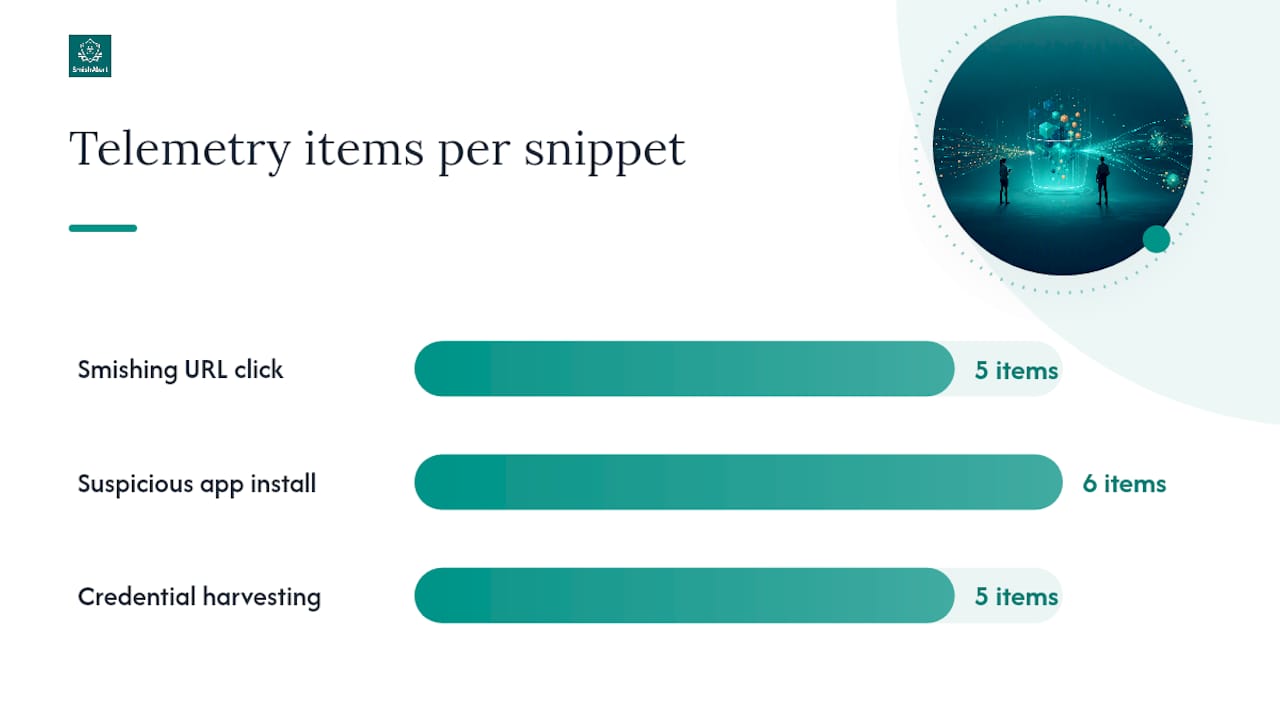
These fragments are designed to drop into your playbook repository and customize for local tooling. Each covers trigger, containment, telemetry, decision gates, and next steps.
Snippet 1: Smishing URL click on executive device
Trigger: User or MDM reports that an executive device received, and the user clicked a suspicious SMS or iMessage link.
Immediate containment: Check MDM enrollment status. If enrolled and managed: push network isolation policy via MDM. If BYOD: request voluntary airplane mode; do not force wipe without legal sign-off.
Telemetry to collect: Message screenshot (URL, sender number), MDM last-seen timestamp, device OS version, browser history artifact (if accessible via MDM), domain reputation query result.
Decision gate: Has the domain been confirmed as credential-harvesting infrastructure? Yes → escalate to IM, revoke SSO tokens, notify IAM. No → continue monitoring; close if domain is benign after 24-hour watch.
Next steps: Eradication: block domain at DNS/proxy. Recovery: verify credential integrity via IAM logs; re-enable network access after confirmation. Post-incident: update smishing domain blocklist; log in runbook success tracker.
Snippet 2: Suspicious app install with excessive permissions
Trigger: MDM or mobile EDR alert on app install requesting permissions inconsistent with app category (e.g., a productivity app requesting SMS read, contacts, and microphone access).
Immediate containment: Quarantine app via MDM (managed device) or request voluntary uninstall (BYOD). Capture app metadata before removal.
Telemetry to collect: App name, package ID, permissions list, install source (Play Store, sideloaded, enterprise catalog), network connections made post-install, MDM compliance status.
Decision gate: Is the app present on other enrolled devices? Yes → expand scope; notify TM and IM. No → treat as isolated; continue analysis.
Next steps: Eradication: confirm app removal via MDM compliance report. Recovery: scan for data exfiltration indicators in network logs. Post-incident: add app to MDM blocklist; update detection rule in mobile EDR.
Snippet 3: Credential harvesting via messaging link (suspected compromise)
Trigger: SIEM correlation rule fires on combination of: user clicked messaging link + subsequent login from new geography or device within 60 minutes.
Immediate containment: Revoke all active SSO sessions for the affected user. Force MFA re-enrollment. Isolate device via MDM if managed.
Telemetry to collect: SSO session logs (pre- and post-click), IAM access logs, MDM isolation confirmation, message artifact, network egress logs for the device.
Decision gate: Is there evidence of lateral movement (access to systems beyond the user’s normal scope)? Yes → escalate to CISO; initiate full IR. No → scope to single-user credential reset and monitoring.
Next steps: Eradication: reset all credentials; audit OAuth grants. Recovery: verify no persistent access mechanisms remain. Post-incident: blameless postmortem; update SIEM correlation rule sensitivity.
| Scenario | Android minimum evidence (remote) | iOS minimum evidence (remote) |
|---|---|---|
| Smishing URL click | MDM last-seen, browser history (some MDMs), network logs, message artifact | MDM last-seen, device config, message artifact (user-provided), network state |
| Malicious app install | App inventory, permissions list, install source, network connections | App inventory (MDM), permissions visible in MDM profile, no direct app-level logs |
| Credential harvest via link | SSO logs, network egress, MDM isolation status, browser history | SSO logs, network state, MDM isolation status, browser history (user-provided) |
How Smishalert fits into a mobile threat response playbook
Smishalert addresses the detection gap that MDM and mobile EDR leave open: visibility into the messaging layer itself. MDM tells you a device is enrolled and compliant. Mobile EDR tells you a malicious process is running. Smishalert tells you that a coordinated smishing campaign is targeting your executives across SMS, iMessage, and WhatsApp — before any device is compromised.
Capabilities that map directly to playbook steps:
- On-device iOS Message Filter extension: Classifies incoming messages before they reach the user’s inbox, feeding detection data without requiring MDM enrollment. This is the earliest possible signal in the iOS attack chain.
- User reporting and campaign correlation: Aggregates reports across users to surface coordinated campaigns. A single user report looks like noise; five reports of the same sender pattern in 20 minutes is a confirmed campaign that triggers a playbook.
- Cross-channel correlation: Connects SMS, iMessage, and WhatsApp reports to identify multi-channel attacks targeting the same individual or role (e.g., a CFO receiving the same impersonation attempt across three channels simultaneously).
- SIEM/API integration: Pushes structured alert data into your SIEM so Smishalert signals feed existing SOAR playbooks and correlation rules. SOC-relevant Smishalert features include audit-ready incident reporting that maps directly to the evidence-collection steps in your playbook.
Sample alert flow:
- Employee reports suspicious SMS via Smishalert’s reporting interface.
- Smishalert analyzes the message, correlates it against known campaign patterns, and pushes a structured alert to the SIEM.
- SIEM correlation rule matches the alert against MDM enrollment data and IAM logs.
- SOAR playbook fires: domain block at DNS/proxy, notification to IM, and a task to the TM to check MDM status on the reporting device.
- If the domain is confirmed credential-harvesting infrastructure, SOAR triggers SSO token revocation and payroll team notification.
Pro Tip: Instrument Smishalert alerts as a dedicated SIEM source type (e.g., source: smishalert) and set a maximum 10-minute SLA for any alert tagged as involving an executive device. Campaign correlation data from Smishalert often surfaces the full scope of an attack before individual device forensics can — use it to set containment priority before the TM begins device-level work.
The playbook pitfalls most SOC teams learn the hard way
The most common failure in mobile playbook rollouts is not a tooling gap. It is a framing error: treating mobile incidents as a subset of endpoint incidents and applying desktop IR logic to a fundamentally different device context.
Over-automation without device context is the specific version of this mistake that causes the most damage. A SOAR runbook that automatically wipes any device flagged by a mobile EDR alert will eventually wipe a BYOD device that an employee uses for personal banking. The legal and HR consequences of that action can outlast the incident itself. Automation is valuable precisely where the decision is low-risk and high-frequency; it is dangerous where the action is irreversible and the device ownership is ambiguous. Every high-impact automated action needs a human confirmation gate, and that gate needs to check device ownership before it checks threat severity.
BYOD privacy constraints deserve more attention than most rollout plans give them. Legal and HR need to be involved before the first playbook is deployed, not after the first containment action generates a complaint. The containment options available on a BYOD device are genuinely narrower than on a managed device, and the playbook must reflect that reality rather than paper over it with a generic “isolate device” step.
The other consistent gap is failing to involve communications and legal early in the tabletop cycle. These stakeholders are not just notification recipients; they shape what containment actions are permissible and what external disclosure timelines apply. A TTX that includes only technical roles will produce a playbook that is technically sound and legally problematic.
On the positive side: runbook success rate is the most honest leading indicator of playbook maturity. MTTR is a lagging metric that reflects many variables. Runbook success rate — the percentage of incidents where the playbook reached containment without an ad-hoc workaround — tells you whether the playbook is actually usable under real conditions.
Smishalert gives your mobile playbook a detection layer it cannot build alone
The hardest part of a mobile threat response playbook is not the containment steps. It is getting a reliable, early signal that an incident is happening at all. MDM compliance checks and mobile EDR alerts cover device-level indicators, but they are blind to the messaging layer where smishing campaigns originate.

Smishalert fills that gap with on-device iOS message filtering, cross-channel campaign correlation, and SIEM-ready alert output that feeds directly into your existing SOAR playbooks. For organizations in healthcare, finance, or professional services, the platform’s audit-ready incident reporting also satisfies the evidence-collection requirements that regulated industries demand. The typical engagement starts with a 30-day paid pilot, with the pilot fee credited toward the first annual subscription, so your team can validate detection coverage and playbook integration before committing to full deployment.
To assess your current messaging-threat readiness and see where Smishalert fits in your playbook stack, start with the SmishAlert self-evaluation or review the full solutions overview to map capabilities to your specific threat scenarios.
Sources
The sources below are the primary references for building, validating, and maintaining mobile threat response playbooks in a US enterprise environment.
- Incident Response Plan Basics — CISA
- Computer Security Incident Handling Guide (NIST SP 800-61)
- How Ready is Your Ready? Assessing the Usability of Incident Response Playbook Frameworks